Introduction
Modern AI meeting assistants are expected to do much more than simply record conversations. They transcribe speech, identify speakers, generate summaries, detect action items, provide live captions, and deliver meeting insights—all while the meeting is still taking place.
Making this possible is a technology known as real-time audio processing.
Real-time audio processing allows AI meeting assistants to analyze, enhance, and interpret audio streams instantly as participants speak. Without it, features such as live transcription, noise cancellation, speaker identification, and AI-powered meeting intelligence would be impossible.
This guide explains how real-time audio processing works and why it is one of the most important technologies powering modern AI meeting assistants.
What Is Real-Time Audio Processing?
Real-time audio processing is the continuous analysis and modification of audio signals as they are being captured.
Instead of recording a meeting first and analyzing it later, the AI system processes incoming audio within milliseconds.
This enables the meeting assistant to:
- Understand speech instantly
- Remove background noise
- Generate live captions
- Identify speakers
- Create real-time transcripts
- Deliver immediate meeting insights
The goal is to process audio fast enough that users experience little or no delay.
Why Real-Time Processing Matters
Modern workplaces increasingly rely on:
- Remote meetings
- Hybrid collaboration
- Global teams
- Virtual conferences
- Customer calls
Participants expect immediate results.
Real-time processing enables:
Live Transcription
Words appear on screen as they are spoken.
Instant Captions
Accessibility features become available during conversations.
Better Meeting Participation
Participants can focus on discussions rather than taking notes.
Immediate AI Assistance
AI assistants can generate insights during meetings rather than afterward.
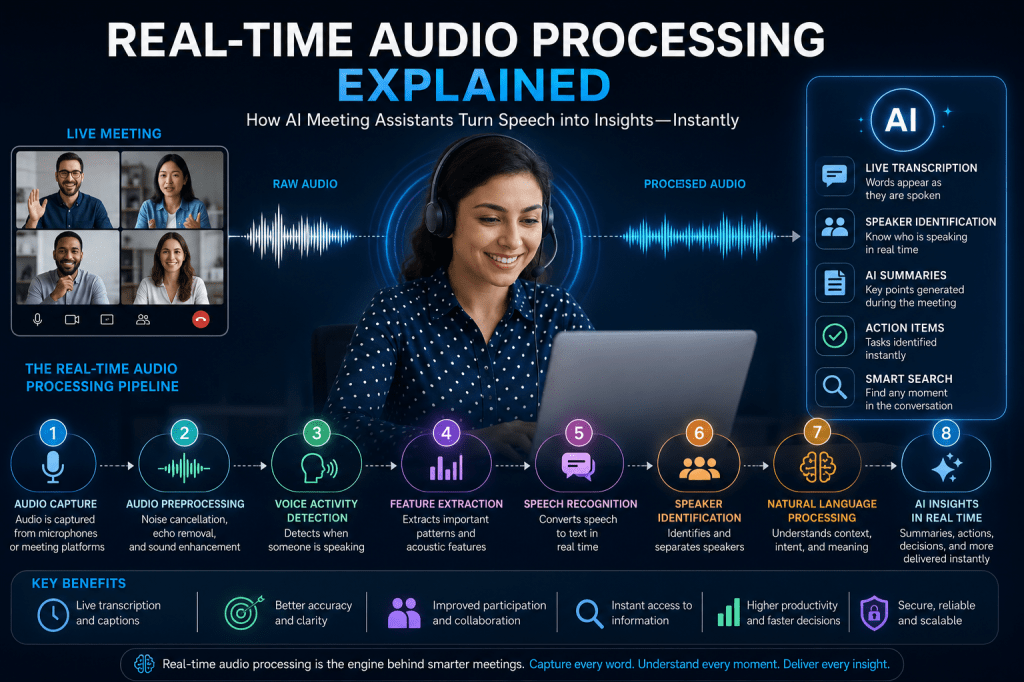
The Real-Time Audio Processing Pipeline
AI meeting assistants process audio through multiple stages.
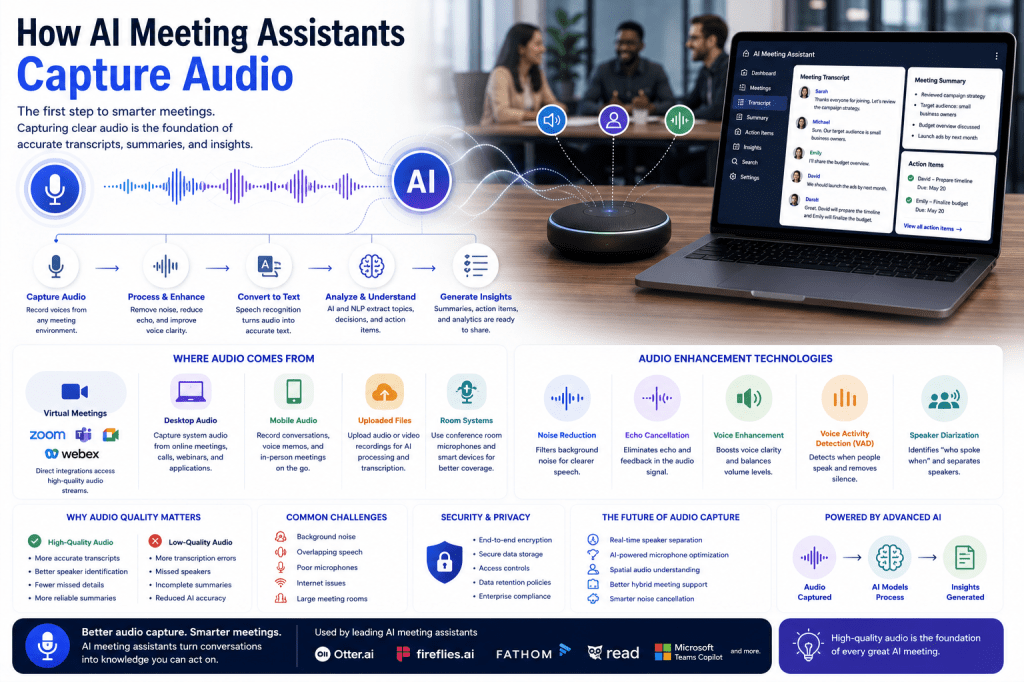
Step 1: Audio Capture
The process begins when audio is collected from:
- Computer microphones
- USB microphones
- Headsets
- Mobile devices
- Conference room systems
- Video conferencing platforms
The system captures raw audio data continuously.
Step 2: Audio Digitization
Human speech is an analog signal.
Computers convert speech into digital information through a process called sampling.
The digital audio stream contains:
- Frequencies
- Volume levels
- Timing information
- Voice characteristics
This digital representation becomes the foundation for AI analysis.
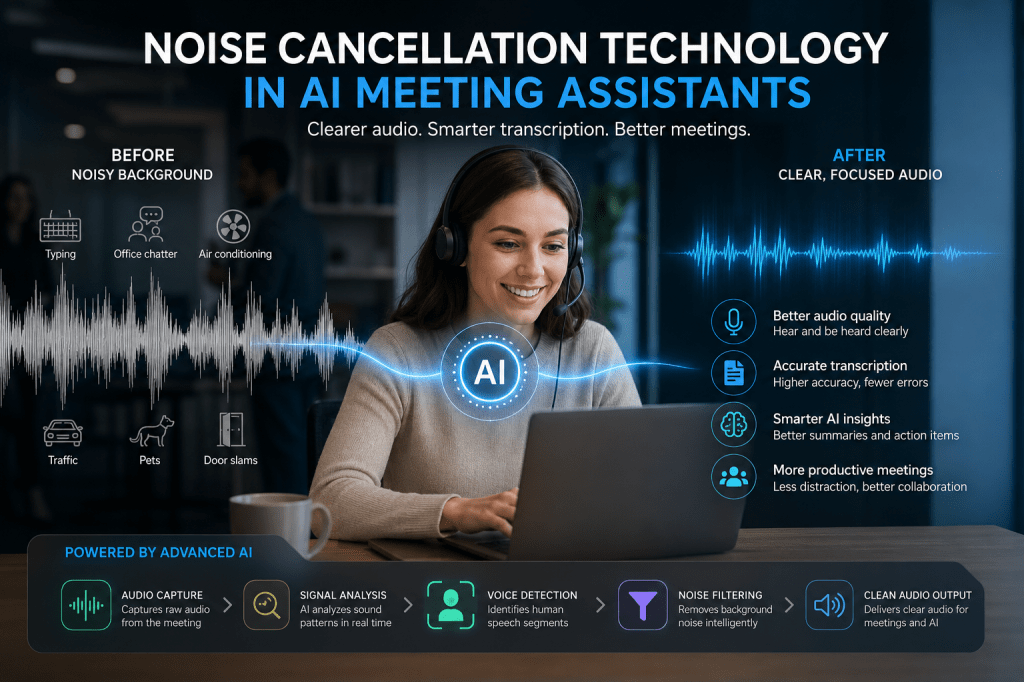
Step 3: Audio Preprocessing
Raw audio often contains unwanted sounds.
Before speech recognition begins, the system cleans the signal using:
Noise Cancellation
Removes:
- Keyboard clicks
- Office chatter
- Traffic noise
- HVAC systems
- Background sounds
Echo Cancellation
Eliminates audio reflections and feedback.
Gain Control
Balances audio levels across speakers.
Voice Enhancement
Improves speech clarity for AI analysis.
This stage significantly improves downstream accuracy.
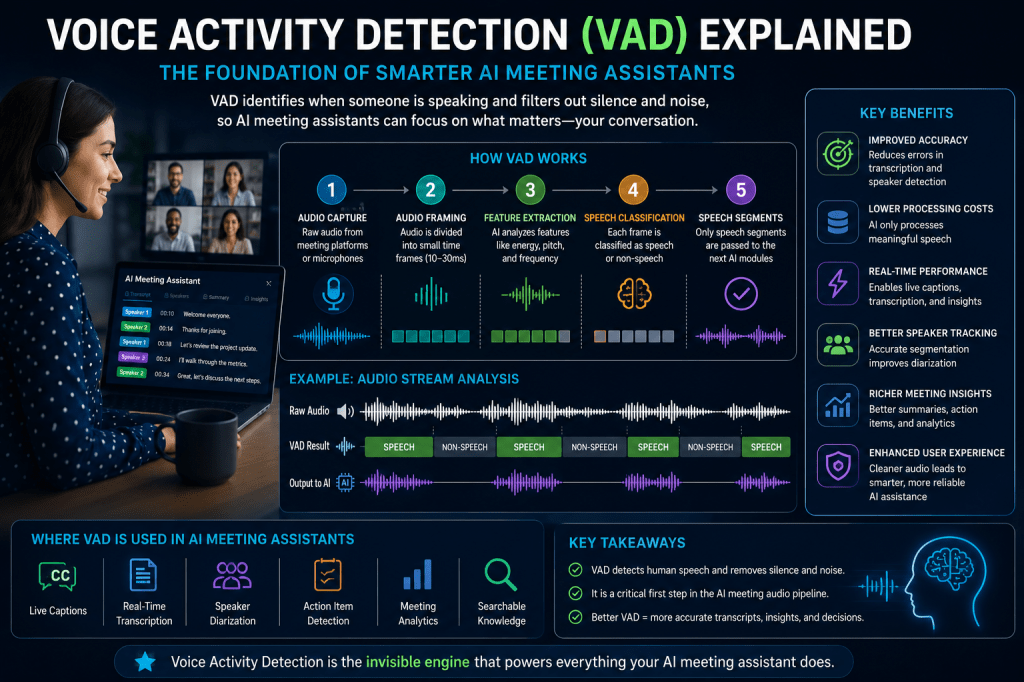
Step 4: Voice Activity Detection
Voice Activity Detection (VAD) determines when someone is speaking.
The AI identifies:
- Speech segments
- Silence periods
- Non-speech sounds
Benefits include:
- Reduced processing requirements
- Better transcription accuracy
- Improved speaker tracking
VAD acts as a gatekeeper for the entire processing pipeline.
Step 5: Feature Extraction
The system extracts meaningful patterns from audio.
Rather than analyzing raw sound directly, AI models focus on characteristics such as:
- Frequency patterns
- Pitch
- Energy levels
- Voice signatures
- Spectral features
These features help machine learning models understand speech more effectively.
Step 6: Speech Recognition
The next stage converts spoken language into text.
This process is known as Automatic Speech Recognition (ASR).
Modern ASR systems use:
- Deep learning
- Neural networks
- Large speech datasets
- Language models
The AI predicts spoken words in real time.
For example:
Speaker says:
“Let’s schedule a follow-up meeting next Thursday.”
The system immediately generates text:
“Let’s schedule a follow-up meeting next Thursday.”
This conversion occurs within fractions of a second.
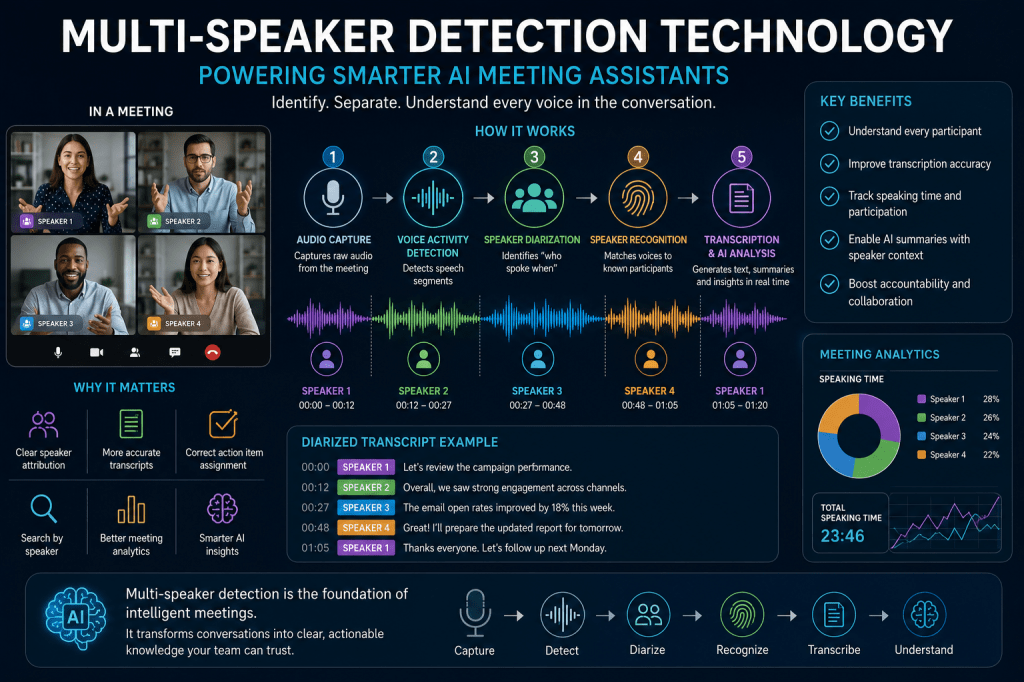
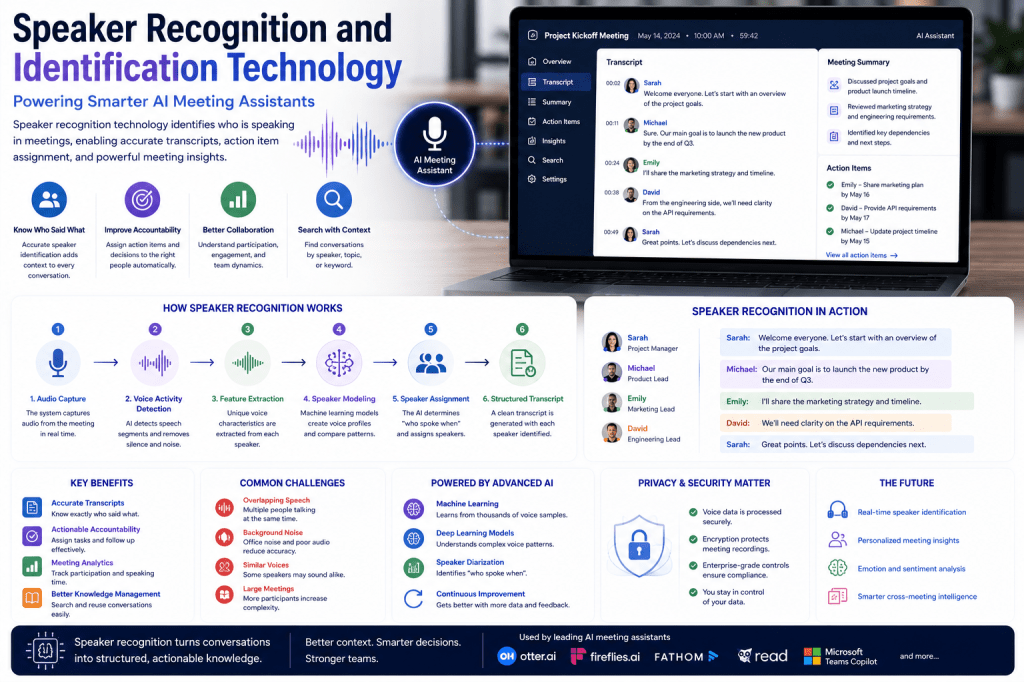
Step 7: Speaker Identification
Many meetings involve multiple participants.
AI meeting assistants must determine:
- Who is speaking
- When they begin speaking
- When they stop speaking
This process includes:
Speaker Diarization
Separating conversation into speaker segments.
Speaker Recognition
Identifying known speakers.
Speaker Attribution
Assigning transcript content to individuals.
The result is a structured transcript with clear speaker labels.
Step 8: Natural Language Processing
Once speech becomes text, Natural Language Processing (NLP) begins.
The AI analyzes:
- Meaning
- Intent
- Context
- Topics
- Sentiment
NLP enables meeting assistants to understand conversations rather than merely record them.
Step 9: Real-Time AI Analysis
Modern AI meeting assistants increasingly use Large Language Models (LLMs).
These systems continuously analyze conversations and generate:
Meeting Summaries
Key points are captured automatically.
Action Items
Tasks are identified and assigned.
Decisions
Important decisions are extracted.
Topics
Discussion themes are categorized.
Follow-Up Suggestions
AI recommends next steps.
Many of these insights can be generated before the meeting ends.
Low Latency: The Key Requirement
Real-time systems must process audio extremely quickly.
The delay between speech and AI output is known as latency.
Typical targets include:
| Feature | Typical Latency |
|---|---|
| Noise Cancellation | Under 50 ms |
| Live Captions | Under 300 ms |
| Speech Recognition | Under 500 ms |
| Meeting Insights | 1–3 seconds |
Lower latency creates a more natural experience.
Challenges in Real-Time Audio Processing
Processing audio live is difficult.
Background Noise
Noisy environments reduce accuracy.
Multiple Speakers
Overlapping conversations create complexity.
Accents and Languages
Global teams require multilingual support.
Poor Audio Quality
Low-quality microphones affect recognition.
Internet Connectivity
Cloud-based processing depends on stable connections.
Meeting assistant providers invest heavily in solving these challenges.
Cloud-Based vs Edge Processing
Cloud Processing
Audio is sent to remote servers.
Advantages:
- Powerful AI models
- Scalable infrastructure
- Faster model improvements
Disadvantages:
- Internet dependency
- Potential latency
- Privacy considerations
Edge Processing
Audio processing occurs locally on the device.
Advantages:
- Lower latency
- Better privacy
- Offline capabilities
Disadvantages:
- Hardware limitations
- Smaller AI models
Many modern meeting assistants use hybrid approaches that combine both methods.
How Real-Time Processing Improves Meeting Assistants
Real-time audio processing enables nearly every major AI meeting feature.
Live Transcription
Conversations become searchable instantly.
Meeting Summaries
AI can build summaries during discussions.
Speaker Recognition
Transcripts remain organized and readable.
Accessibility
Live captions support hearing-impaired participants.
Searchable Knowledge
Meeting information becomes immediately available.
Better Collaboration
Participants focus on conversations instead of note-taking.
The Role of Machine Learning
Machine learning drives continuous improvements.
Models learn from:
- Millions of audio samples
- Diverse accents
- Various languages
- Different meeting environments
This allows systems to become increasingly accurate over time.
Future of Real-Time Audio Processing
Several innovations are expected to shape the future.
Multimodal AI
Combining audio, video, text, and screen content.
Personalized Voice Models
AI learns individual speaking patterns.
Real-Time Translation
Instant multilingual communication.
Advanced Speaker Separation
Improved handling of overlapping conversations.
Generative Speech Enhancement
AI reconstructs clear speech from poor recordings.
Context-Aware Meeting Intelligence
Systems understand meeting objectives and business context.
These developments will make AI meeting assistants even more valuable.
Conclusion
Real-time audio processing is the technological foundation of modern AI meeting assistants. By capturing, cleaning, analyzing, and interpreting speech within milliseconds, these systems can provide live transcription, noise cancellation, speaker identification, AI summaries, and intelligent meeting insights.
As organizations continue to embrace remote and hybrid work, the importance of real-time audio processing will only increase. The combination of machine learning, speech recognition, natural language processing, and large language models is transforming meetings from simple conversations into searchable, actionable sources of organizational knowledge.
The future of AI meeting assistants depends on faster, smarter, and more accurate real-time audio processing—and that future is already arriving.

 Meeting Notes AI