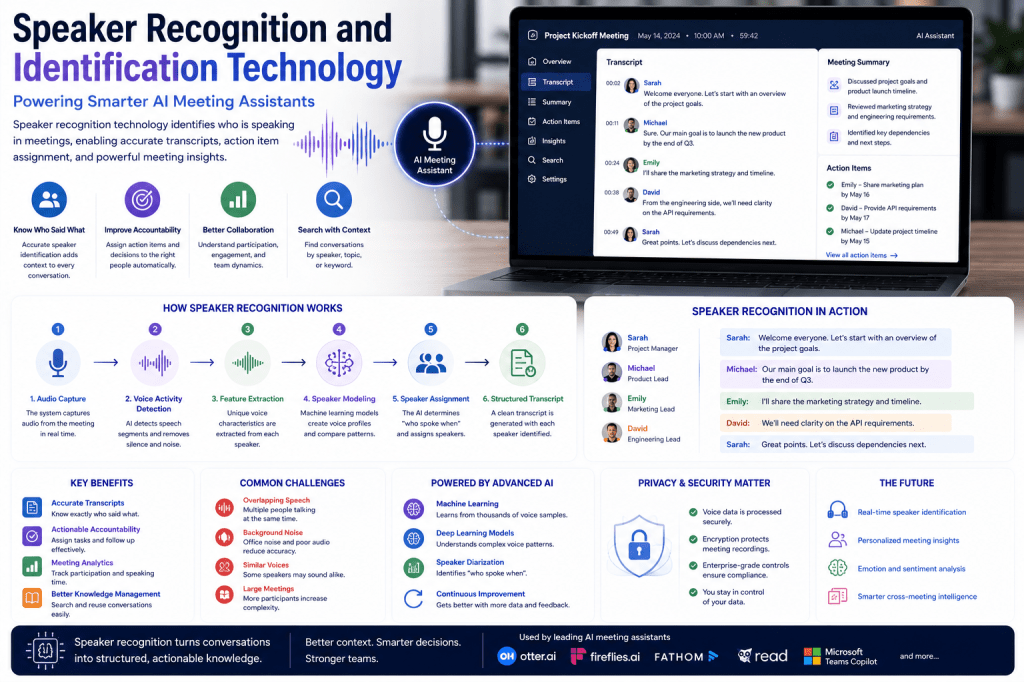
One of the most valuable capabilities of modern AI meeting assistants is their ability to identify who said what during a meeting. A transcript is useful, but a transcript that accurately attributes comments, decisions, questions, and action items to specific individuals is significantly more powerful. This capability is made possible through speaker recognition and speaker identification technology.
Whether teams are conducting internal meetings, client calls, interviews, project reviews, or board meetings, speaker recognition helps transform conversations into structured and actionable information. In this article, we’ll explore how speaker recognition technology works, why it matters in AI meeting assistants, and how it contributes to better meeting intelligence and collaboration.
What Is Speaker Recognition Technology?
Speaker recognition is a branch of artificial intelligence that enables computer systems to distinguish between different speakers based on the characteristics of their voices.
The technology can answer questions such as:
- Who is speaking?
- When did a speaker start talking?
- When did they stop talking?
- Which statements belong to which participant?
In AI meeting assistants, speaker recognition helps organize conversations by associating spoken content with specific individuals.
Without speaker recognition, a transcript would simply appear as a continuous block of text.
With speaker recognition, transcripts become structured records of conversations.
Speaker Recognition vs Speaker Identification
Although the terms are often used interchangeably, they describe slightly different technologies.
Speaker Recognition
Speaker recognition determines whether a voice belongs to a previously known speaker.
For example:
“Is this Sarah speaking?”
The system compares the voice against existing speaker profiles.
Speaker Identification
Speaker identification determines which participant in a meeting is speaking at a given moment.
For example:
“This statement was made by Michael.”
AI meeting assistants often combine both capabilities to improve transcript accuracy.
Why Speaker Identification Matters in Meetings
Meetings are collaborative by nature.
Multiple participants contribute:
- Ideas
- Questions
- Decisions
- Feedback
- Commitments
Knowing who said what is critical for:
Accountability
Action items can be assigned to the correct person.
Context
Users can understand the source of information.
Collaboration
Teams can follow discussions more effectively.
Knowledge Management
Meeting archives become more useful and searchable.
Without speaker attribution, valuable context can be lost.
How Speaker Recognition Works
Speaker recognition technology combines audio processing, machine learning, and artificial intelligence.
The process generally follows several stages.
Step 1: Audio Capture
The meeting assistant records audio from:
- Zoom meetings
- Microsoft Teams
- Google Meet
- Webex
- Phone calls
- Uploaded recordings
The quality of the recording directly impacts recognition accuracy.
Step 2: Voice Segmentation
The system identifies sections of audio that contain speech.
This process is known as Voice Activity Detection (VAD).
The AI separates:
- Speech
- Silence
- Background noise
Only speech segments move forward for analysis.
Step 3: Feature Extraction
The AI analyzes characteristics of each speaker’s voice.
Features may include:
- Pitch
- Tone
- Frequency patterns
- Speaking rhythm
- Vocal characteristics
These features create a unique voice profile.
Step 4: Speaker Modeling
Machine learning models convert voice characteristics into mathematical representations.
These representations allow the AI to compare speakers efficiently.
The system learns to distinguish one participant from another based on their voice patterns.
Step 5: Speaker Assignment
The AI groups similar voice segments together and assigns them to specific speakers.
For example:
Sarah: We should launch the campaign next month.
Michael: I’ll finalize the budget proposal.
Sarah: Great, let’s review progress next week.
The system recognizes that Sarah spoke twice and correctly attributes her comments.
Speaker Diarization: The Core Technology
Most AI meeting assistants rely heavily on speaker diarization.
What Is Speaker Diarization?
Speaker diarization is the process of determining:
“Who spoke when?”
The technology automatically segments a conversation and labels each speaker.
For example:
Speaker 1 → Sarah
Speaker 2 → Michael
Speaker 3 → Emily
This allows AI meeting assistants to create structured transcripts without manual intervention.
Why Diarization Matters
Speaker diarization improves:
- Transcript readability
- Meeting summaries
- Action item extraction
- Search functionality
- Analytics
It is one of the key technologies behind modern meeting intelligence platforms.
Machine Learning and Speaker Recognition
Speaker recognition systems rely heavily on machine learning.
Training Data
Models are trained using:
- Thousands of voice samples
- Different accents
- Various languages
- Diverse speaking styles
The AI learns patterns that distinguish one voice from another.
Deep Learning
Modern systems use deep neural networks capable of analyzing complex audio patterns.
Deep learning improves the AI’s ability to:
- Identify speakers accurately
- Handle noisy environments
- Recognize voices over time
- Adapt to different meeting conditions
This has dramatically improved performance compared to older systems.
Speaker Recognition in AI Meeting Assistants
AI meeting assistants use speaker recognition for several important functions.
Transcript Attribution
Assigning statements to individual participants.
Action Item Assignment
Identifying who accepted responsibility for a task.
Example:
“Sarah will prepare the proposal.”
The AI recognizes:
- Task: Prepare proposal
- Owner: Sarah
Meeting Summaries
Summaries often reference specific participants.
Example:
“Michael presented the budget update, and Sarah approved the proposal timeline.”
Meeting Analytics
Speaker data helps generate insights such as:
- Speaking time
- Participation levels
- Meeting engagement
These analytics help organizations evaluate collaboration effectiveness.
Challenges in Speaker Recognition
Although the technology has improved significantly, several challenges remain.
Overlapping Speech
Multiple people speaking simultaneously can create confusion.
Background Noise
Poor audio quality reduces accuracy.
Similar Voices
Some speakers may sound alike.
Remote Meeting Audio
Internet connectivity issues can affect voice clarity.
Large Meetings
More participants increase complexity.
Modern AI systems use advanced algorithms to minimize these challenges.
Multilingual Speaker Recognition
Global organizations often conduct meetings in multiple languages.
Advanced AI meeting assistants can:
- Identify speakers across languages
- Maintain speaker labels during language switching
- Support international teams
This capability is becoming increasingly important in multinational organizations.
Speaker Recognition and Meeting Analytics
Speaker recognition enables advanced meeting intelligence features.
Examples include:
Participation Tracking
Who contributed most to the discussion?
Speaking Time Analysis
How balanced was the conversation?
Engagement Measurement
Were all participants actively involved?
Collaboration Insights
Which teams communicate most effectively?
Organizations use these metrics to improve meeting quality and team dynamics.
Privacy and Security Considerations
Because speaker recognition analyzes personal voice data, privacy is an important consideration.
Organizations should evaluate:
- Data retention policies
- Voice storage practices
- Encryption methods
- Access controls
- Compliance requirements
Enterprise-grade meeting assistants typically provide security controls to protect sensitive information.
The Future of Speaker Recognition
Speaker recognition technology continues to evolve rapidly.
Future capabilities may include:
Higher Accuracy
Improved performance in noisy and complex environments.
Real-Time Speaker Identification
Instant attribution during live meetings.
Personalized Meeting Intelligence
Participant-specific summaries and recommendations.
Emotion and Sentiment Detection
Understanding how participants feel during discussions.
Cross-Meeting Knowledge Mapping
Tracking contributions and expertise across multiple meetings.
These advancements will make AI meeting assistants even more valuable for collaboration and decision-making.
Popular AI Meeting Assistants Using Speaker Recognition
Most leading meeting assistants incorporate speaker recognition technology, including:
- Otter.ai
- Fireflies.ai
- Microsoft Teams Copilot
- Read AI
- Fellow
- Fathom
While implementations vary, speaker identification has become a standard feature in modern meeting intelligence platforms.
Final Thoughts
Speaker recognition and identification technology play a critical role in modern AI meeting assistants. By accurately determining who said what, these systems transform conversations into structured, searchable, and actionable records. Combined with speech recognition, Natural Language Processing, and Large Language Models, speaker recognition enables richer meeting summaries, better accountability, improved collaboration, and deeper business insights. As AI technology continues to advance, speaker recognition will become even more accurate and valuable, helping organizations unlock the full potential of their meeting data.







 Meeting Notes AI