AI meeting assistants have become one of the fastest-growing categories of business productivity software. Tools such as Fireflies.ai, Otter, Fathom, Read AI, and tl;dv offer increasingly sophisticated features, including automatic transcription, meeting summaries, action item extraction, speaker identification, analytics, coaching insights, and dozens of integrations.
While these products are powerful, they can also be overwhelming. Many users only need a handful of core capabilities: record a meeting, generate a transcript, summarize the discussion, and identify action items.
This realization inspired a new project for MeetingNotesAI.org: building a minimal AI Meeting Assistant from scratch and documenting the entire journey.
Rather than creating another feature-heavy productivity platform, the goal is to build a simple, transparent, and educational application that focuses on the essential functionality of an AI meeting assistant. Every component will be developed step-by-step, published on GitHub, and explained through detailed articles on this website.
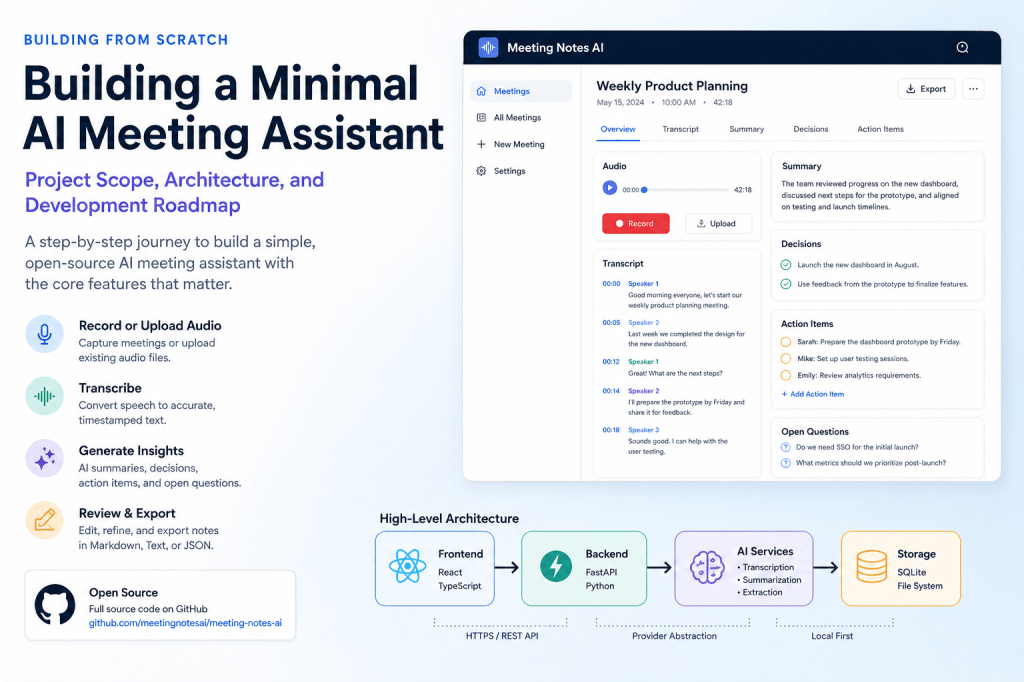
This article introduces the project scope, system architecture, technology choices, and development roadmap.
Why Build Another AI Meeting Assistant?
The answer is simple: to understand how modern AI meeting assistants actually work.
Many commercial products hide the complexity behind polished user interfaces. While this creates a great user experience, it makes it difficult for developers, students, and AI enthusiasts to learn how the underlying systems are designed.
Building a minimal AI meeting assistant provides several benefits:
- Learn how speech-to-text systems operate.
- Understand transcript processing pipelines.
- Explore large language model summarization.
- Experiment with action item extraction.
- Study meeting intelligence workflows.
- Create a practical open-source project.
- Document real-world development challenges.
The project is intended to be both educational and functional.
Project Goals
The primary goal is to build an AI meeting assistant that performs the core tasks users expect while remaining simple enough to understand and maintain.
The application should allow users to:
- Create a meeting.
- Record or upload meeting audio.
- Generate a transcript.
- Review and edit the transcript.
- Generate a meeting summary.
- Extract decisions.
- Extract action items.
- Export meeting notes.
Nothing more is required for the first version.
If the application successfully completes these tasks, it will already provide substantial value for many users.
What This Project Will Not Include
One of the biggest mistakes in software development is attempting to build too much too early.
Many AI meeting assistants include features such as:
- Automatic meeting bots
- Zoom integrations
- Microsoft Teams integrations
- Google Meet integrations
- CRM synchronization
- Calendar synchronization
- Email automation
- Sentiment analysis
- Coaching recommendations
- Team workspaces
- Analytics dashboards
- AI agents
- Workflow automation
While these features may be useful, they significantly increase complexity.
For this project, they are intentionally excluded.
The objective is to master the fundamentals before expanding into advanced functionality.
Defining the Minimum Viable Product (MVP)
The MVP consists of a straightforward workflow.
Step 1: Create a Meeting
The user creates a meeting record and provides a title.
Example:
Weekly Product Planning
Step 2: Capture Audio
The user can either:
- Record directly from the browser.
- Upload an existing audio file.
Supported formats may include:
MP3WAVM4AWEBM
Step 3: Generate a Transcript
The application converts speech into text using a transcription engine.
Example:
Speaker 1:Let's complete the prototype by Friday.Speaker 2:I can take ownership of that task.
Step 4: Generate Meeting Intelligence
The transcript is analyzed to create:
- Summary
- Key discussion points
- Decisions
- Action items
- Open questions
Step 5: Review and Edit
Users can modify:
- Transcript content
- Summary text
- Decisions
- Action items
AI-generated content should always be treated as a draft rather than a final result.
Step 6: Export Notes
The meeting notes can be exported as:
- Markdown
- Plain text
- JSON
These formats are easy to integrate with other systems and knowledge bases.
High-Level System Architecture
The system architecture is intentionally simple.
Frontend (React) | vBackend (FastAPI) | +-------------------+ | | v vAudio Services AI Services | | v vTranscription Summarization Action Items Decisions | vSQLite Database
Each component is responsible for a specific task.
This modular design makes the project easier to understand and maintain.
Frontend Architecture
The frontend will be built using React and TypeScript.
Initial screens include:
Dashboard
Displays:
- Existing meetings
- Create meeting button
- Meeting status
Meeting Screen
Displays:
- Meeting title
- Audio controls
- Transcript
- Summary
- Action items
Export Screen
Provides export functionality.
The user interface will remain intentionally minimal.
The focus should be on usability rather than visual complexity.
Backend Architecture
The backend will be developed using FastAPI.
FastAPI offers several advantages:
- Excellent performance
- Strong typing support
- Automatic API documentation
- Native Pydantic integration
- Large AI developer community
The backend will be organized into services.
Meeting Service
Responsible for:
- Creating meetings
- Updating meetings
- Listing meetings
- Deleting meetings
Audio Service
Responsible for:
- Uploading audio
- Storing files
- Audio validation
Transcription Service
Responsible for:
- Converting speech to text
- Returning timestamped segments
Summarization Service
Responsible for:
- Generating summaries
- Extracting decisions
- Extracting action items
Export Service
Responsible for:
- Markdown exports
- JSON exports
- Text exports
This separation helps keep the codebase clean as the project grows.
Database Design
SQLite is more than sufficient for the initial version.
The first database schema will likely include the following entities.
Meeting
idtitlecreated_atstatusaudio_path
Transcript Segment
idmeeting_idspeakerstart_timeend_timetext
Summary
idmeeting_idoverview
Action Item
idmeeting_idtaskownerdue_datestatus
Decision
idmeeting_iddecision_text
The schema may evolve over time as new requirements emerge.
Transcription Strategy
Transcription is one of the most important parts of any AI meeting assistant.
The initial version will likely use a Whisper-compatible transcription engine.
The system should produce:
- Transcript text
- Timestamps
- Language detection
Example:
{ "start": 15.2, "end": 18.7, "speaker": null, "text": "We should launch the pilot next month."}
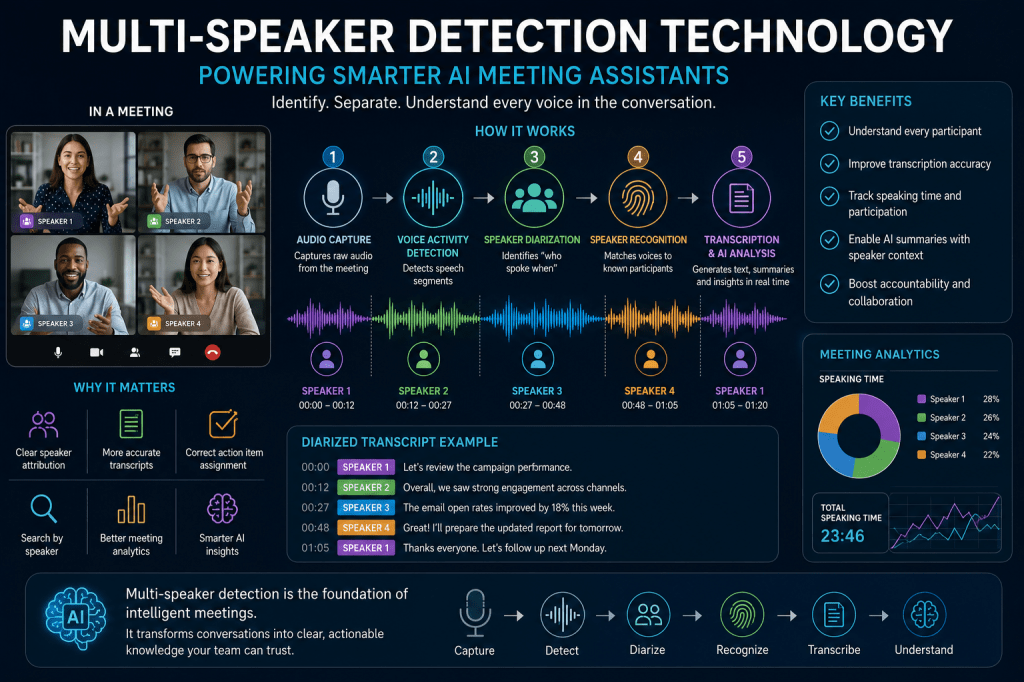
Speaker identification may be added later, but it is not required for the MVP.
AI-Powered Meeting Intelligence
After transcription is complete, the transcript will be processed by a language model.
The model will generate structured information rather than free-form text.
Example:
{ "summary": "The team reviewed the project timeline.", "decisions": [ "The pilot launch will begin in August." ], "action_items": [ { "task": "Prepare launch materials", "owner": "Sarah" } ]}
Structured output is easier to validate and display consistently.
GitHub Repository Strategy
The project will be fully open-source.
A single repository will contain:
frontend/backend/docs/tests/examples/
Every major milestone will be tagged.
Example:
v0.1-project-setupv0.2-data-modelv0.3-audio-recordingv0.4-audio-uploadv0.5-transcriptionv0.6-summary-generationv0.7-action-itemsv0.8-exportv1.0-release
This approach allows readers to follow the project’s evolution step-by-step.
Development Roadmap
The development roadmap is divided into six phases.
Phase 1: Foundations
- Define project scope
- Create repository
- Set up frontend
- Set up backend
- Design database
Phase 2: Audio Processing
- Browser recording
- Audio uploads
- Audio validation
- Audio preprocessing
Phase 3: Transcription
- Speech-to-text service
- Transcript storage
- Transcript viewer
- Transcript editing
Phase 4: Meeting Intelligence
- Summary generation
- Decision extraction
- Action item extraction
- Open question extraction
Phase 5: Review and Editing
- Transcript editor
- Summary editor
- Action item management
Phase 6: Export and Release
- Markdown export
- JSON export
- Text export
- Testing
- Deployment
By the end of these phases, the application will be capable of processing real meetings and generating useful meeting notes.
Why This Project Matters
Many AI products today are treated as black boxes. Users upload data, receive results, and rarely see what happens in between.
This project takes a different approach.
The goal is complete transparency.
Every design decision, architectural choice, implementation detail, success, and failure will be documented publicly. Readers will be able to inspect the source code, understand the reasoning behind the architecture, and follow the evolution of a working AI application from its first commit to a usable release.
Whether you are a developer interested in speech recognition, an AI enthusiast exploring large language model applications, or simply curious about how modern meeting assistants work, this project aims to provide a practical and educational reference implementation.
Conclusion
The journey begins with a simple idea: build the smallest useful AI meeting assistant possible.
Instead of chasing dozens of features, the focus will remain on a handful of essential capabilities:
- Record meetings
- Generate transcripts
- Create summaries
- Extract decisions
- Extract action items
- Export notes
Everything else can come later.
In the next article, we will create the GitHub repository, establish the project structure, choose the technology stack, and set up the initial React and FastAPI development environment that will serve as the foundation for the entire AI meeting assistant.

 Meeting Notes AI