Introduction
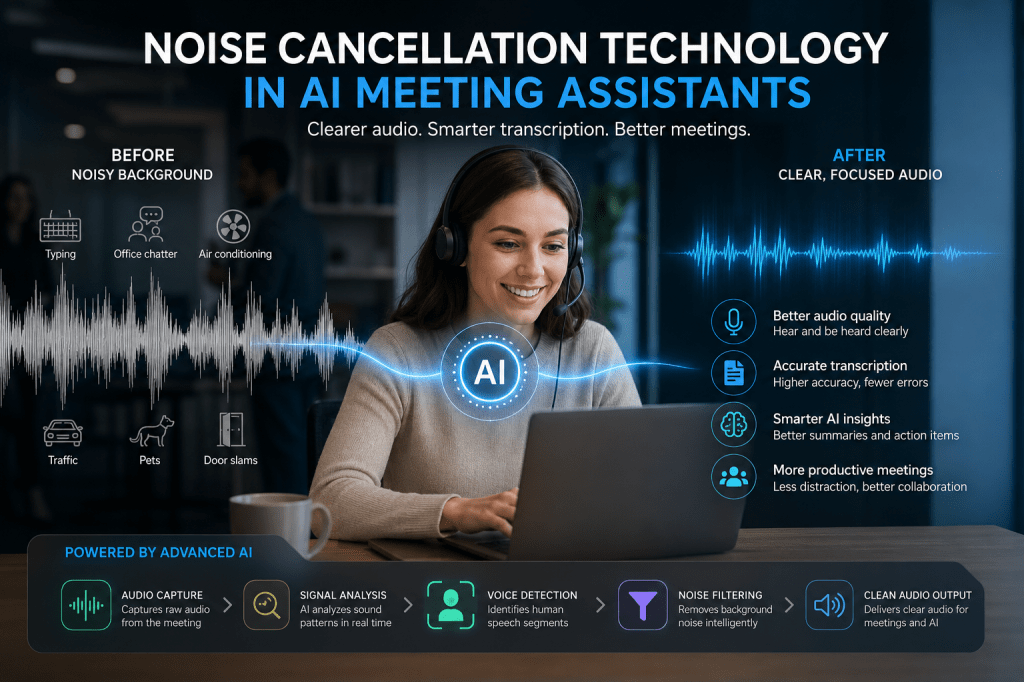
One of the biggest challenges in virtual and hybrid meetings is background noise. Barking dogs, keyboard clicks, office conversations, traffic sounds, air conditioning units, and other distractions can reduce meeting quality, make conversations difficult to follow, and negatively impact transcription accuracy.
Modern AI meeting assistants solve this problem through advanced noise cancellation technology. By using artificial intelligence, machine learning, and digital signal processing, these tools can isolate human speech while suppressing unwanted sounds in real time.
As AI meeting assistants become an essential part of workplace communication, noise cancellation has evolved from a convenience feature into a core technology that directly affects meeting productivity, transcript quality, and user experience.
This guide explains how noise cancellation technology works in AI meeting assistants and why it has become so important for modern collaboration.
What Is Noise Cancellation?
Noise cancellation is the process of identifying and reducing unwanted audio signals while preserving the speaker’s voice.
In the context of AI meeting assistants, noise cancellation removes sounds that can interfere with conversations, including:
- Keyboard typing
- Mouse clicks
- Paper shuffling
- Office chatter
- Traffic noise
- Construction sounds
- Air conditioners
- Fans
- Door slams
- Pet noises
- Echoes and room reverberation
The goal is to deliver cleaner audio that both meeting participants and AI systems can understand more accurately.
Why Noise Cancellation Matters
Without noise cancellation, meeting assistants face several challenges:
Poor Transcription Accuracy
Speech recognition systems rely on clear audio input.
Background noise can cause:
- Misheard words
- Incorrect transcripts
- Missing information
- Reduced speaker recognition accuracy
Even small amounts of noise can significantly affect transcription quality.
Reduced Meeting Quality
Participants become distracted when background sounds interrupt conversations.
Common issues include:
- Difficulty understanding speakers
- Increased listener fatigue
- More meeting interruptions
- Frequent requests for clarification
Lower AI Performance
Many AI meeting assistant features depend on clean audio.
These include:
- Meeting summaries
- Action item extraction
- Topic detection
- Sentiment analysis
- Conversational search
Cleaner audio leads to better AI-generated insights.
Traditional Noise Reduction vs AI Noise Cancellation
Traditional Noise Reduction
Older systems use fixed audio filters to remove specific frequencies.
These methods:
- Work well for predictable noise
- Struggle with complex environments
- Often distort speech
- Cannot adapt dynamically
Examples include:
- Static frequency filtering
- Echo suppression
- Basic microphone processing
AI Noise Cancellation
Modern AI systems analyze audio in real time and intelligently determine:
- What is speech
- What is noise
- Which sounds should be preserved
- Which sounds should be removed
Advantages include:
- Greater accuracy
- Adaptive filtering
- Better speech preservation
- Improved performance in changing environments
AI-powered solutions outperform traditional methods in most meeting scenarios.
How AI Noise Cancellation Works
Step 1: Audio Capture
The meeting assistant captures audio from:
- Computer microphones
- USB microphones
- Headsets
- Conference room systems
- Virtual meeting platforms
The raw audio contains both speech and background sounds.
Step 2: Signal Analysis
The AI system analyzes the incoming audio stream.
It examines characteristics such as:
- Frequency patterns
- Amplitude
- Timing
- Voice signatures
- Acoustic environments
This creates a detailed representation of the sound landscape.
Step 3: Voice Detection
Voice Activity Detection (VAD) identifies when speech is present.
The system learns:
- When someone starts speaking
- When speech ends
- Which audio segments contain conversation
This step helps separate speech from silence and noise.
Step 4: Noise Classification
Machine learning models classify sounds into categories.
Examples include:
- Human speech
- Keyboard typing
- Mouse clicks
- Background conversations
- Vehicle sounds
- Mechanical noise
The AI determines which sounds should be removed.
Step 5: Audio Reconstruction
The system suppresses unwanted sounds while preserving speech.
Modern deep learning models reconstruct clean speech signals from noisy audio.
This process occurs within milliseconds.
Step 6: Clean Audio Output
The enhanced audio is then used for:
- Live meetings
- Transcription
- Recording
- Meeting analytics
- AI summaries
The result is significantly clearer communication.
Machine Learning Behind Noise Cancellation
Noise cancellation models are trained on massive datasets containing:
- Human speech samples
- Office sounds
- Home office environments
- Public spaces
- Transportation noise
- Conference room recordings
The system learns patterns associated with both speech and noise.
Over time, these models become increasingly effective at distinguishing between them.
This is why modern AI meeting assistants perform much better than earlier generations of conferencing software.
Deep Learning and Neural Networks
Most advanced meeting assistants rely on neural networks.
These models can recognize subtle differences between:
- Speech frequencies
- Environmental noise
- Overlapping sounds
- Multiple speakers
Common approaches include:
Recurrent Neural Networks (RNNs)
Designed to process sequential audio information.
Convolutional Neural Networks (CNNs)
Useful for identifying audio patterns and frequency structures.
Transformer Models
Increasingly used to analyze complex audio relationships in real time.
These architectures enable highly accurate speech enhancement.
Echo Cancellation vs Noise Cancellation
Although often confused, these are different technologies.
Noise Cancellation
Removes unwanted environmental sounds.
Examples:
- Typing
- Traffic
- Air conditioning
Echo Cancellation
Removes reflected audio generated by speakers and microphones.
Examples:
- Meeting participants hearing themselves
- Room reverberation
- Speaker feedback loops
Most AI meeting assistants use both technologies together.
Real-Time Noise Cancellation
Modern meeting assistants perform noise suppression during live conversations.
Benefits include:
- Improved participant experience
- Better call quality
- More accurate live captions
- Enhanced transcription
Real-time processing is particularly important for:
- Zoom meetings
- Microsoft Teams meetings
- Google Meet sessions
- Hybrid conference rooms
Noise Cancellation and Transcription Accuracy
One of the largest benefits of noise cancellation is improved transcription quality.
Cleaner audio enables speech recognition systems to:
- Detect words more accurately
- Separate speakers more effectively
- Understand context better
- Produce more reliable transcripts
This directly improves downstream AI features.
For example:
Better audio → Better transcripts → Better summaries → Better action items
Every stage benefits from cleaner input.
Noise Cancellation in Hybrid Meetings
Hybrid meetings present unique challenges.
Audio sources may include:
- In-office participants
- Remote workers
- Conference room microphones
- Personal devices
Noise cancellation helps by:
- Reducing room noise
- Improving speaker clarity
- Enhancing remote participant audio
- Creating more consistent recordings
This improves collaboration across distributed teams.
Common Noise Types AI Systems Remove
Modern meeting assistants can suppress:
| Noise Type | Example |
|---|---|
| Mechanical Noise | Fans, HVAC systems |
| Typing Noise | Keyboard clicks |
| Office Noise | Nearby conversations |
| Home Noise | Pets, children |
| Transportation Noise | Cars, trains |
| Outdoor Noise | Wind, traffic |
| Electronic Noise | Hums and buzzes |
| Room Echoes | Reflections and reverberation |
The best systems adapt automatically without requiring user intervention.
Benefits of Noise Cancellation in AI Meeting Assistants
Organizations gain several advantages:
Better Communication
Participants hear each other more clearly.
Improved Meeting Records
Transcripts become more accurate and searchable.
Higher Productivity
Less time spent repeating information.
Better AI Insights
Summaries and action items become more reliable.
Reduced Meeting Fatigue
Cleaner audio reduces cognitive effort during long meetings.
Future of Noise Cancellation Technology
Future AI meeting assistants will likely include:
Personalized Voice Models
Systems will learn individual voices more accurately.
Context-Aware Audio Processing
AI will understand meeting environments and adapt automatically.
Advanced Multi-Speaker Separation
Improved handling of overlapping conversations.
Edge AI Processing
Noise cancellation performed locally for lower latency and greater privacy.
Generative Audio Enhancement
AI models that reconstruct exceptionally clear speech from poor recordings.
These innovations will further improve meeting experiences and AI-generated insights.
Conclusion
Noise cancellation technology is one of the most important components of modern AI meeting assistants. By combining machine learning, deep learning, voice activity detection, and advanced audio processing, these systems can remove distracting sounds while preserving clear human speech.
The benefits extend far beyond better audio quality. Noise cancellation improves transcription accuracy, enhances AI-generated summaries, strengthens meeting analytics, and helps teams communicate more effectively in remote and hybrid work environments.
As AI meeting technology continues to evolve, noise cancellation will remain a foundational capability that enables more productive, accurate, and intelligent meetings.







 Meeting Notes AI