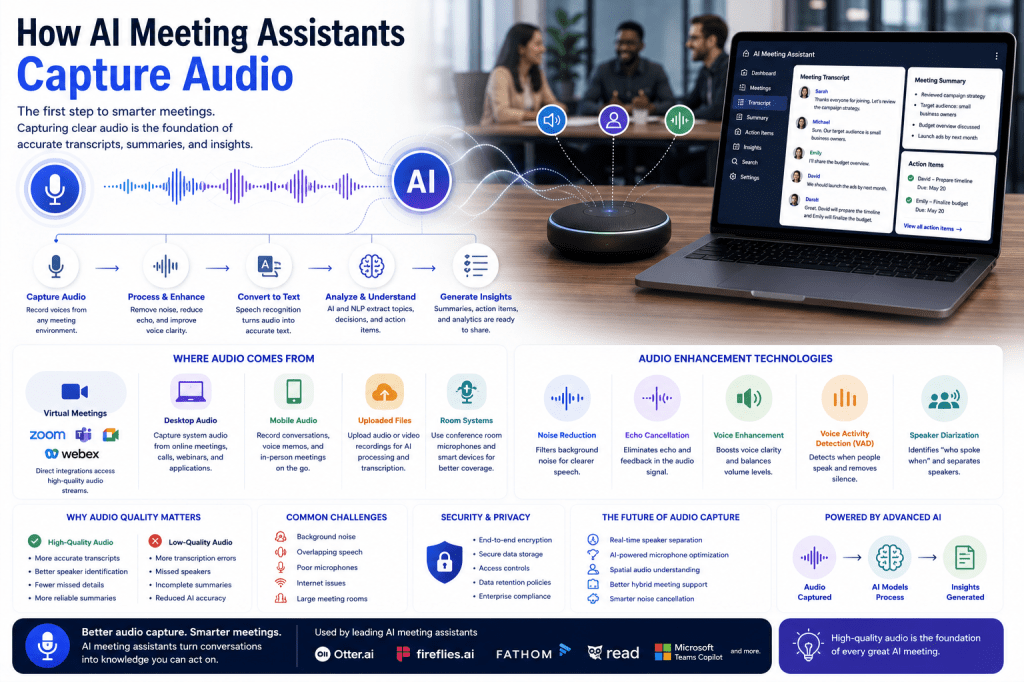
Every AI meeting assistant begins with a simple but critical task: capturing audio. Before artificial intelligence can generate transcripts, create summaries, identify action items, or provide meeting insights, it must first accurately record the conversation. The quality of this audio capture process directly impacts everything that follows, from transcription accuracy to the usefulness of AI-generated meeting summaries.
In this guide, we’ll explore how AI meeting assistants capture audio, the technologies involved, the challenges they face, and why audio quality is one of the most important factors in meeting intelligence.
Why Audio Capture Matters
AI meeting assistants rely entirely on spoken conversations.
Everything the platform does depends on its ability to accurately hear and process:
- Discussions
- Questions
- Decisions
- Action items
- Presentations
- Brainstorming sessions
If audio quality is poor, the AI has less reliable information to work with.
This can lead to:
- Transcription errors
- Missed action items
- Inaccurate summaries
- Reduced meeting insights
High-quality audio capture is the foundation of effective AI meeting intelligence.
The First Step in the AI Meeting Workflow
Before speech recognition, Natural Language Processing, and Large Language Models can analyze a meeting, audio must be collected.
The typical workflow looks like this:
- Capture audio
- Process and enhance audio
- Convert speech to text
- Analyze the transcript
- Generate summaries and insights
- Create searchable meeting records
Everything starts with audio capture.
How AI Meeting Assistants Access Audio
Different platforms use different methods depending on the meeting environment.
Virtual Meeting Platforms
Most AI meeting assistants integrate directly with:
- Zoom
- Microsoft Teams
- Google Meet
- Webex
The assistant may join the meeting as a virtual participant and receive audio streams directly from the platform.
This approach often provides cleaner audio than recording through external microphones.
Desktop Applications
Some meeting assistants capture system audio directly from a user’s computer.
This allows the software to record:
- Online meetings
- Voice calls
- Webinars
- Internal audio streams
Without needing to join the meeting as a visible participant.
Mobile Applications
Mobile AI meeting assistants capture audio using:
- Smartphone microphones
- Mobile operating system audio APIs
- Voice recording features
These tools are often used for:
- Interviews
- In-person meetings
- Voice memos
- Client conversations
Uploaded Recordings
Some platforms allow users to upload audio or video recordings after a meeting.
The AI then processes the file and generates:
- Transcripts
- Summaries
- Action items
- Meeting insights
This is common for recorded interviews, podcasts, and offline meetings.
Audio Sources Used by AI Meeting Assistants
AI meeting assistants may collect audio from multiple sources simultaneously.
Participant Microphones
Each participant’s microphone provides an individual audio stream.
Speaker Audio
The assistant captures voices from all participants.
Shared System Audio
Presentations, videos, and multimedia content may also be recorded.
Conference Room Equipment
In hybrid environments, AI meeting assistants can integrate with:
- Conference room microphones
- Speakerphones
- Smart meeting room systems
This ensures all participants are captured clearly.
Audio Capture in Virtual Meetings
Virtual meetings represent the most common use case for AI meeting assistants.
Direct Platform Integration
Platforms such as Zoom and Microsoft Teams provide APIs that allow meeting assistants to access audio streams directly.
Benefits include:
- Cleaner recordings
- Reduced background noise
- Better speaker separation
- Improved transcription accuracy
Direct integration often produces better results than microphone-based recording.
Meeting Bots
Many AI meeting assistants join meetings as automated participants.
Examples include:
- Fireflies.ai
- Otter.ai
- Fathom
The meeting bot listens to the conversation and records audio for processing.
Participants typically see the bot listed alongside human attendees.
Audio Capture for In-Person Meetings
Capturing audio in physical meeting rooms presents additional challenges.
Room Microphones
The assistant may rely on:
- Laptop microphones
- Smartphone microphones
- Dedicated conference microphones
Smart Conference Systems
Enterprise meeting rooms often include advanced hardware such as:
- Beamforming microphones
- Speaker tracking systems
- Multi-microphone arrays
These technologies help capture speech more accurately.
Hybrid Meetings
Hybrid meetings involve both remote and in-person participants.
AI meeting assistants must combine audio from:
- Video conferencing platforms
- Conference room devices
- Local microphones
This creates a complete recording of the discussion.
Audio Enhancement Technologies
Raw audio is rarely perfect.
Modern AI meeting assistants use audio enhancement technologies to improve quality before transcription begins.
Noise Reduction
The system removes unwanted sounds such as:
- Keyboard typing
- Air conditioning
- Traffic noise
- Office chatter
Echo Cancellation
Echoes caused by speakers and microphones are reduced or eliminated.
Voice Enhancement
Speech signals are amplified and clarified.
Volume Normalization
The system balances volume levels across participants.
These enhancements help improve transcription accuracy and AI analysis.
Voice Activity Detection (VAD)
Not all audio contains speech.
Voice Activity Detection helps AI systems determine:
- When someone is speaking
- When silence occurs
- When background noise is present
This technology allows the system to focus only on meaningful audio.
Benefits include:
- Reduced processing costs
- Improved transcription accuracy
- Better speaker segmentation
Voice Activity Detection is a critical component of modern meeting assistants.
Multi-Speaker Audio Processing
Meetings often involve multiple participants speaking.
AI meeting assistants must identify:
- Who is speaking
- When speakers change
- Which statements belong to each participant
This process supports:
- Speaker identification
- Meeting summaries
- Action item assignment
- Meeting analytics
Advanced audio processing helps separate and organize conversations effectively.
Challenges in Audio Capture
Capturing meeting audio is more difficult than it may appear.
Background Noise
Office environments often contain distracting sounds.
Poor Microphones
Low-quality microphones reduce speech clarity.
Overlapping Conversations
Multiple people speaking simultaneously create challenges for AI systems.
Internet Connectivity Issues
Remote meetings may suffer from audio dropouts and distortion.
Large Meeting Rooms
Participants sitting far from microphones may be difficult to hear.
Modern AI systems use machine learning to overcome many of these challenges.
How Audio Quality Affects Transcription
Audio quality directly impacts transcription accuracy.
High-Quality Audio
Benefits include:
- Fewer transcription errors
- Better speaker recognition
- More accurate summaries
- Improved action item extraction
Low-Quality Audio
Can lead to:
- Misheard words
- Missed speakers
- Incomplete summaries
- Reduced AI effectiveness
Organizations seeking the best results should prioritize good audio equipment and meeting environments.
Security and Privacy Considerations
Audio recordings often contain sensitive information.
AI meeting assistants typically implement:
- Encryption
- Access controls
- Secure storage
- Data retention policies
- Compliance frameworks
Organizations should review privacy settings and security policies before deploying meeting intelligence solutions.
The Future of Audio Capture in AI Meetings
Audio capture technology continues to evolve rapidly.
Future innovations may include:
Better Noise Cancellation
Improved filtering of complex background environments.
Real-Time Speaker Separation
More accurate handling of overlapping conversations.
AI-Powered Microphone Optimization
Automatically adjusting recording settings during meetings.
Spatial Audio Analysis
Understanding where speakers are located within a room.
Improved Hybrid Meeting Support
Seamless integration of remote and in-person conversations.
These advancements will further improve meeting intelligence and transcription quality.
Popular AI Meeting Assistants Using Advanced Audio Capture
Several leading platforms rely on sophisticated audio capture technologies, including:
- Otter.ai
- Fireflies.ai
- Fathom
- Read AI
- Microsoft Teams Copilot
- Fellow
While implementations vary, audio capture remains one of the most critical components of every AI meeting assistant.
Final Thoughts
Audio capture is the foundation of every AI meeting assistant. Before transcription, summarization, action item extraction, or meeting analytics can occur, the system must accurately record the conversation. Through direct integrations, advanced microphones, audio enhancement technologies, and machine learning, modern meeting assistants can capture conversations with remarkable accuracy. As audio processing technology continues to improve, AI meeting assistants will become even more effective at transforming spoken conversations into valuable organizational knowledge.







 Meeting Notes AI