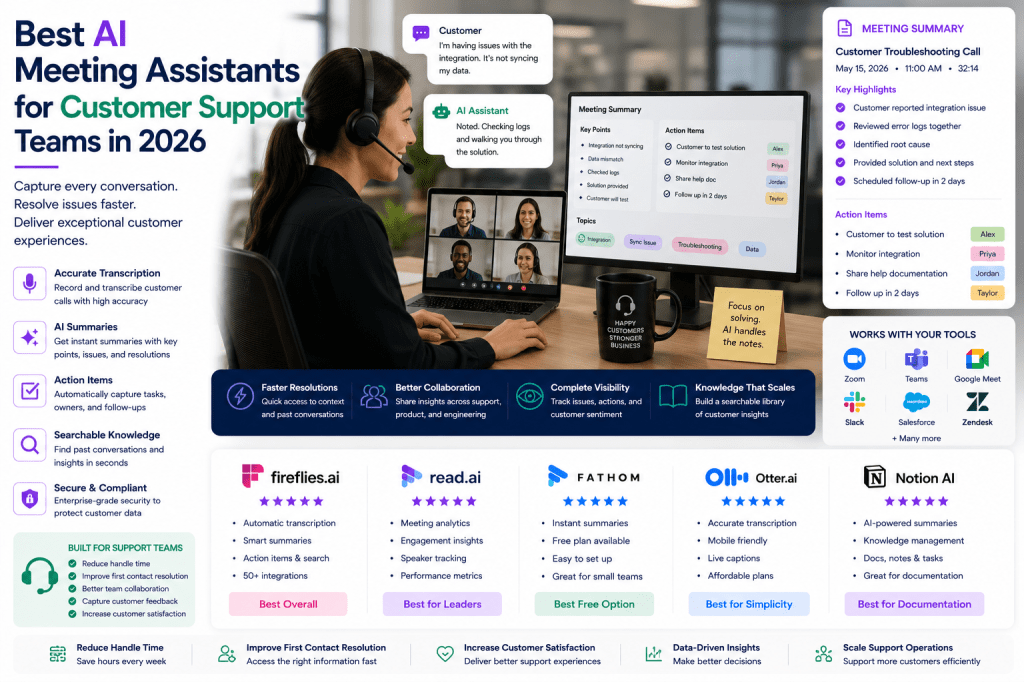
Customer support teams are on the front lines of every business. Whether helping customers resolve issues, conducting onboarding sessions, troubleshooting technical problems, or managing escalations, support professionals spend much of their day communicating with customers and internal teams.
Every conversation contains valuable information about customer needs, recurring problems, product feedback, and service opportunities. Unfortunately, manually documenting those interactions can be time-consuming and inconsistent.
AI meeting assistants help customer support teams automatically record conversations, generate transcripts, create summaries, identify action items, and build searchable knowledge bases.
In this guide, we’ll examine the best AI meeting assistants for customer support teams in 2026 and identify which solutions provide the most value for support organizations.
Why Customer Support Teams Need AI Meeting Assistants
Customer support teams regularly participate in:
- Customer troubleshooting calls
- Escalation meetings
- Onboarding sessions
- Technical support consultations
- Customer training sessions
- Internal support reviews
- Product feedback discussions
- Cross-functional issue resolution meetings
Missing important details can impact customer satisfaction and resolution times.
AI meeting assistants help support teams:
- Capture customer conversations accurately
- Improve documentation consistency
- Reduce manual note-taking
- Generate support summaries automatically
- Track follow-up actions
- Share information across teams
- Build searchable support knowledge
The result is faster resolutions and better customer experiences.
What Customer Support Teams Should Look For
Accurate Transcription
Customer conversations often include technical terminology, product names, and troubleshooting details.
Fast Summaries
Support teams need quick access to meeting outcomes and next steps.
Searchable Knowledge Base
Previous conversations can provide valuable context for future support cases.
Collaboration Features
Support teams frequently work with:
- Product teams
- Engineering teams
- Customer success teams
- Sales teams
- Management
CRM and Ticketing Integrations
Useful integrations include:
- Salesforce
- HubSpot
- Zendesk
- Freshdesk
- Intercom
- Slack
Best AI Meeting Assistants for Customer Support Teams
1. Fireflies.ai
Best Overall for Customer Support
Fireflies.ai combines meeting documentation, collaboration, and search functionality into a single platform.
Pros
- Automatic transcription
- Searchable conversations
- Action-item tracking
- Collaboration tools
- Strong integrations
Cons
- Advanced capabilities require premium plans
Best For
Support teams of all sizes.
Why Support Teams Choose Fireflies
It helps centralize customer conversations while improving team collaboration and follow-up.
2. Read AI
Best for Support Leadership
Read AI provides advanced analytics and meeting intelligence.
Pros
- Engagement insights
- Speaker analytics
- Meeting summaries
- Participation tracking
Cons
- Analytics may be unnecessary for some teams
Best For
Support managers and leadership teams.
Why Teams Choose Read AI
It provides valuable insights into customer interactions and team communication.
3. Fathom
Best Free Option
Fathom delivers excellent value with a powerful free plan.
Pros
- Free plan available
- Fast summaries
- Easy implementation
- User-friendly interface
Cons
- Limited advanced analytics
Best For
Small support teams and startups.
Why Support Teams Like Fathom
It reduces administrative work without increasing software expenses.
4. Otter AI
Best for Simplicity
Otter AI remains a dependable transcription solution.
Pros
- Reliable transcription
- Mobile support
- Easy setup
- Affordable plans
Cons
- Fewer advanced workflow features
Best For
Small and mid-sized support teams.
Why Teams Choose Otter
It provides accurate documentation without adding complexity.
5. Notion AI
Best for Support Documentation
Notion AI works well for teams focused on knowledge management and internal documentation.
Pros
- Strong documentation workflows
- Knowledge management capabilities
- AI-generated summaries
- Team collaboration
Cons
- Less focused on meeting-specific intelligence
Best For
Support organizations with extensive documentation requirements.
Why Teams Choose Notion AI
Meeting notes and support knowledge can be centralized in one system.
Comparison Table
| Tool | Best For | Key Strength |
|---|---|---|
| Fireflies.ai | Support Teams | Collaboration & Search |
| Read AI | Support Leaders | Meeting Intelligence |
| Fathom | Budget-Conscious Teams | Free Features |
| Otter AI | Simplicity | Reliable Transcription |
| Notion AI | Documentation | Knowledge Management |
How AI Meeting Assistants Improve Customer Support
Better Case Documentation
Every customer interaction is documented consistently.
Faster Resolution Times
Teams can quickly review previous conversations and decisions.
Improved Collaboration
Support, product, and engineering teams can access the same information.
Stronger Knowledge Sharing
Support conversations become searchable organizational assets.
Reduced Administrative Work
Agents spend less time taking notes and more time helping customers.
Which AI Meeting Assistant Should You Choose?
Choose Fireflies.ai if:
- You want the best overall solution
- Collaboration is important
- Searchability matters
Choose Read AI if:
- You manage support operations
- Analytics are valuable
- Meeting intelligence is important
Choose Fathom if:
- Budget is limited
- You want a free solution
- Ease of use matters
Choose Otter AI if:
- Simplicity is the priority
- Reliable transcription is sufficient
- You have a smaller team
Choose Notion AI if:
- Documentation is a major focus
- Knowledge management matters
- Your team already uses Notion
AI Meeting Assistants and Customer Experience
Customer experience depends heavily on communication quality.
AI meeting assistants help support organizations:
- Maintain accurate records
- Improve handoffs between teams
- Capture customer feedback
- Ensure accountability
- Reduce information loss
These capabilities ultimately contribute to faster resolutions and higher customer satisfaction.
Final Verdict
For most customer support teams in 2026, Fireflies.ai provides the strongest combination of transcription accuracy, searchable documentation, collaboration features, and workflow automation. It helps support professionals capture customer conversations while reducing administrative burden.
Read AI offers valuable insights for support leaders, Fathom provides exceptional value for smaller teams, Otter AI remains a reliable and simple option, and Notion AI excels at documentation and knowledge management.
As support organizations continue adopting AI-powered workflows, meeting assistants are becoming essential tools for improving communication, preserving customer knowledge, and delivering exceptional service experiences.

 Meeting Notes AI