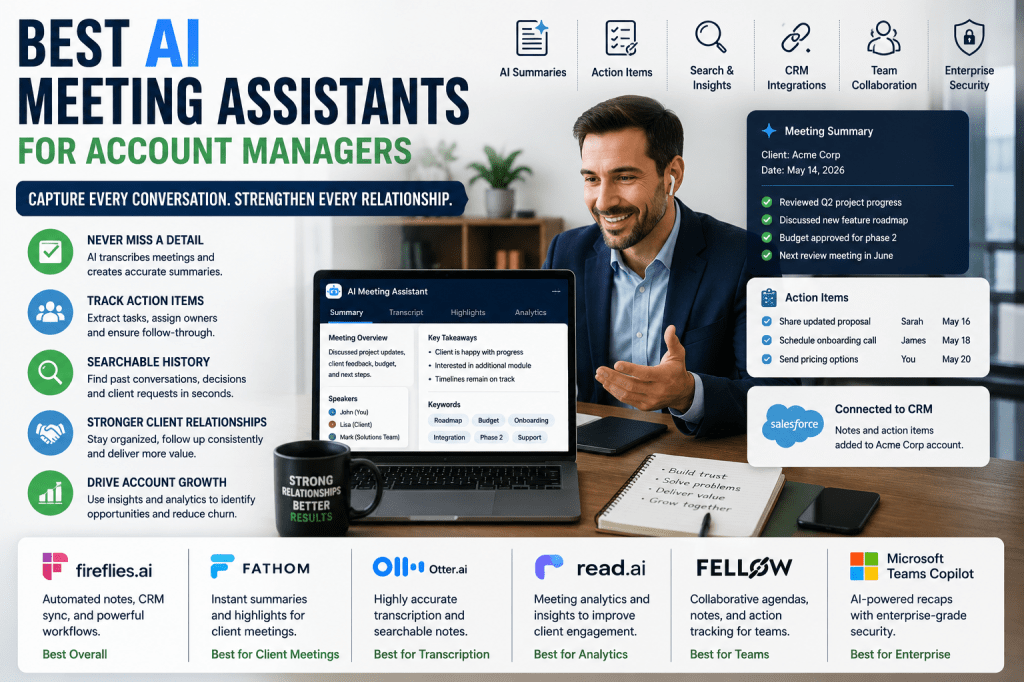
Account managers spend their days building client relationships, conducting status meetings, reviewing project progress, resolving issues, and identifying growth opportunities. With multiple clients and ongoing conversations to manage, keeping accurate records of discussions, commitments, and action items is essential. AI meeting assistants help account managers stay organized by automatically capturing meeting notes, generating summaries, tracking follow-ups, and creating searchable records of client interactions.
In this guide, we’ll explore the best AI meeting assistants for account managers in 2026 and identify the tools that can help improve client communication and account growth.
Why Account Managers Need AI Meeting Assistants
Successful account management relies on effective communication and follow-through.
Common challenges include:
- Managing multiple client accounts
- Tracking commitments and deadlines
- Documenting client feedback
- Capturing renewal discussions
- Coordinating internal teams
- Preparing account reviews
AI meeting assistants help ensure important details are never missed while reducing the administrative burden associated with client management.
What Account Managers Should Look For
CRM Integration
The best solutions integrate directly with:
- Salesforce
- HubSpot
- Zoho CRM
- Microsoft Dynamics
- Customer Success platforms
This allows meeting notes and action items to flow directly into account records.
Automated Follow-Up
Look for tools that can:
- Capture action items
- Assign tasks
- Generate summaries
- Support follow-up workflows
Searchable Meeting History
Account managers frequently revisit previous discussions.
Search functionality helps users quickly locate:
- Client requests
- Renewal conversations
- Product feedback
- Escalation history
Team Collaboration
Customer-facing teams benefit from:
- Shared meeting notes
- Collaborative workspaces
- Centralized account knowledge
Best AI Meeting Assistants for Account Managers
1. Fireflies.ai
Best Overall for Account Management
Fireflies.ai combines transcription, automation, and CRM integration into a powerful client management solution.
Key features:
- Meeting transcription
- AI-generated summaries
- CRM syncing
- Workflow automation
- Action item tracking
Pros
- Excellent CRM integrations
- Strong automation capabilities
- Great for managing multiple accounts
Cons
- Advanced workflows may require setup
2. Fathom
Best for Client Meetings
Fathom is highly effective for customer-facing professionals who need instant meeting summaries and follow-up support.
Key features:
- Automated summaries
- Meeting highlights
- CRM integrations
- Shareable notes
- Action item extraction
Pros
- Easy to use
- Fast summaries
- Strong client-focused workflows
Cons
- Fewer advanced analytics features
3. Otter.ai
Best for Detailed Conversation Capture
Otter.ai remains one of the strongest transcription platforms available.
Key features:
- Real-time transcription
- Speaker identification
- Searchable transcripts
- AI summaries
- Shared notes
Pros
- Excellent transcription accuracy
- Easy collaboration
Cons
- Some advanced features require paid plans
4. Read AI
Best for Customer Engagement Insights
Read AI helps account managers understand meeting participation and engagement levels.
Key features:
- Meeting analytics
- AI summaries
- Engagement reporting
- Action item tracking
- Team insights
Pros
- Valuable client engagement data
- Strong reporting features
Cons
- Analytics may exceed some users’ needs
5. Fellow
Best for Customer Success Teams
Fellow focuses on structured meetings and accountability.
Key features:
- Collaborative agendas
- AI-generated notes
- Team collaboration
- Meeting templates
- Follow-up tracking
Pros
- Excellent for recurring client meetings
- Strong accountability features
Cons
- Less focused on analytics
6. Microsoft Teams Copilot
Best for Enterprise Account Management
Organizations already using Microsoft 365 can benefit from Teams Copilot’s integrated capabilities.
Key features:
- AI-generated recaps
- Action item tracking
- Meeting summaries
- Microsoft integration
- Enterprise security
Pros
- Excellent security
- Deep Microsoft ecosystem integration
Cons
- Best suited for Microsoft-centric organizations
Comparison Table
| Tool | Best For | CRM Integration | Follow-Up Automation | Analytics |
|---|---|---|---|---|
| Fireflies.ai | Overall Account Management | Excellent | Excellent | Good |
| Fathom | Client Meetings | Strong | Strong | Good |
| Otter.ai | Conversation Capture | Good | Good | Good |
| Read AI | Engagement Insights | Strong | Good | Excellent |
| Fellow | Customer Success Teams | Good | Strong | Good |
| Microsoft Teams Copilot | Enterprise Accounts | Strong | Excellent | Excellent |
Benefits of AI Meeting Assistants for Account Managers
Stronger Client Relationships
Accurate meeting records help account managers deliver personalized service and follow through on commitments.
Improved Retention
Action item tracking reduces the likelihood of missed follow-ups and unresolved issues.
Better Team Alignment
Internal teams gain access to shared meeting notes and client context.
More Effective Account Reviews
Historical meeting records simplify preparation for quarterly business reviews and renewal discussions.
Increased Productivity
Less time spent taking notes means more time focused on clients and growth opportunities.
Choosing the Right Solution
The best AI meeting assistant depends on your priorities:
- Choose Fireflies.ai for overall account management workflows.
- Choose Fathom for customer-facing meetings.
- Choose Otter.ai for transcription accuracy.
- Choose Read AI for engagement analytics.
- Choose Fellow for customer success teams.
- Choose Microsoft Teams Copilot for enterprise environments.
Frequently Asked Questions
Can AI meeting assistants improve client retention?
Yes. By helping account managers track commitments, follow-ups, and customer concerns, AI meeting assistants can contribute to stronger client relationships.
Do AI meeting assistants integrate with CRMs?
Many leading solutions integrate directly with popular CRM platforms, allowing meeting notes and action items to be attached to account records.
Can these tools help with quarterly business reviews?
Absolutely. Searchable meeting histories and automated summaries make it easier to prepare account reviews and strategic discussions.
Are AI meeting assistants useful for remote client meetings?
Yes. They automatically document conversations and provide summaries regardless of whether meetings occur in person or virtually.
Final Thoughts
Account managers are responsible for maintaining strong customer relationships while managing a growing number of meetings and communications. AI meeting assistants help streamline documentation, improve follow-up consistency, and provide valuable client insights. By adopting the right solution, account managers can spend less time on administrative tasks and more time helping customers succeed.







 Meeting Notes AI