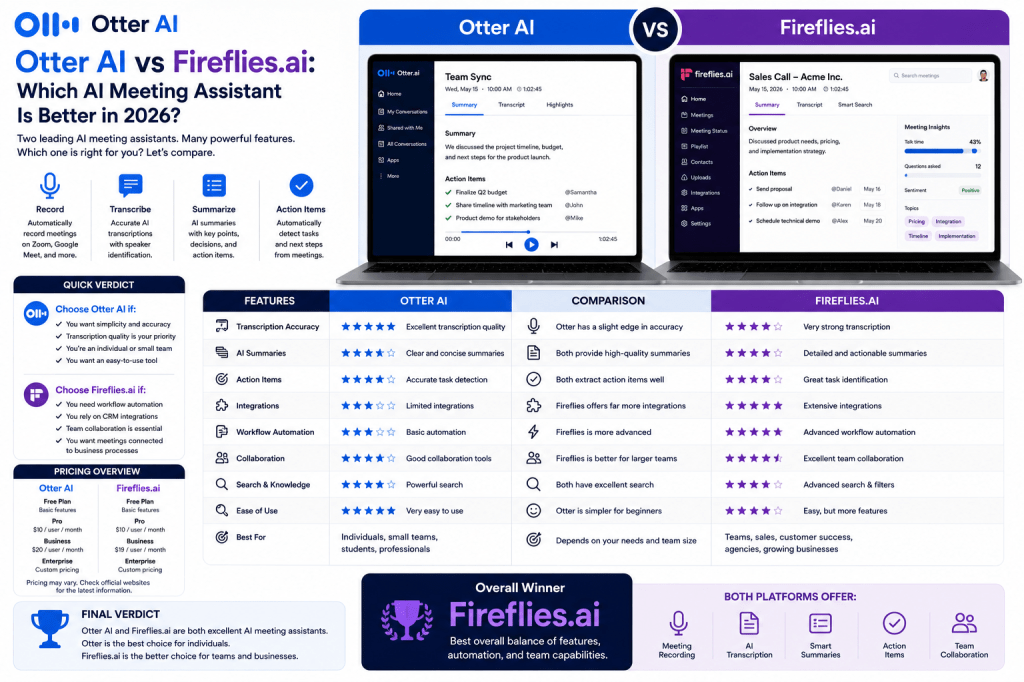
Choosing an AI meeting assistant can significantly improve productivity, collaboration, and knowledge management. Two of the most popular options available today are Otter AI and Fireflies.ai.
Both platforms can record meetings, generate transcripts, create summaries, and identify action items. However, they take different approaches to meeting productivity.
Otter AI focuses on simplicity, transcription quality, and ease of use. Fireflies.ai places a stronger emphasis on workflow automation, integrations, and team collaboration.
So which one is better?
In this comparison, we’ll evaluate both platforms across the areas that matter most.
Quick Verdict
Choose Otter AI If:
- You want a simple and reliable meeting assistant
- Transcription accuracy is your top priority
- You prefer a clean user experience
- You’re an individual professional or small team
Choose Fireflies.ai If:
- You need workflow automation
- You rely on CRM integrations
- Team collaboration is important
- You want meetings connected to business processes
For many individual users, Otter AI offers the better experience.
For growing teams and businesses, Fireflies.ai often provides greater long-term value.
Feature Overview
| Feature | Otter AI | Fireflies.ai |
|---|---|---|
| Meeting Recording | ✓ | ✓ |
| AI Summaries | ✓ | ✓ |
| Action Items | ✓ | ✓ |
| Speaker Identification | ✓ | ✓ |
| Searchable Archives | ✓ | ✓ |
| CRM Integrations | Limited | Excellent |
| Workflow Automation | Basic | Advanced |
| Collaboration Tools | Good | Excellent |
| Ease of Use | Excellent | Very Good |
| Team Features | Good | Excellent |
Round 1: Transcription Accuracy
Otter AI
Otter has built its reputation on high-quality transcription.
Strengths include:
- Real-time transcription
- Clear speaker separation
- Reliable meeting documentation
- Consistent performance
For many users, transcription quality remains Otter’s strongest advantage.
Fireflies.ai
Fireflies also delivers strong transcription performance.
However, its focus extends beyond transcription into broader workflow capabilities.
Accuracy is generally excellent, although some users feel Otter has a slight edge in pure transcription quality.
Winner: Otter AI
A narrow victory based on transcription focus and reputation.
Round 2: AI Summaries
Otter AI
Otter generates concise meeting summaries that highlight:
- Key topics
- Decisions
- Action items
The summaries are clear and easy to review.
Fireflies.ai
Fireflies offers similarly strong summaries but often provides more structure for team collaboration and follow-up workflows.
Winner: Tie
Both platforms perform well in this category.
Round 3: Integrations
Otter AI
Otter supports integrations with major meeting platforms including:
- Zoom
- Google Meet
- Microsoft Teams
However, its broader business integrations remain relatively limited.
Fireflies.ai
Fireflies shines here.
The platform connects with:
- Salesforce
- HubSpot
- Slack
- Notion
- Asana
- Monday.com
- Google Workspace
- Microsoft 365
These integrations help automate post-meeting workflows.
Winner: Fireflies.ai
A clear advantage.
Round 4: Workflow Automation
Otter AI
Otter focuses primarily on meeting capture and documentation.
Automation capabilities exist but are relatively limited.
Fireflies.ai
Automation is one of Fireflies’ biggest strengths.
Teams can automatically:
- Update CRM records
- Share meeting information
- Trigger workflows
- Organize customer conversations
Winner: Fireflies.ai
A significant lead.
Round 5: Collaboration
Otter AI
Otter supports:
- Shared notes
- Comments
- Highlights
- Team collaboration
These features work well for many organizations.
Fireflies.ai
Fireflies offers deeper collaboration features designed specifically for teams.
The platform integrates meeting information directly into broader workflows.
Winner: Fireflies.ai
Especially for larger teams.
Round 6: Search and Knowledge Management
Otter AI
Otter provides excellent searchable meeting archives.
Users can easily find:
- Keywords
- Topics
- Participants
- Discussions
Fireflies.ai
Fireflies also provides powerful search capabilities and benefits from stronger integrations with external systems.
Winner: Tie
Both platforms perform exceptionally well.
Round 7: Ease of Use
Otter AI
Otter remains one of the easiest AI meeting assistants to learn.
The platform emphasizes simplicity.
Fireflies.ai
Fireflies offers more features, which creates additional complexity.
While still user-friendly, it requires more setup and configuration.
Winner: Otter AI
A better experience for beginners.
Round 8: Best for Teams
Otter AI
Works well for:
- Small teams
- Consultants
- Recruiters
- Professionals
Fireflies.ai
Excels for:
- Sales organizations
- Customer success teams
- Agencies
- Growing businesses
- Cross-functional teams
Winner: Fireflies.ai
Especially for organizations with collaborative workflows.
Pricing Considerations
Both platforms offer:
- Free plans
- Individual plans
- Business plans
- Enterprise options
Pricing structures evolve regularly, so always review current plans before purchasing.
In general:
- Otter provides excellent value for individuals.
- Fireflies often provides greater value for teams.
Who Should Choose Otter AI?
Otter AI is ideal for:
- Individual professionals
- Consultants
- Recruiters
- Students
- Small businesses
Choose Otter if simplicity and transcription quality matter most.
Who Should Choose Fireflies.ai?
Fireflies.ai is ideal for:
- Sales teams
- Customer success teams
- Agencies
- Remote teams
- Growing businesses
Choose Fireflies if collaboration and workflow automation are priorities.
Frequently Asked Questions
Is Otter AI more accurate than Fireflies.ai?
Many users feel Otter has a slight advantage in transcription quality, although both platforms perform very well.
Is Fireflies.ai better for teams?
Yes. Its integrations and automation features make it particularly attractive for collaborative organizations.
Which platform is easier to use?
Otter AI generally offers a simpler user experience.
Which tool has better integrations?
Fireflies.ai provides a much larger integration ecosystem.
Which platform is better overall?
For individuals, Otter AI often wins. For teams, Fireflies.ai frequently offers more value.
Final Verdict
Both Otter AI and Fireflies.ai are excellent AI meeting assistants, but they serve slightly different audiences.
Otter AI excels at simplicity, transcription accuracy, and ease of use. Fireflies.ai stands out through workflow automation, integrations, and team collaboration.
If you’re an individual professional looking for a reliable AI meeting assistant, Otter AI is difficult to beat.
If you’re part of a growing team that wants meeting information integrated into business workflows, Fireflies.ai is likely the stronger choice.
Overall Winner
Individuals: Otter AI
Teams and Businesses: Fireflies.ai
Best Overall Balance: Fireflies.ai (by a narrow margin)
Related Article
Otter AI Review
Fireflies.ai Review
Best AI Meeting Assistants in 2026
Best AI Meeting Notes Tools in 2026
What Is an AI Meeting Assistant?
AI Meeting Notes for Small Businesses
AI Meeting Notes for Remote Teams

 Meeting Notes AI