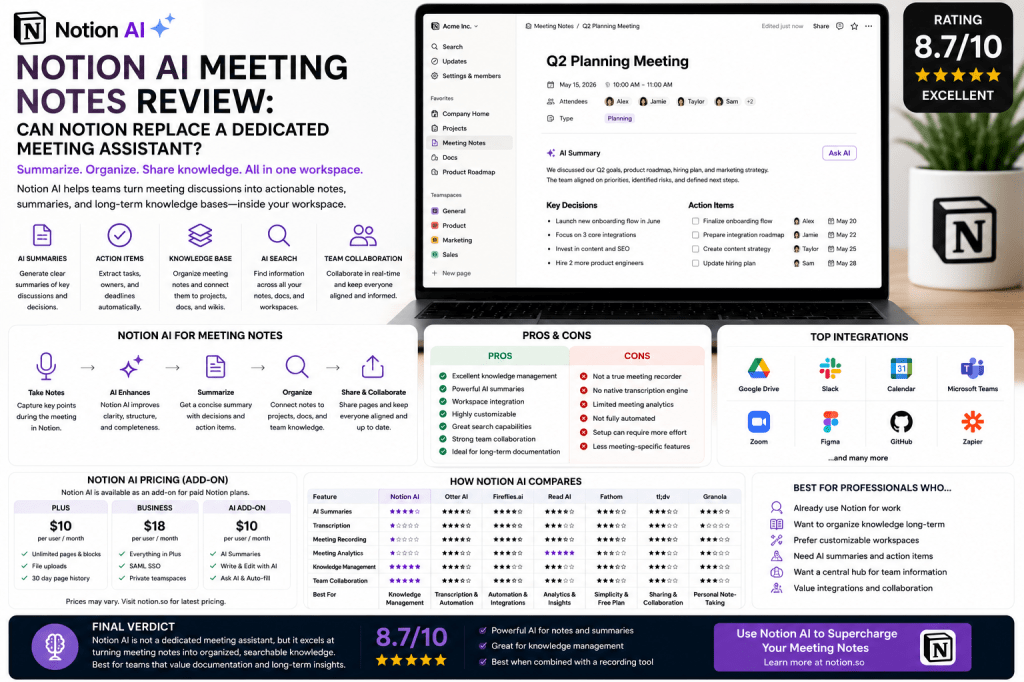
Notion has evolved from a simple note-taking application into one of the most powerful productivity and knowledge management platforms available today.
With the introduction of AI features, many users now rely on Notion AI to create meeting summaries, organize discussions, generate action items, and manage team knowledge.
This raises an important question:
Can Notion AI replace dedicated AI meeting assistants such as Otter AI, Fireflies.ai, Read AI, Fathom, or tl;dv?
The answer depends on how your organization works.
In this review, we’ll examine Notion AI’s meeting note capabilities, strengths, weaknesses, pricing, and ideal use cases.
What Is Notion AI?
Notion AI is an artificial intelligence layer built into the Notion workspace platform.
It helps users:
- Generate content
- Summarize information
- Organize notes
- Extract action items
- Search knowledge
- Create documentation
Unlike dedicated meeting assistants, Notion AI is part of a broader productivity ecosystem.
Its goal is not only meeting documentation but also long-term knowledge management.
How Notion AI Handles Meeting Notes
Notion AI supports meeting workflows by helping users:
- Create meeting templates
- Organize discussions
- Generate summaries
- Extract decisions
- Track action items
- Build searchable archives
Teams can use meeting pages as central repositories for discussions and outcomes.
The AI then helps process and organize the information.
Key Features
AI Summaries
One of Notion AI’s strongest capabilities is summarization.
The platform can quickly transform lengthy meeting notes into concise summaries highlighting:
- Key discussions
- Decisions
- Action items
- Next steps
Action Item Extraction
Notion AI can identify tasks and responsibilities from meeting notes.
This improves accountability and project execution.
Knowledge Management
Unlike most dedicated meeting assistants, Notion excels at long-term information organization.
Meeting notes can be connected to:
- Projects
- Databases
- Team wikis
- Documentation
- Processes
This creates a unified workspace.
AI Search
Users can search across:
- Meeting notes
- Documents
- Projects
- Knowledge bases
This makes historical information easy to retrieve.
Workspace Integration
Meeting information naturally becomes part of broader organizational workflows.
This is one of Notion’s biggest advantages.
What Notion AI Does Not Do Well
While Notion AI is powerful, it differs significantly from dedicated meeting assistants.
No Native Meeting Recording
Unlike:
- Otter AI
- Fireflies.ai
- Read AI
- Fathom
- tl;dv
Notion does not specialize in recording meetings automatically.
No Advanced Transcription Engine
Dedicated meeting assistants offer far stronger speech-to-text capabilities.
Limited Meeting Analytics
Notion does not provide engagement scores, participation analysis, or meeting intelligence reporting.
Fewer Meeting Automation Features
Dedicated meeting assistants generally offer stronger meeting-specific workflows.
User Experience
One of Notion’s biggest strengths is flexibility.
Teams can create:
- Meeting databases
- Team hubs
- Project workspaces
- Knowledge repositories
The interface is modern and intuitive.
However, setup often requires more effort than dedicated meeting assistants.
Organizations willing to invest time in workspace design will benefit most.
Notion AI for Teams
Startups
Centralize meeting notes and company knowledge.
Product Teams
Connect meetings directly to roadmaps and development projects.
Agencies
Organize client discussions and project documentation.
Consulting Firms
Maintain structured knowledge repositories.
Remote Teams
Create shared documentation accessible across locations.
Growing Businesses
Scale organizational knowledge management.
Knowledge Management: Notion’s Greatest Strength
Most AI meeting assistants focus on capturing meetings.
Notion focuses on preserving and organizing knowledge.
This difference is important.
Meeting assistants answer:
“What happened in the meeting?”
Notion helps answer:
“What does the organization know?”
For teams building long-term knowledge assets, this can be a major advantage.
Notion AI Pricing
Notion AI is typically offered as part of the broader Notion ecosystem.
Pricing varies depending on:
- Workspace plans
- Team size
- AI usage
- Enterprise requirements
Organizations already using Notion may find the additional value compelling.
Notion AI Pros
Excellent Knowledge Management
One of the best organizational systems available.
Powerful AI Summaries
Strong summarization capabilities.
Workspace Integration
Meeting notes connect directly to projects and documentation.
Flexible Structure
Highly customizable.
Search Capabilities
Find information quickly across large knowledge bases.
Strong Team Collaboration
Excellent for collaborative work environments.
Notion AI Cons
Not a True Meeting Assistant
It lacks many meeting-specific features.
No Native Recording
Requires external recording solutions.
Limited Transcription
Dedicated meeting assistants perform much better.
Setup Complexity
Requires workspace planning and organization.
Fewer Analytics
Read AI provides much deeper meeting intelligence.
Notion AI vs Competitors
Notion AI vs Otter AI
Otter excels at transcription and meeting capture, while Notion excels at knowledge organization.
Notion AI vs Fireflies.ai
Fireflies offers stronger meeting automation and integrations.
Notion AI vs Read AI
Read AI provides superior meeting analytics and engagement insights.
Notion AI vs Fathom
Fathom offers a more streamlined meeting assistant experience.
Notion AI vs tl;dv
tl;dv focuses more heavily on recording and sharing meeting knowledge.
Who Should Use Notion AI?
Notion AI is ideal for:
- Startups
- Product teams
- Agencies
- Consultants
- Remote teams
- Knowledge-driven organizations
Teams that already use Notion will gain the most value.
Who Might Prefer Dedicated Meeting Assistants?
Choose a dedicated meeting assistant if you need:
- Automatic recording
- Advanced transcription
- AI meeting analytics
- Workflow automation
- Real-time meeting support
In these situations, Otter AI, Fireflies.ai, Read AI, or Fathom are stronger options.
Frequently Asked Questions
Can Notion AI take meeting notes?
Yes. It can summarize, organize, and enhance meeting notes.
Does Notion AI record meetings?
No. It is not a dedicated meeting recording platform.
Is Notion AI better than Otter AI?
They serve different purposes. Otter excels at meeting capture, while Notion excels at knowledge management.
Can Notion AI create action items?
Yes. It can extract tasks and responsibilities from notes.
Is Notion AI worth it for teams?
For organizations already using Notion, it can provide significant additional value.
Final Verdict
Notion AI is not a direct replacement for dedicated AI meeting assistants, but it is one of the most powerful knowledge management platforms available today.
Organizations that prioritize documentation, knowledge sharing, and long-term information management will find tremendous value in Notion AI. However, teams that need automatic recording, transcription, and meeting analytics will likely benefit from combining Notion with a dedicated AI meeting assistant.
Rating: 8.7/10
Best For: Startups, product teams, agencies, consultants, remote teams, and organizations building long-term knowledge repositories.
Related Articles
What Is an AI Meeting Assistant?
Best AI Meeting Assistants in 2026
Best AI Meeting Notes Tools in 2026
Otter AI Review
Fireflies.ai Review
Read AI Review
Fathom Review
tl;dv Review
Granola Review







 Meeting Notes AI