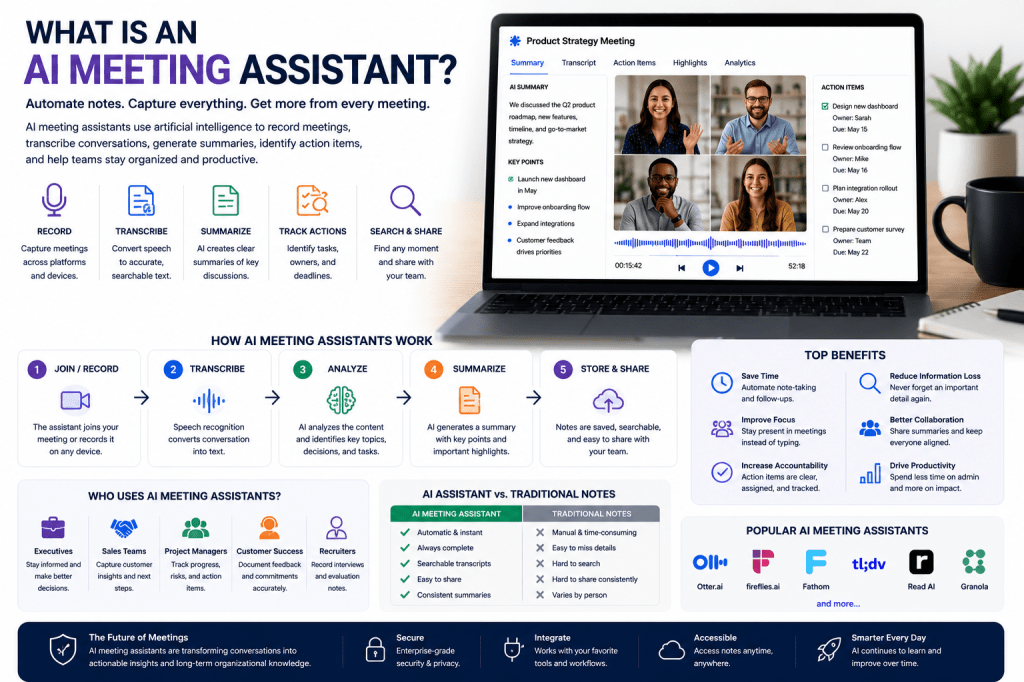
Meetings are an essential part of modern work, but they often create a surprising amount of administrative overhead. Employees spend time taking notes, writing summaries, tracking action items, sending follow-up emails, and searching for information discussed weeks or months earlier.
AI meeting assistants were created to solve these problems.
These intelligent tools can automatically record meetings, generate transcripts, summarize conversations, identify action items, and create searchable records of important discussions. Instead of spending time documenting meetings manually, teams can focus on participating in the conversation itself.
In this guide, we’ll explain what AI meeting assistants are, how they work, their benefits, and why they are rapidly becoming a standard part of modern business workflows.
An AI meeting assistant is a software tool that uses artificial intelligence to help manage, document, and analyze meetings.
Most AI meeting assistants can:
- Record meetings
- Transcribe conversations
- Generate summaries
- Identify action items
- Track decisions
- Create searchable meeting records
- Support collaboration
The goal is to reduce administrative work while improving communication and accountability.
Rather than acting as a simple recorder, modern AI meeting assistants actively help teams organize and understand meeting information.
Why AI Meeting Assistants Have Become Popular
Businesses today conduct more meetings than ever.
Remote work, hybrid teams, and global collaboration have increased the need for effective meeting management.
Common challenges include:
- Missed details
- Incomplete notes
- Forgotten action items
- Information silos
- Meeting fatigue
AI meeting assistants address these problems by automating much of the documentation process.
This allows teams to spend more time executing decisions and less time managing meeting records.
How AI Meeting Assistants Work
Most AI meeting assistants follow a similar workflow.
Step 1: Join or Record the Meeting
The assistant connects to:
- Zoom
- Google Meet
- Microsoft Teams
- Phone calls
- In-person meetings
Some tools join meetings as virtual participants, while others record directly through apps or devices.
Step 2: Transcribe the Conversation
Speech recognition technology converts spoken language into written text.
Modern systems can often:
- Recognize multiple speakers
- Understand different accents
- Process conversations in real time
Step 3: Analyze Meeting Content
Artificial intelligence examines the transcript and identifies:
- Key topics
- Decisions
- Tasks
- Questions
- Follow-up items
Step 4: Generate Summaries
Generative AI creates concise summaries highlighting:
- Important discussions
- Decisions made
- Action items
- Next steps
Step 5: Store Information
The meeting record becomes searchable and accessible for future reference.
Key Features of AI Meeting Assistants
Automatic Transcription
Creates a written record of conversations.
AI Summaries
Provides quick overviews of lengthy meetings.
Action Item Tracking
Identifies responsibilities and deadlines.
Speaker Identification
Separates contributions from different participants.
Searchable Meeting Archives
Makes historical discussions easy to find.
Integrations
Connects with:
- CRM systems
- Project management platforms
- Team collaboration tools
Meeting Analytics
Some platforms provide insights into participation and engagement.
Benefits of AI Meeting Assistants
Save Time
Automate note-taking, summaries, and follow-up documentation.
Improve Focus
Participants can focus on the discussion rather than taking notes.
Increase Accountability
Action items are clearly documented and assigned.
Reduce Information Loss
Important discussions are preserved and searchable.
Improve Collaboration
Everyone has access to the same meeting information.
Support Remote Teams
Team members can review meetings they missed.
Who Uses AI Meeting Assistants?
AI meeting assistants are useful across many professions.
Executives
Review summaries without attending every meeting.
Sales Teams
Capture customer conversations and commitments.
Recruiters
Document interviews and hiring discussions.
Consultants
Maintain accurate client meeting records.
Customer Success Teams
Track customer feedback and follow-up actions.
Project Managers
Monitor decisions, risks, and next steps.
Remote Teams
Maintain communication across locations and time zones.
Popular AI Meeting Assistants
Several platforms currently dominate the market.
Popular solutions include:
- Otter AI
- Fireflies.ai
- Read AI
- Fathom
- tl;dv
- Granola
- Notion AI
Each platform offers a different combination of transcription, summarization, collaboration, and workflow features.
AI Meeting Assistants vs Traditional Note-Taking
Traditional Note-Taking
Pros:
- Human interpretation
- Personal context
- No software costs
Cons:
- Time-consuming
- Easy to miss details
- Difficult to share consistently
AI Meeting Assistants
Pros:
- Automatic documentation
- Searchable records
- Better collaboration
- Consistent summaries
Cons:
- Subscription costs
- Potential privacy considerations
- Occasional transcription errors
For many organizations, the benefits outweigh the limitations.
Are AI Meeting Assistants Accurate?
Modern AI systems are highly accurate under good conditions.
Performance depends on:
- Audio quality
- Background noise
- Speaker overlap
- Industry terminology
Most platforms provide excellent results for typical business meetings.
Important meetings should still receive human review when necessary.
Privacy and Security Considerations
Organizations should evaluate:
- Data storage practices
- Encryption standards
- Compliance certifications
- Access controls
- Retention policies
Leading vendors typically provide strong security features, but privacy requirements vary by industry.
The Future of AI Meeting Assistants
AI meeting assistants continue to evolve rapidly.
Future capabilities may include:
- Real-time coaching
- Automated project updates
- Predictive task management
- Meeting effectiveness scoring
- Advanced knowledge management
- Personalized meeting insights
The technology is moving beyond transcription toward becoming a comprehensive meeting intelligence platform.
Frequently Asked Questions
What does an AI meeting assistant do?
An AI meeting assistant records meetings, creates transcripts, generates summaries, identifies action items, and helps organize meeting information.
Do AI meeting assistants work with Zoom?
Yes. Most major platforms support Zoom, Google Meet, and Microsoft Teams.
Are AI meeting assistants worth it?
For organizations that conduct frequent meetings, the productivity benefits often justify the cost.
Can AI meeting assistants replace manual notes?
In many situations, they significantly reduce the need for manual note-taking.
What is the best AI meeting assistant?
The answer depends on your needs, but popular options include Otter AI, Fireflies.ai, Read AI, Fathom, and tl;dv.
Final Thoughts
AI meeting assistants are transforming how organizations manage conversations, decisions, and knowledge. By automating transcription, summaries, and action item tracking, these tools help teams work more efficiently while reducing administrative burden.
As businesses continue embracing AI-powered productivity tools, AI meeting assistants are becoming an essential part of modern collaboration and communication workflows.
Related Articles
What Are AI Meeting Notes?
Best AI Meeting Notes Tools in 2026
Benefits of AI Meeting Notes
AI Meeting Notes for Remote Teams
AI Meeting Notes for Small Businesses
Otter AI Review
Fireflies AI Review
Read AI Review
Best AI Meeting Assistants in 2026
Meeting Automation Explained







 Meeting Notes AI