Meetings generate some of the most important information within an organization. Decisions are made, projects move forward, customer conversations create opportunities, and teams coordinate work.
Unfortunately, meetings also create a significant administrative burden.
Taking notes, writing summaries, tracking action items, and following up after meetings can consume hours every week.
AI meeting assistants solve this problem by automatically recording conversations, generating transcripts, creating summaries, and identifying action items.
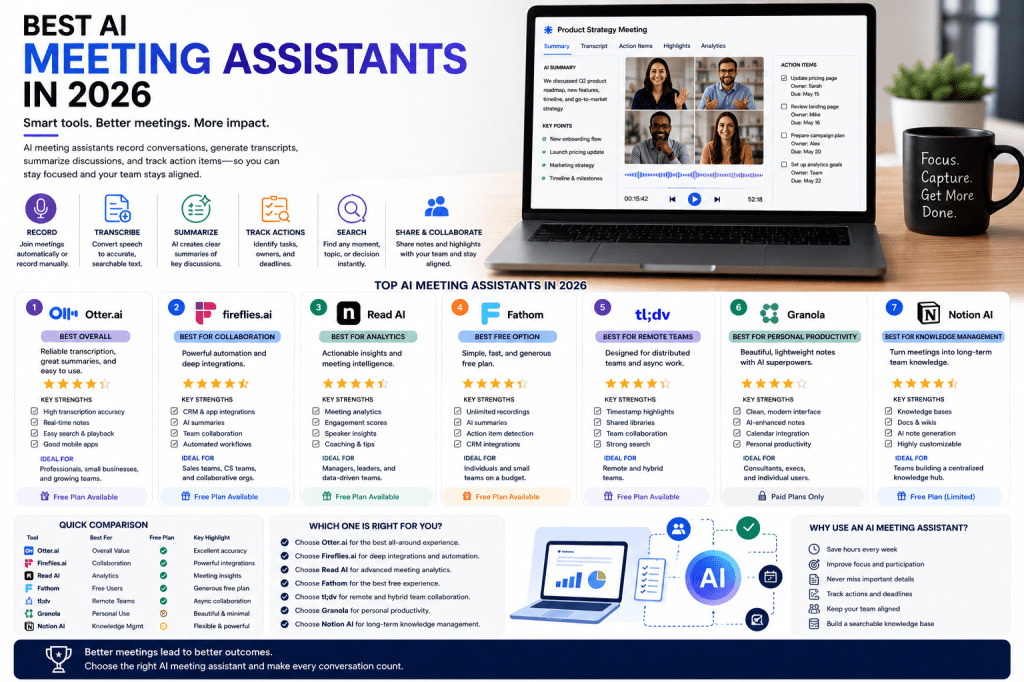
In this guide, we’ll compare the best AI meeting assistants in 2026 and help you find the right solution for your team.
What Is an AI Meeting Assistant?
An AI meeting assistant is a software platform that uses artificial intelligence to:
- Record meetings
- Generate transcripts
- Create summaries
- Identify action items
- Track decisions
- Organize meeting information
The goal is to reduce manual work while improving collaboration and accountability.
Modern AI meeting assistants have evolved far beyond simple transcription tools. Many now function as complete meeting intelligence platforms.
What We Looked For
To evaluate the best AI meeting assistants, we considered:
- Transcription accuracy
- Summary quality
- Ease of use
- Integrations
- Search functionality
- Team collaboration features
- Security
- Pricing
Let’s look at the top solutions.
1. Otter AI
Best Overall AI Meeting Assistant
Otter.ai
Otter AI remains one of the most widely adopted AI meeting assistants on the market.
Key features include:
- Real-time transcription
- Meeting summaries
- Speaker identification
- Searchable transcripts
- Action item tracking
Otter offers an excellent balance between simplicity and powerful functionality.
Pros
- Excellent transcription quality
- Easy setup
- Strong free plan
- Reliable performance
Cons
- Advanced collaboration features require higher plans
Best For
Professionals, small businesses, and teams seeking a reliable all-around solution.
2. Fireflies.ai
Best for Team Collaboration
Fireflies.ai
Fireflies has become a favorite among organizations that need strong collaboration and workflow automation.
Features include:
- AI meeting summaries
- CRM integrations
- Searchable meeting archives
- Team collaboration tools
- Automated workflows
Pros
- Excellent integrations
- Strong search capabilities
- Good automation features
Cons
- Interface can feel complex for new users
Best For
Sales teams, customer success teams, and collaborative organizations.
3. Read AI
Best for Meeting Analytics
Read AI
Read AI differentiates itself through advanced meeting intelligence.
Features include:
- Engagement scores
- Participation analytics
- AI summaries
- Speaker insights
- Meeting effectiveness reports
Pros
- Powerful analytics
- Strong meeting intelligence
- Unique reporting capabilities
Cons
- Some users may not need advanced analytics
Best For
Managers, executives, and data-driven organizations.
4. Fathom
Best Free AI Meeting Assistant
Fathom
Fathom has quickly become one of the most popular free AI meeting assistants.
Features include:
- Automatic recording
- AI-generated summaries
- Action item tracking
- Meeting highlights
- CRM integrations
Pros
- Excellent free plan
- Fast summary generation
- Easy deployment
Cons
- Fewer enterprise-focused features
Best For
Individuals and small teams.
5. tl;dv
Best for Remote Teams
tl;dv
tl;dv focuses on helping distributed teams share and manage meeting knowledge.
Features include:
- Meeting recordings
- AI summaries
- Timestamp highlights
- Searchable knowledge base
- Team collaboration tools
Pros
- Excellent remote work features
- Strong knowledge sharing
- Easy meeting review
Cons
- Less emphasis on analytics
Best For
Remote and hybrid organizations.
6. Granola
Best for Personal Productivity
Granola
Granola takes a unique approach by combining personal note-taking with AI assistance.
Instead of fully automating meetings, it enhances user-created notes with AI-generated insights.
Pros
- Beautiful user experience
- Lightweight workflow
- Excellent for personal productivity
Cons
- Limited team collaboration features
Best For
Consultants, executives, and individual professionals.
7. Notion AI
Best for Knowledge Management
Notion AI
Notion AI extends meeting documentation into broader knowledge management workflows.
Features include:
- AI note generation
- Project documentation
- Team wikis
- Knowledge bases
- Workspace search
Pros
- Highly flexible
- Powerful organization tools
- Excellent long-term knowledge management
Cons
- Requires setup and customization
Best For
Organizations building centralized knowledge systems.
Quick Comparison Table
| Tool | Best For | Free Plan |
|---|---|---|
| Otter AI | Overall Value | Yes |
| Fireflies.ai | Collaboration | Yes |
| Read AI | Analytics | Yes |
| Fathom | Free Users | Yes |
| tl;dv | Remote Teams | Yes |
| Granola | Personal Productivity | No |
| Notion AI | Knowledge Management | Limited |
Which AI Meeting Assistant Should You Choose?
Choose Otter AI if:
You want the best overall balance of usability, accuracy, and value.
Choose Fireflies.ai if:
You need strong integrations and team collaboration features.
Choose Read AI if:
You want deeper insights into meeting effectiveness.
Choose Fathom if:
You want a powerful free option.
Choose tl;dv if:
You manage remote or hybrid teams.
Choose Granola if:
You prefer a personal productivity-focused workflow.
Choose Notion AI if:
You want meeting information integrated into a broader knowledge management platform.
Frequently Asked Questions
What is the best AI meeting assistant overall?
Otter AI remains one of the strongest all-around solutions thanks to its balance of accuracy, usability, and pricing.
Are AI meeting assistants worth paying for?
For organizations that conduct frequent meetings, the productivity gains often justify the subscription costs.
Do AI meeting assistants work with Zoom?
Most leading platforms integrate with Zoom, Google Meet, and Microsoft Teams.
Can AI meeting assistants identify action items?
Yes. Most modern platforms automatically detect tasks, owners, and deadlines.
What is the best free AI meeting assistant?
Fathom is currently one of the strongest free options available.
Final Thoughts
AI meeting assistants have become essential productivity tools for modern organizations. By automating transcription, summaries, action item tracking, and knowledge management, they help teams spend less time documenting meetings and more time executing decisions.
For most users, Otter AI, Fireflies.ai, Read AI, and Fathom represent the strongest options in 2026. The right choice depends on your workflow, team size, collaboration needs, and budget.
Regardless of which platform you choose, AI meeting assistants can dramatically improve how your organization captures and uses meeting information.
Related Articles
What Is an AI Meeting Assistant?
What Are AI Meeting Notes?
Best AI Meeting Notes Tools in 2026
Otter AI Review
Fireflies AI Review
Read AI Review
Fathom Review
Granola Review
AI Meeting Notes for Remote Teams
AI Meeting Notes for Small Businesses

 Meeting Notes AI