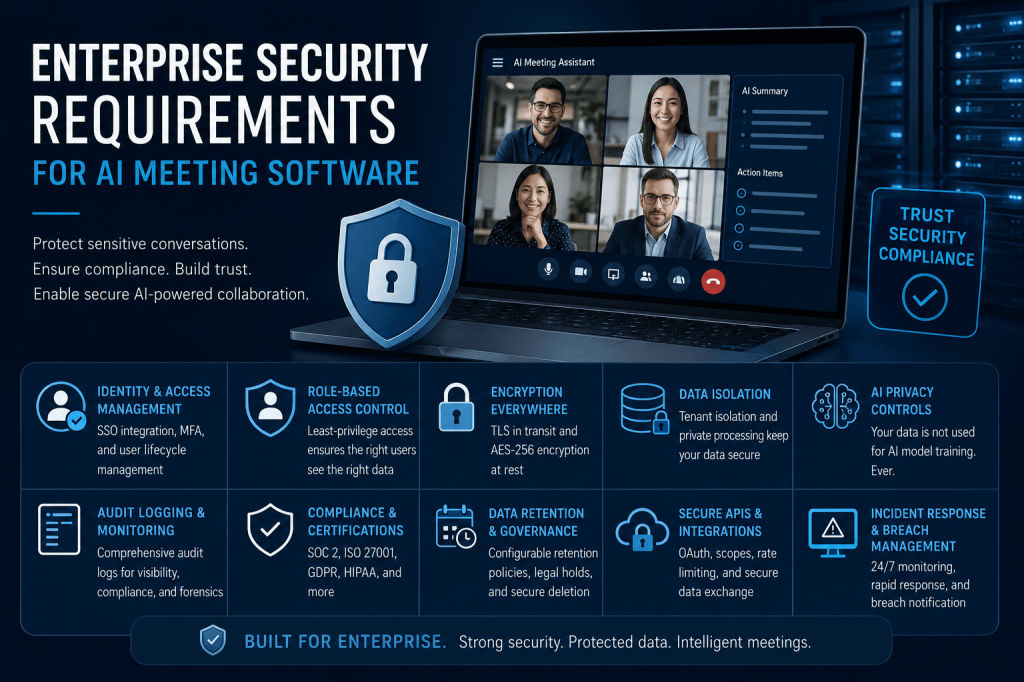
AI Meeting Software has quickly evolved from a productivity tool into a critical business platform. Modern solutions can record meetings, generate transcripts, create summaries, identify action items, detect decisions, analyze conversations, and build searchable knowledge repositories. As organizations increasingly rely on these capabilities, security has become a primary concern.
Enterprise meetings often contain highly sensitive information, including strategic plans, financial forecasts, customer discussions, intellectual property, legal matters, and confidential employee information. A security incident involving meeting data can have serious financial, operational, legal, and reputational consequences.
For this reason, enterprises evaluating AI Meeting Software must carefully assess security requirements before deployment.
In this article, we’ll explore the key security requirements that organizations should consider when selecting and implementing AI-powered meeting platforms.
Why Enterprise Security Matters
Unlike consumer-focused collaboration tools, enterprise environments require significantly stronger security controls.
Large organizations must protect:
- Customer information
- Financial data
- Intellectual property
- Regulatory records
- Employee information
- Strategic business discussions
- Mergers and acquisition activities
- Product development plans
AI Meeting Software often becomes a central repository for this information, making security a critical selection criterion.
Identity and Access Management
Identity management serves as the foundation of enterprise security.
Organizations need confidence that only authorized individuals can access meeting data.
Key requirements include:
Single Sign-On (SSO)
Enterprise platforms should support integration with identity providers such as:
- Microsoft Entra ID
- Okta
- Google Workspace
- OneLogin
- Ping Identity
SSO simplifies authentication while improving security and user management.
Multi-Factor Authentication (MFA)
Passwords alone are insufficient for protecting sensitive meeting information.
MFA adds additional verification mechanisms such as:
- Authentication applications
- Hardware security keys
- Biometrics
- Push notifications
MFA significantly reduces the risk of compromised accounts.
User Lifecycle Management
Organizations should be able to:
- Provision users automatically
- Update permissions
- Disable accounts immediately
- Manage employee departures
Automated identity management reduces operational risk.
Role-Based Access Control
Not every employee should have access to every meeting.
Enterprise AI Meeting Software should support Role-Based Access Control (RBAC).
Typical roles include:
- System Administrator
- Compliance Officer
- Team Manager
- Meeting Organizer
- Standard User
- Read-Only User
Permissions should control access to:
- Recordings
- Transcripts
- Summaries
- Analytics
- Administrative functions
RBAC helps enforce the principle of least privilege.
Data Encryption Requirements
Encryption is a fundamental security requirement.
Meeting data should be protected throughout its lifecycle.
Encryption in Transit
Data moving between systems should be protected using Transport Layer Security (TLS).
TLS safeguards:
- Audio streams
- Video streams
- API communications
- User sessions
- File transfers
Most enterprises expect support for TLS 1.2 or TLS 1.3.
Encryption at Rest
Stored information should be protected using strong encryption standards such as AES-256.
Protected assets include:
- Recordings
- Transcripts
- Summaries
- Analytics
- Metadata
Encryption reduces the risk of unauthorized access if storage systems are compromised.
Key Management
Organizations should understand:
- Who controls encryption keys
- How keys are stored
- Key rotation policies
- Customer-managed key options
Strong key management is essential for enterprise-grade security.
Data Isolation
Enterprise customers require assurance that their data remains isolated from other organizations.
Important capabilities include:
Tenant Isolation
Ensuring customer environments remain separate.
Dedicated Storage
Separating organizational data repositories.
Private Processing Environments
Reducing exposure during AI analysis.
Data isolation minimizes the risk of cross-customer data exposure.
AI Privacy and Data Usage Controls
Organizations increasingly scrutinize how AI vendors use customer information.
Key questions include:
- Is customer data used to train AI models?
- Can training be disabled?
- How is customer information isolated?
- Are private AI deployment options available?
Many enterprises require guarantees that:
- Customer data remains private.
- AI models do not learn from confidential content.
- Organizational information is not shared across customers.
AI governance has become a major component of enterprise security reviews.
Audit Logging and Monitoring
Visibility is essential for enterprise security operations.
AI Meeting Software should provide comprehensive audit logs covering:
- User logins
- Meeting access
- Transcript downloads
- Recording views
- Permission changes
- Administrative actions
- Data exports
Audit logging supports:
- Compliance reporting
- Security investigations
- Insider threat monitoring
- Incident response
Detailed logging is often mandatory in regulated industries.
Security Information and Event Management Integration
Many enterprises use Security Information and Event Management (SIEM) platforms.
Examples include:
- Microsoft Sentinel
- Splunk
- IBM QRadar
- Sumo Logic
AI Meeting Software should support integration with security monitoring systems.
Benefits include:
- Centralized visibility
- Automated threat detection
- Compliance reporting
- Faster incident response
Integration with existing security operations is often a key enterprise requirement.
Data Retention and Governance Controls
Organizations need control over how long information is stored.
Enterprise retention capabilities should include:
- Configurable retention policies
- Automated deletion
- Archiving options
- Legal hold support
- Compliance reporting
Retention controls help balance:
- Security
- Privacy
- Compliance
- Operational requirements
Meeting data should not be retained longer than necessary.
Compliance Certifications
Enterprise customers frequently require independent security validation.
Common certifications include:
SOC 2
Evaluates controls related to:
- Security
- Availability
- Confidentiality
- Privacy
ISO 27001
Demonstrates implementation of a formal information security management system.
HIPAA
Important for healthcare organizations handling protected health information.
GDPR Support
Essential for organizations processing data related to European residents.
FedRAMP
Relevant for government agencies and contractors.
Compliance certifications provide assurance that vendors follow recognized security practices.
Secure APIs
AI Meeting Software rarely operates in isolation.
Organizations integrate these platforms with:
- CRM systems
- Project management tools
- Knowledge bases
- Collaboration platforms
- Business intelligence tools
Secure APIs should support:
- OAuth authentication
- Access scopes
- Rate limiting
- Audit logging
- API key management
API security protects organizational data as it moves between systems.
Data Residency and Sovereignty
Many enterprises operate across multiple regions.
Organizations may need control over:
- Data storage locations
- Processing locations
- Backup locations
Data residency requirements are particularly important for:
- Government organizations
- Healthcare providers
- Financial institutions
- International enterprises
Vendors should provide transparency regarding infrastructure locations and regional controls.
Incident Response and Breach Management
No security system is perfect.
Organizations should evaluate vendor incident response capabilities.
Key considerations include:
- Threat detection processes
- Security monitoring
- Incident response procedures
- Breach notification timelines
- Recovery capabilities
Strong incident response practices reduce the impact of security events.
Zero Trust Security Support
Many enterprises are adopting Zero Trust architectures.
AI Meeting Software should support:
- Continuous verification
- Conditional access policies
- Device validation
- Least-privilege access
- Risk-based authentication
Zero Trust reduces reliance on traditional network-based security models.
Advanced Security Features
Leading enterprise platforms increasingly provide additional protections.
Examples include:
Confidential Computing
Protects data while it is being processed.
Customer-Managed Encryption Keys
Allows organizations to maintain greater control.
Private AI Models
Dedicated AI environments for sensitive workloads.
Data Loss Prevention (DLP)
Detects and protects sensitive information.
Automated Redaction
Removes confidential information from transcripts and recordings.
These features are becoming increasingly important for large organizations.
Security Assessment Checklist
When evaluating AI Meeting Software, organizations should ask:
- Does the platform support SSO?
- Is MFA available?
- How is data encrypted?
- What compliance certifications are maintained?
- Is customer data used for AI training?
- Are audit logs available?
- Does the platform support retention policies?
- Can encryption keys be customer-managed?
- How is tenant isolation implemented?
- What incident response procedures are in place?
A structured assessment helps identify potential security gaps before deployment.
Best Practices for Enterprises
To maximize security, organizations should:
- Enable MFA for all users.
- Integrate with enterprise identity systems.
- Implement least-privilege access controls.
- Define retention policies.
- Monitor audit logs regularly.
- Review AI data usage policies.
- Conduct security assessments.
- Train employees on data protection practices.
- Verify vendor certifications.
- Establish governance processes for AI usage.
Security should be treated as an ongoing program rather than a one-time project.
The Future of Enterprise AI Meeting Security
As AI Meeting Software becomes increasingly sophisticated, security requirements will continue evolving.
Future trends include:
- AI-driven threat detection
- Privacy-preserving AI processing
- Confidential AI environments
- Post-quantum cryptography
- Enhanced regulatory oversight
- Automated compliance monitoring
Organizations that establish strong security foundations today will be better prepared for future developments.
Conclusion
AI Meeting Software provides tremendous value by transforming conversations into actionable business intelligence. However, because these platforms often contain some of the most sensitive information within an organization, enterprise-grade security is essential.
Identity management, access controls, encryption, AI privacy protections, audit logging, compliance certifications, data governance, secure APIs, and incident response capabilities should all be carefully evaluated before deployment. By understanding and implementing these enterprise security requirements, organizations can safely leverage AI-powered meeting intelligence while protecting their most valuable information assets.
The future of collaboration depends not only on intelligent automation but also on maintaining the trust, privacy, and security that enterprises require.

 Meeting Notes AI