Meetings are a critical part of modern business, but they often come with a familiar problem: capturing and organizing everything that was discussed. Important decisions, action items, and insights can easily get lost in handwritten notes or scattered documents. This is where AI meeting assistants are changing the way teams work.
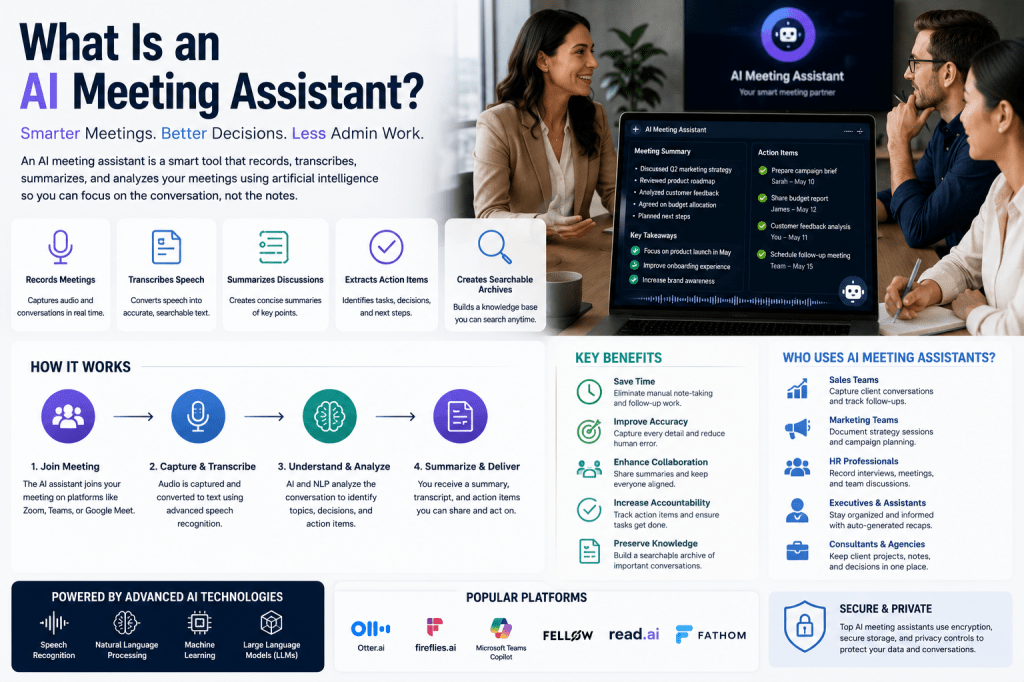
An AI meeting assistant uses artificial intelligence to automatically record, transcribe, summarize, and analyze meetings. Instead of manually taking notes, participants can focus on the conversation while the AI captures key information and creates structured records of the discussion.
In this guide, we’ll explore what AI meeting assistants are, how they work, their benefits, common features, and why they have become essential productivity tools for modern organizations.
Understanding AI Meeting Assistants
An AI meeting assistant is a software application that joins meetings, listens to conversations, and uses artificial intelligence technologies to process spoken content.
These platforms typically perform several tasks automatically:
- Recording meetings
- Transcribing conversations into text
- Identifying speakers
- Generating meeting summaries
- Extracting action items
- Highlighting key decisions
- Creating searchable meeting archives
The goal is to reduce administrative work while improving meeting productivity and knowledge sharing.
How AI Meeting Assistants Work
AI meeting assistants combine several advanced technologies to transform spoken conversations into useful information.
Speech Recognition
The first step is converting spoken language into text using Automatic Speech Recognition (ASR).
This technology:
- Captures audio from meetings
- Converts speech into written text
- Identifies different speakers
- Supports multiple languages and accents
Natural Language Processing (NLP)
Once the conversation has been transcribed, Natural Language Processing helps the AI understand the context and meaning of the discussion.
NLP enables the assistant to:
- Recognize topics
- Understand intent
- Detect decisions
- Identify action items
- Organize information logically
Large Language Models (LLMs)
Many modern AI meeting assistants use Large Language Models to generate high-quality summaries and insights.
These models can:
- Create concise meeting recaps
- Answer questions about meetings
- Highlight important information
- Generate follow-up notes
Meeting Intelligence
Advanced platforms go beyond transcription by analyzing meeting content and providing insights such as:
- Participant engagement
- Meeting effectiveness
- Discussion trends
- Collaboration patterns
Common Features of AI Meeting Assistants
Most AI meeting assistants offer a combination of the following capabilities.
Automatic Meeting Transcription
The assistant records conversations and converts them into searchable text.
Benefits include:
- Improved documentation
- Easy information retrieval
- Better accessibility
- Reduced note-taking
AI-Generated Summaries
Instead of reviewing entire transcripts, users receive concise summaries that highlight key points.
Typical summaries include:
- Main discussion topics
- Decisions made
- Action items
- Next steps
Action Item Detection
AI can automatically identify tasks mentioned during meetings.
Examples include:
- Follow-up emails
- Project assignments
- Client deliverables
- Scheduling requests
Speaker Identification
Many platforms can identify who said what during a meeting.
This makes it easier to:
- Track ownership
- Understand context
- Review conversations accurately
Searchable Meeting Archives
Meeting content becomes part of a searchable knowledge base.
Users can quickly find:
- Previous discussions
- Decisions
- Project updates
- Client requests
Integrations
AI meeting assistants often connect with:
- Zoom
- Microsoft Teams
- Google Meet
- Slack
- Salesforce
- HubSpot
- Asana
- Jira
- Notion
These integrations help organizations automate workflows and centralize information.
Benefits of AI Meeting Assistants
Increased Productivity
Participants can focus on discussions rather than taking notes.
This leads to:
- Better engagement
- More productive meetings
- Reduced administrative work
Improved Accuracy
AI captures information consistently and reduces the risk of missing important details.
Better Collaboration
Shared meeting summaries help keep everyone aligned.
Team members can quickly review:
- Decisions
- Tasks
- Project updates
Enhanced Accountability
Automatically generated action items help ensure responsibilities are clearly assigned and tracked.
Knowledge Preservation
Meeting archives create a valuable organizational knowledge repository.
Teams can easily access historical discussions and decisions.
Who Uses AI Meeting Assistants?
AI meeting assistants are used across a wide range of industries and roles.
Sales Teams
Sales professionals use AI meeting assistants to:
- Capture client conversations
- Generate CRM notes
- Track follow-up tasks
Marketing Teams
Marketing teams use meeting assistants to document planning sessions and campaign discussions.
Human Resources
HR professionals rely on AI tools for interviews, performance discussions, and internal meetings.
Executive Assistants
Executive Assistants use AI-generated summaries to support leadership teams and manage follow-up actions.
Healthcare Professionals
Healthcare organizations use AI meeting assistants for administrative meetings, care coordination, and team collaboration.
Consultants and Agencies
Consultants use meeting assistants to capture client requirements, project discussions, and recommendations.
Popular AI Meeting Assistant Platforms
Several platforms have emerged as leaders in the AI meeting assistant market.
Otter.ai
Known for accurate transcription and collaborative note-taking.
Fireflies.ai
Popular for automation, integrations, and workflow management.
Microsoft Teams Copilot
Provides AI-powered meeting intelligence within the Microsoft ecosystem.
Read AI
Offers advanced meeting analytics and engagement insights.
Fellow
Focuses on meeting management, agendas, and accountability.
Fathom
Known for fast summaries and client-focused workflows.
Challenges and Limitations
Although AI meeting assistants provide significant benefits, they are not perfect.
Common limitations include:
- Occasional transcription errors
- Difficulty with specialized terminology
- Challenges with poor audio quality
- Privacy and compliance considerations
- Dependence on internet connectivity for cloud-based solutions
Organizations should review AI-generated notes and summaries before relying on them for critical decisions.
The Future of AI Meeting Assistants
AI meeting assistants are evolving rapidly.
Future capabilities may include:
- Real-time coaching during meetings
- Predictive action recommendations
- Deeper CRM and workflow automation
- AI-powered decision support
- Long-term organizational memory systems
- Autonomous follow-up management
As artificial intelligence continues to improve, meeting assistants are expected to become central productivity tools for businesses of all sizes.
Final Thoughts
An AI meeting assistant is much more than a transcription tool. It combines speech recognition, natural language processing, machine learning, and workflow automation to help teams capture, organize, and act on meeting information more effectively. By reducing administrative work and improving collaboration, AI meeting assistants allow professionals to focus on what matters most—productive conversations, better decisions, and stronger outcomes.
Whether you’re part of a small business, a growing startup, or a large enterprise, AI meeting assistants can help transform meetings from isolated conversations into valuable organizational knowledge.







 Meeting Notes AI