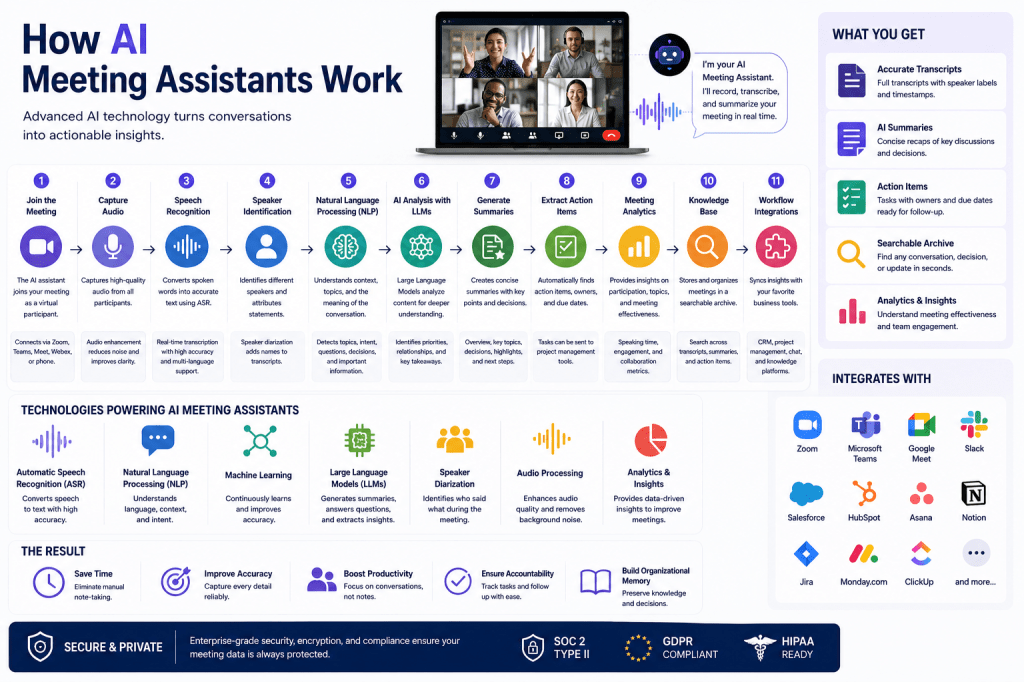
AI meeting assistants have quickly become essential productivity tools for businesses, remote teams, consultants, and professionals who spend significant time in meetings. These platforms can automatically record conversations, generate transcripts, summarize discussions, identify action items, and create searchable meeting records. While the experience feels simple from the user’s perspective, several advanced artificial intelligence technologies work together behind the scenes to make it possible.
In this guide, we’ll break down how AI meeting assistants work, the technologies that power them, and the process that transforms a conversation into useful business insights.
The AI Meeting Assistant Workflow
Most AI meeting assistants follow a similar workflow:
- Join or record the meeting
- Capture audio from participants
- Convert speech into text
- Analyze the conversation
- Generate summaries and action items
- Store and organize meeting knowledge
- Integrate information into business workflows
Let’s explore each step in detail.
Step 1: Joining the Meeting
AI meeting assistants typically connect to meetings through:
- Zoom
- Microsoft Teams
- Google Meet
- Webex
- Phone calls
- In-person meeting recordings
Depending on the platform, the assistant may:
- Join as a virtual participant
- Record audio directly from the meeting platform
- Capture audio through desktop applications
- Process uploaded recordings after the meeting
Once connected, the AI begins collecting audio data.
Step 2: Capturing Audio
The next stage involves recording the conversation.
Modern meeting assistants capture:
- Participant voices
- Questions and responses
- Group discussions
- Presentations
- Shared verbal updates
Many platforms also apply audio enhancement technologies such as:
Noise Reduction
Background sounds like:
- Keyboard typing
- Office chatter
- Traffic noise
- Echoes
can be filtered out before transcription begins.
Voice Isolation
Advanced systems can separate multiple speakers to improve transcription quality and speaker identification.
Step 3: Speech Recognition
After audio is captured, the system converts spoken language into text using Automatic Speech Recognition (ASR).
What Is ASR?
Automatic Speech Recognition is an AI technology that transforms spoken words into written text.
For example:
Audio Input
“Let’s schedule the product launch review meeting for next Thursday.”
becomes:
Text Output
“Let’s schedule the product launch review meeting for next Thursday.”
Modern ASR systems use deep learning models trained on millions of speech samples.
These models can recognize:
- Different accents
- Speaking styles
- Multiple languages
- Industry terminology
- Natural conversation patterns
This process happens in real time for many meeting assistants.
Step 4: Speaker Identification
Knowing what was said is important, but knowing who said it is often equally valuable.
AI meeting assistants use speaker diarization technology to identify individual speakers.
This allows transcripts to show:
Sarah: We need to update the proposal.
David: I’ll handle the revisions by Friday.
Speaker identification improves:
- Accountability
- Context
- Follow-up tracking
- Meeting analysis
Step 5: Natural Language Processing
Once a transcript has been created, Natural Language Processing (NLP) helps the AI understand the meaning behind the conversation.
What Is NLP?
Natural Language Processing is a branch of artificial intelligence that enables computers to understand and interpret human language.
NLP allows meeting assistants to:
- Identify discussion topics
- Detect questions
- Understand context
- Recognize decisions
- Extract important information
Instead of simply storing text, the system begins understanding the conversation itself.
Step 6: Large Language Models Analyze the Meeting
Many modern meeting assistants use Large Language Models (LLMs) to process meeting transcripts.
LLMs are capable of:
- Understanding context
- Identifying priorities
- Recognizing relationships between ideas
- Generating human-like summaries
Popular AI meeting assistants use similar technologies to those found in modern AI chatbots.
The AI analyzes:
- Key discussion points
- Decisions made
- Tasks assigned
- Open questions
- Important insights
Step 7: Generating Meeting Summaries
One of the most valuable features of AI meeting assistants is automatic summarization.
Instead of reading a 10-page transcript, users receive a concise overview.
A typical summary may include:
Meeting Overview
A short description of the discussion.
Key Decisions
Important conclusions reached during the meeting.
Major Topics
The primary subjects discussed.
Risks and Concerns
Issues requiring attention.
Next Steps
Actions that need to happen after the meeting.
This allows participants to review meetings in minutes rather than hours.
Step 8: Action Item Extraction
AI meeting assistants can automatically identify tasks mentioned during conversations.
For example:
“We need the budget report by Friday.”
The AI may create:
Action Item
- Prepare budget report
- Owner: Finance Team
- Deadline: Friday
These tasks can often be exported directly into:
- Asana
- Jira
- Monday.com
- ClickUp
- Microsoft Planner
- Trello
This helps teams improve accountability and follow-through.
Step 9: Meeting Analytics
Advanced AI meeting assistants provide insights beyond notes and summaries.
These analytics may include:
Participation Metrics
- Speaking time
- Engagement levels
- Contribution analysis
Topic Analysis
- Most discussed subjects
- Emerging themes
- Frequently referenced topics
Team Collaboration Insights
- Meeting effectiveness
- Participation balance
- Communication trends
Organizations can use these insights to improve meeting quality and collaboration.
Step 10: Building a Searchable Knowledge Base
Every meeting contains valuable organizational knowledge.
AI meeting assistants transform conversations into searchable information repositories.
Users can search for:
- Client requests
- Project updates
- Product decisions
- Historical discussions
- Strategic plans
Instead of asking colleagues what happened in a meeting, employees can simply search the meeting archive.
This creates a long-term organizational memory system.
Step 11: Workflow Integrations
The final step is connecting meeting insights to business tools.
Common integrations include:
CRM Systems
- Salesforce
- HubSpot
- Zoho CRM
Meeting notes can automatically update customer records.
Project Management Platforms
- Asana
- Jira
- ClickUp
- Monday.com
Action items can become tasks automatically.
Communication Platforms
- Slack
- Microsoft Teams
Meeting summaries can be shared instantly with stakeholders.
Knowledge Management Tools
- Notion
- Confluence
- SharePoint
Meeting content becomes part of the organization’s knowledge base.
Cloud AI vs Local AI Processing
Most AI meeting assistants use cloud-based infrastructure.
Cloud Processing
Advantages:
- Higher accuracy
- Faster model updates
- Greater scalability
Disadvantages:
- Requires internet connectivity
- Data stored externally
Local Processing
Advantages:
- Enhanced privacy
- Greater control
Disadvantages:
- Higher hardware requirements
- More limited AI capabilities
Most enterprise solutions currently rely primarily on cloud-based AI processing.
Security and Privacy Considerations
AI meeting assistants process potentially sensitive information.
Leading platforms typically include:
- Data encryption
- Access controls
- Audit logs
- Retention policies
- Enterprise security frameworks
Organizations should always review security and compliance requirements before deployment.
The Future of AI Meeting Assistants
The technology continues to evolve rapidly.
Future systems may offer:
- Real-time coaching during meetings
- Live decision recommendations
- Autonomous follow-up management
- AI-powered project updates
- Predictive meeting intelligence
- Personalized meeting assistants
As artificial intelligence improves, meeting assistants will become increasingly proactive rather than simply documenting conversations.
Final Thoughts
AI meeting assistants work by combining speech recognition, audio processing, natural language understanding, large language models, and workflow automation into a unified system. These technologies transform spoken conversations into structured, searchable, and actionable information. By automating note-taking, summarization, and follow-up management, AI meeting assistants help teams save time, improve collaboration, and make better use of the knowledge generated during meetings.
What once required hours of manual documentation can now happen automatically, allowing professionals to focus on discussions, decisions, and results instead of note-taking.







 Meeting Notes AI