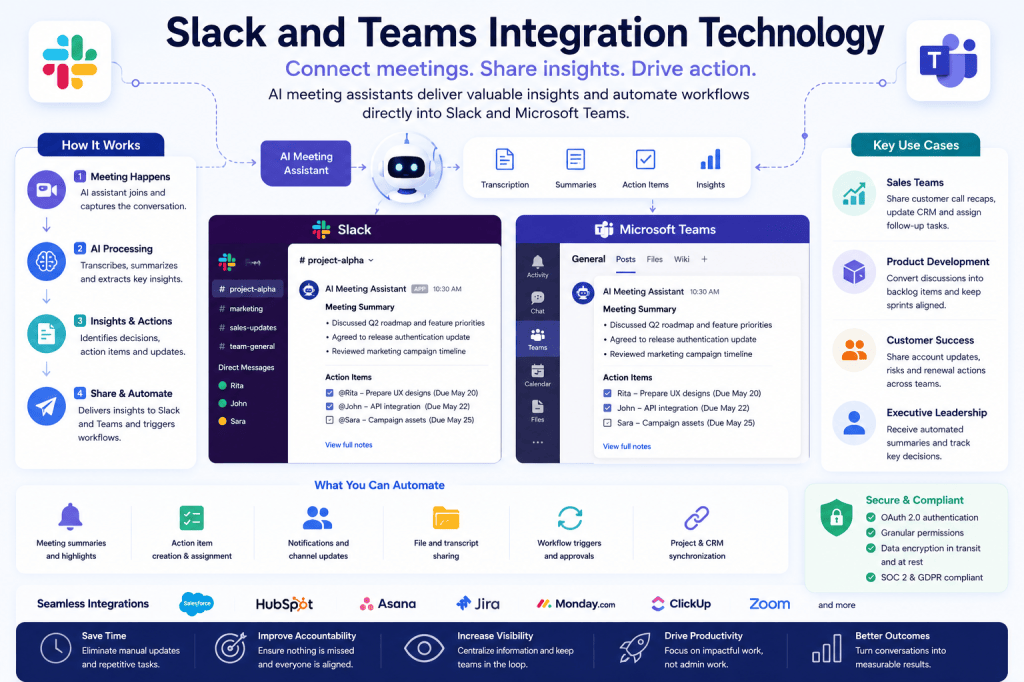
Modern workplaces rely on a growing number of digital tools to communicate, collaborate, and execute work. Among the most widely used collaboration platforms are Slack and Microsoft Teams, which have become central hubs for workplace communication. Employees use them to exchange messages, share files, coordinate projects, and stay connected across distributed teams.
As organizations adopt AI meeting assistants and workplace automation technologies, integrations with Slack and Microsoft Teams have become increasingly important. These integrations help bridge the gap between meetings, conversations, and business workflows, ensuring that valuable information is shared, tracked, and acted upon efficiently.
By connecting AI meeting assistants with collaboration platforms, organizations can transform meetings into actionable insights while reducing manual work and improving team alignment.
What Are Slack and Microsoft Teams Integrations?
Slack and Microsoft Teams integrations allow third-party applications to connect directly with collaboration platforms through APIs, automation frameworks, and native connectors.
These integrations enable software systems to:
- Send notifications
- Share meeting summaries
- Create tasks
- Update project records
- Trigger workflows
- Distribute reports
- Synchronize business data
For AI meeting assistants, these integrations serve as a critical channel for delivering meeting intelligence directly into the tools employees use every day.
Why Collaboration Platform Integrations Matter
Organizations generate vast amounts of information during meetings.
Important outcomes often include:
- Decisions
- Action items
- Project updates
- Customer feedback
- Risk assessments
- Strategic discussions
Without integrations, this information can become trapped in recordings, transcripts, or isolated applications.
Slack and Teams integrations help ensure meeting insights reach the right people at the right time.
Benefits include:
- Faster communication
- Improved transparency
- Better accountability
- Reduced manual follow-up
- Enhanced collaboration
By embedding meeting intelligence into daily workflows, organizations can move more quickly from discussion to execution.
How Slack and Teams Integration Technology Works
API Connectivity
Both Slack and Microsoft Teams provide robust APIs that allow external applications to exchange information securely.
These APIs enable AI meeting assistants to:
- Send messages
- Create channels
- Post summaries
- Upload files
- Trigger notifications
- Respond to events
The integration operates continuously, allowing information to flow between systems in real time.
Authentication and Permissions
Before an integration becomes active, users or administrators authorize access through secure authentication methods such as OAuth.
Permission controls determine:
- Which channels can receive updates
- Who can access meeting data
- What information can be shared
- Which actions can be automated
Enterprise organizations often manage these permissions centrally.
Event-Based Automation
Many integrations use event-driven workflows.
For example:
- A meeting ends.
- The AI assistant generates a summary.
- The summary is posted to a designated Slack channel.
- Action items are shared with team members.
- Notifications are sent automatically.
This workflow occurs without manual intervention.
AI Meeting Assistants and Slack
Slack has become a popular workspace for fast-moving teams that rely on real-time communication.
AI meeting assistant integrations commonly provide:
Meeting Summaries
After a meeting concludes, concise summaries can be posted directly into Slack channels.
Team members who were unable to attend can quickly understand:
- Key decisions
- Discussion highlights
- Next steps
Action Item Notifications
AI-generated tasks can be delivered directly to individuals or teams.
Examples include:
- Assigned responsibilities
- Due dates
- Project updates
- Follow-up reminders
This improves accountability and reduces missed commitments.
Searchable Knowledge Sharing
Meeting insights become easier to discover and share.
Instead of searching through recordings, employees can access summarized information within Slack conversations.
Workflow Automation
Slack integrations can trigger workflows such as:
- Task creation
- CRM updates
- Ticket generation
- Approval requests
This streamlines operational processes across departments.
AI Meeting Assistants and Microsoft Teams
Microsoft Teams offers both communication and meeting capabilities within the Microsoft 365 ecosystem.
This creates powerful integration opportunities.
Meeting Intelligence Distribution
AI-generated insights can be shared directly within Teams channels.
Examples include:
- Meeting recaps
- Decision summaries
- Action item lists
- Transcript links
This keeps project stakeholders informed.
Collaboration Across Departments
Teams integrations help connect:
- Sales
- Marketing
- Customer Success
- Operations
- Product Development
Meeting information becomes accessible across functional groups.
Microsoft 365 Integration
Because Teams is part of Microsoft 365, integrations often extend to:
- Outlook
- SharePoint
- OneDrive
- Planner
- Power Automate
This creates highly connected workplace workflows.
Automated Follow-Ups
Organizations can automate:
- Meeting recap distribution
- Task assignments
- Calendar updates
- Workflow triggers
The result is a more efficient meeting lifecycle.
Common Use Cases
Sales Teams
After a customer meeting:
- AI generates a summary.
- Key insights are extracted.
- A recap is shared in Slack or Teams.
- CRM records are updated.
- Follow-up tasks are assigned.
This improves visibility and sales execution.
Product Development Teams
Sprint planning and project meetings often generate numerous action items.
Integrations help:
- Share updates instantly
- Assign work automatically
- Maintain project alignment
Teams spend less time managing information and more time building products.
Customer Success Teams
Customer-facing teams can distribute:
- Account updates
- Renewal risks
- Feature requests
- Customer feedback
This improves customer visibility across the organization.
Executive Leadership
Leadership teams benefit from:
- Automated meeting recaps
- Strategic update summaries
- Decision tracking
- Cross-functional visibility
Executives gain faster access to organizational intelligence.
Security and Compliance Considerations
Because collaboration platforms often contain sensitive business information, security remains a critical consideration.
Organizations should evaluate:
Access Controls
Only authorized users should access meeting content and AI-generated insights.
Data Encryption
Information should be encrypted both during transmission and storage.
Audit Logging
Organizations should maintain visibility into:
- Shared content
- User activity
- Workflow execution
Regulatory Compliance
Businesses operating in regulated environments may require compliance with:
- GDPR
- SOC 2
- ISO 27001
- HIPAA (where applicable)
- Internal governance standards
Strong security controls help ensure safe and responsible collaboration.
Benefits of Slack and Teams Integrations
Organizations implementing collaboration platform integrations often experience:
Faster Information Sharing
Meeting outcomes reach stakeholders immediately.
Improved Team Alignment
Everyone has access to the same information and updates.
Reduced Administrative Work
Automation eliminates repetitive manual tasks.
Greater Accountability
Tasks and responsibilities are tracked automatically.
Enhanced Productivity
Teams spend less time documenting information and more time acting on it.
The Future of Collaboration Integrations
The next generation of Slack and Teams integrations will become increasingly intelligent.
Future capabilities may include:
- Real-time meeting insights
- Predictive action recommendations
- Automated project updates
- AI-generated decision tracking
- Cross-platform workflow orchestration
- Personalized information delivery
As AI continues to evolve, collaboration platforms will become central hubs for organizational intelligence rather than simple communication tools.
Conclusion
Slack and Microsoft Teams integrations play a critical role in modern workplace technology ecosystems. By connecting AI meeting assistants with collaboration platforms, organizations can ensure that meeting insights flow seamlessly into daily workflows, improving communication, accountability, and productivity.
As businesses continue to embrace automation and AI-driven collaboration, Slack and Teams integration technology will remain a foundational capability that helps transform conversations into coordinated action and measurable results.







 Meeting Notes AI