The AI meeting assistant market has become increasingly competitive. While many platforms offer powerful features, subscription costs can quickly add up for individuals, freelancers, consultants, and small businesses.
That’s where Fathom stands out.
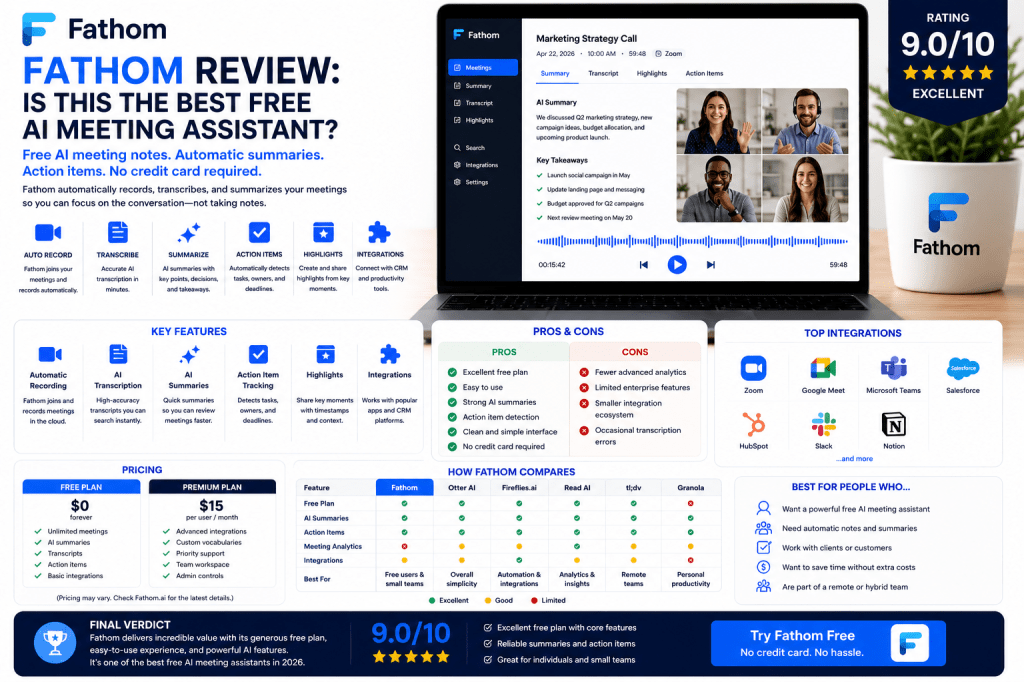
Fathom has built a strong reputation by offering one of the most generous free AI meeting assistant experiences available today. It automatically records meetings, creates transcripts, generates summaries, and identifies action items without requiring users to invest in expensive software plans.
But does free mean limited?
In this review, we’ll examine Fathom’s features, strengths, weaknesses, pricing, and ideal use cases to determine whether it deserves a place among the best AI meeting assistants in 2026.
What Is Fathom?
Fathom is an AI-powered meeting assistant that helps users document and organize conversations automatically.
The platform can:
- Record meetings
- Generate transcripts
- Create AI summaries
- Detect action items
- Capture highlights
- Organize meeting information
Fathom is designed to eliminate manual note-taking and reduce administrative work after meetings.
Its simplicity and strong free plan have made it particularly popular among individual professionals and small teams.
Fathom Key Features
Automatic Meeting Recording
Fathom can automatically join and record meetings.
Supported platforms typically include:
- Zoom
- Google Meet
- Microsoft Teams
Users can focus on conversations while Fathom handles documentation.
AI Transcription
Fathom converts spoken conversations into searchable transcripts.
Benefits include:
- Accurate documentation
- Easy review
- Searchable records
- Improved accessibility
Transcripts are generated quickly after meetings conclude.
AI Summaries
One of Fathom’s strongest capabilities is automated summary generation.
The AI creates concise overviews highlighting:
- Important discussions
- Key decisions
- Action items
- Next steps
This helps users review meetings in minutes rather than rewatch recordings.
Action Item Detection
Fathom automatically identifies:
- Tasks
- Responsibilities
- Follow-up items
- Deadlines
This improves accountability and makes post-meeting execution easier.
Meeting Highlights
Users can create and share highlights from important moments during meetings.
This feature is especially useful for:
- Client calls
- Sales meetings
- Team discussions
- Project reviews
CRM Integrations
Fathom offers integrations with various business tools and CRM platforms.
This helps reduce manual data entry after customer conversations.
User Experience
One reason Fathom has grown so quickly is its simplicity.
Most users can:
- Connect their meeting platform
- Allow Fathom to join meetings
- Receive summaries automatically
The interface is clean and easy to understand.
Unlike some competitors, Fathom focuses on delivering a streamlined experience rather than overwhelming users with advanced features.
Transcription Accuracy
Fathom delivers strong transcription performance for typical business meetings.
Accuracy is generally best when:
- Audio quality is clear
- Background noise is limited
- Participants speak clearly
As with all AI transcription systems, occasional errors may occur when:
- Multiple people speak simultaneously
- Audio quality is poor
- Specialized terminology is used
For most business use cases, transcription quality is more than sufficient.
AI Summaries and Action Items
Fathom performs particularly well in summary generation.
The platform effectively extracts:
- Key takeaways
- Decisions
- Tasks
- Follow-up actions
Many users find these summaries eliminate the need for traditional meeting recap emails.
This alone can save several hours each week.
Fathom for Different Professionals
Consultants
Maintain detailed client records without manual note-taking.
Freelancers
Capture project discussions and customer requirements.
Sales Professionals
Document discovery calls and customer conversations.
Recruiters
Record interviews and candidate discussions.
Small Businesses
Improve documentation while minimizing software costs.
Remote Workers
Create searchable meeting records across distributed teams.
Fathom Pricing
Pricing is where Fathom truly shines.
The platform is widely recognized for offering one of the strongest free plans in the AI meeting assistant market.
Depending on current offerings, users may gain access to:
- Meeting recording
- AI summaries
- Transcription
- Action item tracking
without immediately requiring a paid subscription.
Premium plans add additional capabilities and scalability.
Fathom Pros
Excellent Free Plan
One of the strongest free offerings available.
Easy to Use
Simple setup and intuitive workflows.
Strong AI Summaries
Useful and actionable meeting recaps.
Action Item Tracking
Automatically captures tasks and responsibilities.
Clean Interface
Easy for new users to learn.
Good Performance
Reliable transcription and summary quality.
Fathom Cons
Fewer Advanced Analytics
Read AI provides deeper meeting intelligence.
Limited Enterprise Features
Large organizations may require additional controls.
Smaller Integration Ecosystem
Fireflies offers broader workflow integrations.
Occasional Transcription Errors
As with all AI-powered transcription platforms.
Fathom vs Competitors
Fathom vs Otter AI
Otter AI offers a more mature ecosystem, while Fathom provides an outstanding free experience.
Fathom vs Fireflies.ai
Fireflies focuses more heavily on automation and integrations.
Fathom vs Read AI
Read AI provides more advanced analytics and engagement insights.
Fathom vs tl;dv
Both are excellent for meeting documentation, though their workflows differ slightly.
Who Should Use Fathom?
Fathom is ideal for:
- Freelancers
- Consultants
- Small businesses
- Recruiters
- Sales professionals
- Remote workers
- Budget-conscious teams
Users looking for maximum value without significant software costs will likely find Fathom extremely attractive.
Who Might Prefer Alternatives?
Consider alternatives if you need:
- Advanced analytics
- Extensive workflow automation
- Enterprise administration features
- Deep CRM integrations
In those situations, Fireflies.ai, Read AI, or Otter AI may be stronger choices.
Frequently Asked Questions
Is Fathom really free?
Fathom offers one of the most generous free plans available in the AI meeting assistant market.
Is Fathom accurate?
Yes. Transcription and summary quality are strong for typical business meetings.
Does Fathom work with Zoom?
Yes. Fathom supports major meeting platforms including Zoom, Google Meet, and Microsoft Teams.
Is Fathom good for small businesses?
Absolutely. Its combination of simplicity, functionality, and affordability makes it an excellent option.
Is Fathom better than Otter AI?
That depends on your needs. Fathom excels for users seeking a powerful free solution, while Otter AI offers a broader and more mature ecosystem.
Final Verdict
Fathom has earned its reputation as one of the best free AI meeting assistants available in 2026. It delivers strong transcription, useful summaries, action item tracking, and an excellent user experience without requiring an immediate financial commitment.
For freelancers, consultants, recruiters, sales professionals, and small businesses, Fathom represents one of the best values in the AI meeting productivity market.
Rating: 9.0/10
Best For: Freelancers, consultants, small businesses, recruiters, sales professionals, and anyone looking for a powerful free AI meeting assistant.
Related Articles
What Is an AI Meeting Assistant?
Best AI Meeting Assistants in 2026
Best AI Meeting Notes Tools in 2026
Otter AI Review
Fireflies.ai Review
Read AI Review
AI Meeting Notes for Small Businesses
AI Meeting Notes for Remote Teams
AI Meeting Notes Privacy Guide


 Meeting Notes AI