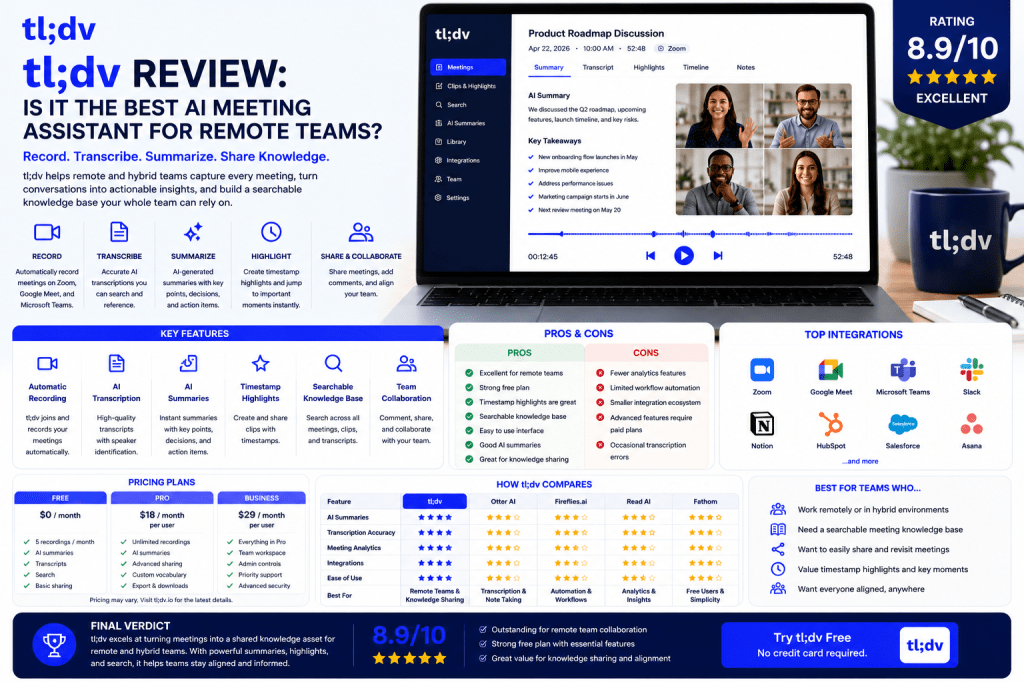
As remote and hybrid work continue to reshape how organizations collaborate, the need for effective meeting documentation has never been greater.
Teams spread across multiple locations often struggle with missed meetings, information silos, and difficulty tracking important decisions. AI meeting assistants help solve these challenges, and one platform that has gained significant attention is tl;dv.
Known for its focus on meeting recording, AI summaries, knowledge sharing, and remote collaboration, tl;dv aims to help teams capture and reuse meeting information more effectively.
But does it deserve a place among the best AI meeting assistants in 2026?
In this review, we’ll examine tl;dv’s features, strengths, limitations, pricing, and ideal use cases.
What Is tl;dv?
tl;dv is an AI-powered meeting assistant designed to help teams record, transcribe, summarize, and share meeting knowledge.
The platform focuses on:
- Meeting recording
- AI-generated summaries
- Searchable transcripts
- Knowledge sharing
- Collaboration
- Meeting insights
Its primary goal is helping teams turn conversations into reusable organizational knowledge.
tl;dv Key Features
Automatic Meeting Recording
tl;dv can automatically record meetings across major conferencing platforms.
Supported platforms typically include:
- Zoom
- Google Meet
- Microsoft Teams
This ensures conversations are captured without requiring manual intervention.
AI Meeting Transcription
The platform converts spoken conversations into searchable text.
Benefits include:
- Meeting documentation
- Easy review
- Improved accessibility
- Searchable archives
Transcripts become valuable resources for future reference.
AI Summaries
tl;dv automatically generates concise summaries that highlight:
- Key discussions
- Decisions
- Action items
- Next steps
This helps team members quickly understand meeting outcomes.
Timestamp Highlights
One of tl;dv’s standout features is its ability to create timestamped highlights.
Users can jump directly to important moments within recorded meetings.
This is especially useful for:
- Project reviews
- Customer calls
- Team updates
- Product discussions
Searchable Knowledge Base
Every meeting becomes part of a searchable repository.
Users can search for:
- Keywords
- Topics
- Participants
- Decisions
- Action items
This transforms meetings into long-term organizational assets.
Collaboration Features
Teams can:
- Share recordings
- Comment on meetings
- Highlight key moments
- Collaborate on meeting outcomes
These features support distributed work environments effectively.
User Experience
tl;dv is designed with simplicity in mind.
Most users can:
- Connect conferencing platforms
- Record meetings automatically
- Access summaries and transcripts
The interface is modern, intuitive, and easy to navigate.
The platform emphasizes knowledge sharing rather than overwhelming users with advanced analytics.
Transcription Accuracy
Transcription quality is strong for typical business meetings.
Performance is generally best when:
- Audio quality is clear
- Participants speak distinctly
- Background noise is limited
Like all AI transcription systems, occasional errors may occur when conversations involve:
- Heavy accents
- Technical terminology
- Cross-talk
- Poor audio quality
For most business scenarios, accuracy is more than adequate.
AI Summaries and Action Items
tl;dv performs well in generating useful summaries.
The AI identifies:
- Important topics
- Decisions
- Responsibilities
- Follow-up tasks
These summaries help reduce administrative effort and improve meeting follow-through.
Knowledge Sharing: tl;dv’s Biggest Strength
Many AI meeting assistants focus primarily on documentation.
tl;dv focuses on knowledge distribution.
This makes it particularly valuable for:
- Remote teams
- Hybrid organizations
- Growing businesses
- Cross-functional departments
The ability to search, share, and revisit meeting knowledge creates long-term value beyond simple note-taking.
tl;dv for Different Teams
Remote Teams
Maintain alignment across locations and time zones.
Hybrid Organizations
Ensure equal access to meeting information.
Product Teams
Document decisions and roadmap discussions.
Customer Success Teams
Capture customer feedback and commitments.
Consultants
Maintain searchable client meeting archives.
Startups
Build institutional knowledge as the company grows.
tl;dv Pricing
tl;dv offers multiple pricing plans designed for:
- Individuals
- Teams
- Businesses
- Enterprise customers
Plans generally vary based on:
- Recording limits
- Storage
- Collaboration features
- Administrative controls
Many users begin with the free plan before upgrading.
tl;dv Pros
Excellent for Remote Teams
Built around distributed collaboration.
Strong Knowledge Sharing Features
One of the best meeting knowledge platforms available.
Timestamp Highlights
Makes reviewing meetings much easier.
Searchable Archives
Powerful long-term knowledge management.
User-Friendly Interface
Easy for teams to adopt.
Good AI Summaries
Provides useful meeting recaps.
tl;dv Cons
Fewer Analytics Features
Read AI offers deeper meeting intelligence.
Limited Workflow Automation
Fireflies.ai provides stronger automation capabilities.
Advanced Features Require Paid Plans
Some collaboration tools are reserved for higher tiers.
Occasional Transcription Errors
Common to all AI meeting assistants.
tl;dv vs Competitors
tl;dv vs Otter AI
Otter focuses more on transcription and note-taking, while tl;dv emphasizes knowledge sharing.
tl;dv vs Fireflies.ai
Fireflies provides stronger workflow automation and integrations.
tl;dv vs Read AI
Read AI offers significantly deeper analytics and engagement insights.
tl;dv vs Fathom
Both offer strong documentation capabilities, but tl;dv places greater emphasis on collaboration and knowledge management.
Who Should Use tl;dv?
tl;dv is ideal for:
- Remote teams
- Hybrid organizations
- Startups
- Product teams
- Customer success teams
- Consultants
- Growing businesses
Teams that prioritize knowledge sharing and collaboration will benefit most.
Who Might Prefer Alternatives?
Consider alternatives if you need:
- Advanced analytics
- Extensive workflow automation
- Enterprise administration features
- CRM-heavy workflows
In these cases, Read AI or Fireflies.ai may be stronger options.
Frequently Asked Questions
Is tl;dv worth it?
For remote and hybrid teams, tl;dv provides substantial value through documentation and knowledge sharing.
Is tl;dv accurate?
Yes. Transcription and summary quality are strong for typical business meetings.
Does tl;dv work with Zoom?
Yes. The platform supports Zoom, Google Meet, and Microsoft Teams.
What makes tl;dv different?
Its focus on searchable meeting knowledge and collaboration.
Is tl;dv good for remote teams?
Absolutely. Remote collaboration is one of the platform’s primary strengths.
Final Verdict
tl;dv is one of the best AI meeting assistants for remote and hybrid teams in 2026. Its combination of recording, transcription, AI summaries, searchable archives, and knowledge-sharing capabilities makes it particularly valuable for distributed organizations.
While it may not offer the analytics depth of Read AI or the automation capabilities of Fireflies.ai, it excels at helping teams capture, organize, and share meeting knowledge.
Rating: 8.9/10
Best For: Remote teams, hybrid organizations, startups, product teams, consultants, and businesses focused on knowledge sharing.
Related Articles
What Is an AI Meeting Assistant?
Best AI Meeting Assistants in 2026
Best AI Meeting Notes Tools in 2026
Otter AI Review
Fireflies.ai Review
Read AI Review
Fathom Review
AI Meeting Notes for Remote Teams
AI Meeting Notes for Small Businesses







 Meeting Notes AI