Most AI meeting assistants follow the same formula. They record meetings, generate transcripts, create summaries, and store everything in searchable archives.
Granola takes a different approach.
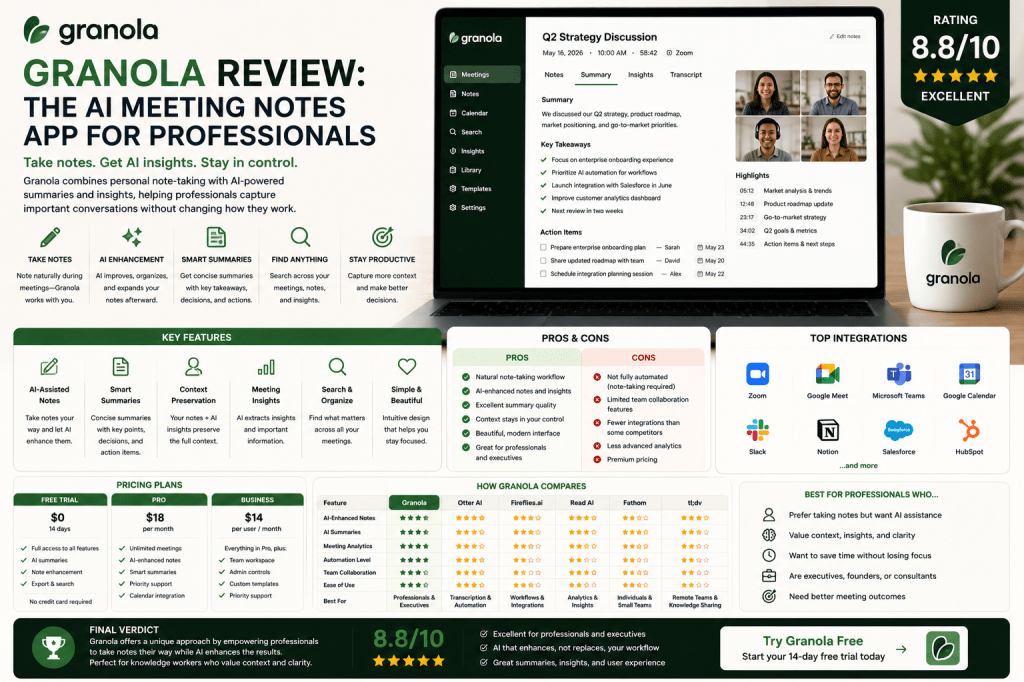
Rather than replacing note-taking entirely, Granola enhances the way professionals already work. The platform combines personal notes with AI-generated insights, allowing users to stay engaged during meetings while still benefiting from automation.
This unique workflow has made Granola increasingly popular among founders, executives, consultants, investors, and other knowledge workers.
But is Granola actually better than traditional AI meeting assistants?
In this review, we’ll examine Granola’s features, strengths, weaknesses, pricing, and ideal use cases.
What Is Granola?
Granola is an AI-powered meeting notes application designed for professionals who prefer taking notes during meetings but want AI assistance to improve and organize those notes afterward.
Instead of focusing entirely on recording and transcription, Granola emphasizes:
- Personal note-taking
- AI-enhanced summaries
- Meeting insights
- Productivity workflows
- Knowledge capture
The platform aims to make professionals more effective without fundamentally changing their meeting habits.
How Granola Differs From Other AI Meeting Assistants
Most competitors focus on:
- Recording meetings
- Creating transcripts
- Automating note-taking
Granola focuses on:
- Supporting human note-taking
- Enhancing notes with AI
- Generating insights from conversations
- Preserving user context
This creates a more personal workflow that many professionals prefer.
Rather than relying solely on AI, Granola combines human judgment with artificial intelligence.
Granola Key Features
AI-Assisted Notes
Granola allows users to take notes normally during meetings.
Afterward, AI helps:
- Expand notes
- Improve clarity
- Organize information
- Extract insights
This creates richer documentation without requiring additional effort.
Meeting Summaries
The platform automatically generates summaries that highlight:
- Key discussions
- Decisions
- Action items
- Important takeaways
Summaries help users quickly review conversations.
Context Preservation
Because users contribute their own notes, Granola often preserves context more effectively than fully automated systems.
Professionals can emphasize:
- Priorities
- Concerns
- Strategic observations
that may not be obvious from transcripts alone.
Meeting Intelligence
Granola helps organize information from conversations and makes it easier to revisit key insights later.
Simple User Experience
The platform is intentionally lightweight.
Users do not need to manage complex workflows or extensive settings.
This simplicity is one of Granola’s strongest selling points.
User Experience
Granola’s interface is clean, modern, and highly polished.
Many users describe it as one of the best-designed applications in the AI productivity space.
The workflow is straightforward:
- Join a meeting
- Take notes naturally
- Let AI enhance the notes
- Review summaries and insights
The platform feels more like a productivity companion than a meeting recorder.
AI Summary Quality
Granola generates concise and useful summaries.
The platform performs particularly well at:
- Capturing key discussions
- Identifying decisions
- Highlighting next steps
- Organizing information
Because user notes contribute additional context, summaries often feel more personalized.
Productivity Benefits
Granola helps professionals:
Save Time
Reduce post-meeting documentation work.
Improve Note Quality
Transform rough notes into polished meeting records.
Capture More Context
Preserve observations that matter personally.
Stay Engaged
Focus on conversations rather than managing technology.
Build Better Knowledge Repositories
Maintain organized records of important discussions.
Granola for Different Professionals
Executives
Review key discussions quickly and efficiently.
Founders
Track decisions and strategic conversations.
Consultants
Maintain high-quality client meeting records.
Investors
Document meetings and investment discussions.
Product Managers
Capture product feedback and roadmap decisions.
Knowledge Workers
Improve note-taking without disrupting workflows.
Granola Pricing
Granola typically offers premium pricing aimed at professionals and business users.
Plans may vary based on:
- Usage volume
- Team features
- Storage
- Collaboration capabilities
Unlike some competitors, Granola’s focus is less on free users and more on delivering a premium experience.
Granola Pros
Excellent User Experience
One of the most polished interfaces available.
Natural Workflow
Supports existing note-taking habits.
AI-Enhanced Notes
Adds value without replacing human judgment.
Strong Summary Quality
Produces useful and concise meeting recaps.
Context Preservation
Retains important personal insights.
Ideal for Professionals
Designed specifically for knowledge workers.
Granola Cons
Not Fully Automated
Users still need to participate in note-taking.
Limited Team Features
Less collaboration-focused than Fireflies.ai or tl;dv.
Fewer Analytics
Read AI offers deeper meeting intelligence.
Premium Pricing
May be more expensive than some alternatives.
Granola vs Competitors
Granola vs Otter AI
Otter focuses on transcription and automation, while Granola focuses on enhancing personal notes.
Granola vs Fireflies.ai
Fireflies is better for team collaboration and workflow automation.
Granola vs Read AI
Read AI offers stronger analytics and meeting intelligence.
Granola vs Fathom
Fathom provides a more automated meeting assistant experience.
Granola vs tl;dv
tl;dv is stronger for team knowledge sharing and remote collaboration.
Who Should Use Granola?
Granola is ideal for:
- Executives
- Founders
- Consultants
- Investors
- Product managers
- Knowledge workers
Professionals who enjoy taking notes but want AI assistance will likely love the platform.
Who Might Prefer Alternatives?
Consider alternatives if you need:
- Fully automated note-taking
- Deep collaboration features
- Extensive workflow automation
- Advanced meeting analytics
In these situations, Fireflies.ai, Read AI, or Otter AI may be better choices.
Frequently Asked Questions
Is Granola worth it?
For professionals who prefer note-taking but want AI assistance, Granola can provide significant value.
Does Granola record meetings?
Granola focuses more on note enhancement than traditional meeting recording workflows.
What makes Granola different?
Its combination of personal note-taking and AI-enhanced productivity.
Is Granola good for executives?
Yes. Executives are one of the platform’s primary target audiences.
Is Granola better than Otter AI?
That depends on your workflow. Granola is ideal for users who prefer active note-taking, while Otter AI is better for fully automated documentation.
Final Verdict
Granola is one of the most interesting AI meeting products available in 2026. Rather than replacing human note-taking, it enhances it, creating a workflow that feels natural, productive, and highly effective.
Professionals who value context, personal insights, and polished meeting notes will find Granola particularly compelling.
Rating: 8.8/10
Best For: Executives, founders, consultants, investors, product managers, and knowledge workers who want AI-enhanced note-taking without sacrificing personal context.
Related Articles
What Is an AI Meeting Assistant?
Best AI Meeting Assistants in 2026
Best AI Meeting Notes Tools in 2026
Otter AI Review
Fireflies.ai Review
Read AI Review
Fathom Review
tl;dv Review
AI Meeting Notes for Small Businesses


 Meeting Notes AI