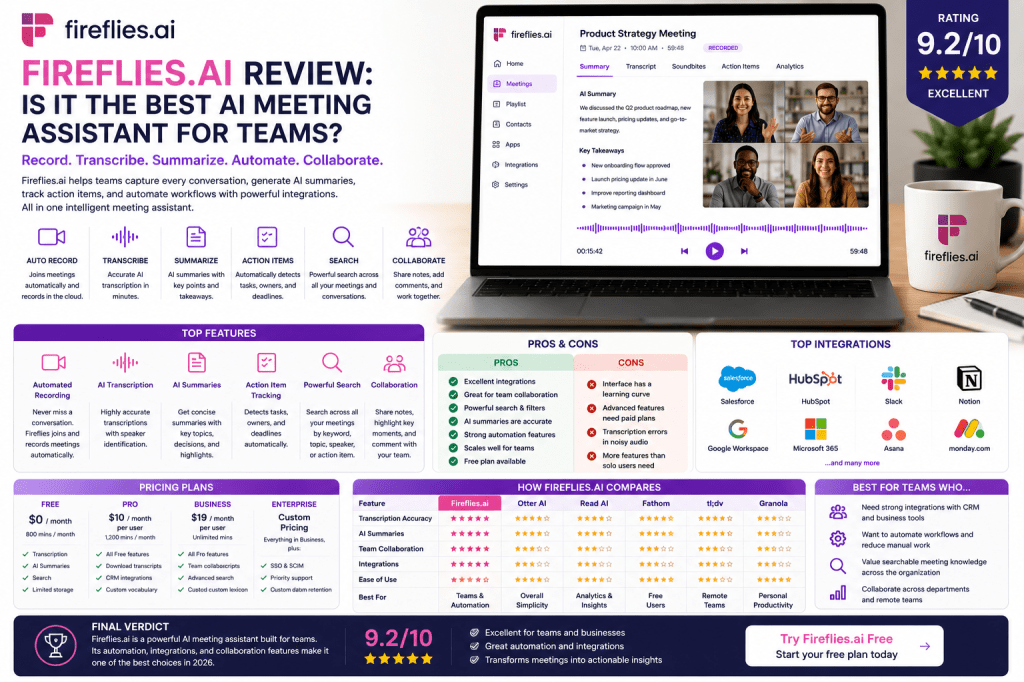
As AI meeting assistants continue to transform workplace productivity, Fireflies.ai has emerged as one of the most powerful solutions available for teams that need more than just meeting transcription.
While many meeting assistants focus primarily on recording conversations and generating notes, Fireflies.ai goes further by offering workflow automation, CRM integrations, collaboration tools, and searchable meeting intelligence.
But does that make it the best AI meeting assistant for teams in 2026?
In this review, we’ll explore Fireflies.ai’s features, strengths, limitations, pricing, and ideal use cases to help you decide whether it’s the right solution for your organization.
What Is Fireflies.ai?
Fireflies.ai is an AI-powered meeting assistant that records, transcribes, summarizes, and organizes meetings automatically.
The platform is designed to help businesses:
- Capture meeting conversations
- Generate AI summaries
- Track action items
- Search meeting records
- Share knowledge across teams
- Automate workflows
Fireflies integrates directly with popular conferencing platforms and business applications, making it particularly attractive for collaborative organizations.
Fireflies.ai Key Features
Automated Meeting Recording
Fireflies can automatically join meetings and record conversations across:
- Zoom
- Google Meet
- Microsoft Teams
- Webex
- Other conferencing platforms
This eliminates the need to manually start recordings.
AI Transcription
The platform converts spoken conversations into searchable text.
Benefits include:
- Meeting documentation
- Searchable transcripts
- Improved accessibility
- Historical records
Transcripts become available shortly after meetings end.
AI Summaries
Fireflies automatically generates meeting summaries that highlight:
- Key topics
- Decisions
- Action items
- Follow-up requirements
This significantly reduces post-meeting administrative work.
Conversation Search
One of Fireflies’ strongest features is its searchable meeting database.
Users can search across:
- Keywords
- Topics
- Customer discussions
- Decisions
- Action items
This helps transform meetings into a valuable organizational knowledge resource.
Collaboration Features
Teams can:
- Share notes
- Add comments
- Highlight discussions
- Review meetings together
These capabilities make Fireflies particularly useful for collaborative environments.
Workflow Automation
Fireflies stands out by offering strong automation capabilities.
Meeting information can be connected to:
- CRM systems
- Project management tools
- Collaboration platforms
- Productivity workflows
This reduces manual data entry and improves operational efficiency.
Integrations
Fireflies has built a reputation for offering one of the strongest integration ecosystems in the AI meeting assistant market.
Common integrations include:
- Salesforce
- HubSpot
- Slack
- Notion
- Asana
- Monday.com
- Google Workspace
- Microsoft 365
These integrations help teams move information directly into existing workflows.
User Experience
Despite its powerful feature set, Fireflies remains relatively easy to use.
Most users can:
- Connect meeting platforms
- Configure integrations
- Allow Fireflies to join meetings automatically
The interface is more feature-rich than some competitors, which may create a slightly steeper learning curve.
However, teams that invest time in setup often gain substantial productivity benefits.
Transcription Accuracy
Fireflies delivers strong transcription performance for typical business meetings.
Accuracy is generally highest when:
- Audio quality is clear
- Background noise is minimal
- Participants avoid speaking simultaneously
As with any AI transcription platform, occasional errors may occur when conversations involve:
- Heavy accents
- Technical terminology
- Cross-talk
- Poor audio quality
For most organizations, transcription quality is more than sufficient for everyday use.
AI Summaries and Action Items
Fireflies performs particularly well when generating:
- Meeting summaries
- Key takeaways
- Action items
- Follow-up recommendations
These features help teams move from discussion to execution more quickly.
Many organizations find that Fireflies reduces the need for manual meeting recap emails entirely.
Fireflies.ai for Teams
Fireflies is especially well suited for organizations that need collaboration and workflow automation.
Sales Teams
Capture customer conversations and automatically update CRM systems.
Customer Success Teams
Track customer feedback and commitments.
Marketing Teams
Document campaign planning and project discussions.
Consulting Firms
Maintain detailed client meeting records.
Remote Teams
Share searchable meeting knowledge across locations.
Growing Businesses
Scale documentation processes without increasing administrative burden.
Fireflies.ai Pricing
Fireflies offers multiple pricing tiers designed for:
- Individuals
- Small teams
- Growing businesses
- Enterprise organizations
Plans generally increase based on:
- Storage limits
- Advanced features
- Collaboration capabilities
- Administrative controls
Businesses should evaluate pricing against meeting volume and integration requirements.
Fireflies.ai Pros
Strong Integrations
One of the most connected platforms available.
Excellent Collaboration Features
Supports team-based workflows effectively.
Powerful Search
Find discussions, decisions, and action items quickly.
Workflow Automation
Reduces manual work after meetings.
Reliable AI Summaries
Creates useful meeting overviews and follow-up documentation.
Scalable for Teams
Works well across departments and organizations.
Fireflies.ai Cons
Slightly More Complex Interface
New users may need time to learn all available features.
Advanced Features Require Paid Plans
Many automation capabilities are reserved for higher tiers.
Occasional Transcription Errors
Similar to all AI transcription platforms.
Potential Overkill for Solo Users
Individuals may not need the platform’s extensive collaboration features.
Fireflies.ai vs Competitors
Fireflies.ai vs Otter AI
Otter AI emphasizes simplicity and transcription quality, while Fireflies focuses on integrations and workflow automation.
Fireflies.ai vs Read AI
Read AI offers stronger analytics and meeting intelligence features.
Fireflies.ai vs Fathom
Fathom provides a simpler experience and a strong free plan.
Fireflies.ai vs tl;dv
Both support remote teams well, but Fireflies offers broader automation capabilities.
Who Should Use Fireflies.ai?
Fireflies is ideal for:
- Sales teams
- Customer success teams
- Consultants
- Agencies
- Growing businesses
- Remote organizations
- Cross-functional teams
Organizations that rely heavily on collaboration and integrations will benefit most.
Who Might Prefer Alternatives?
You may prefer another platform if:
- You want maximum simplicity
- You need advanced meeting analytics
- You only attend a few meetings per month
- You primarily work alone
In these situations, Otter AI, Read AI, or Granola may be better fits.
Frequently Asked Questions
Is Fireflies.ai worth it?
For teams that conduct regular meetings and rely on collaboration workflows, Fireflies can provide significant productivity benefits.
Is Fireflies.ai accurate?
Yes. Under good audio conditions, transcription quality is strong and suitable for most business use cases.
Does Fireflies.ai work with Zoom?
Yes. Fireflies integrates with Zoom, Google Meet, Microsoft Teams, and several other conferencing platforms.
Can Fireflies.ai identify action items?
Yes. Action item detection is one of the platform’s strongest capabilities.
Is Fireflies.ai good for teams?
Absolutely. Collaboration and workflow automation are among its biggest strengths.
Final Verdict
Fireflies.ai is one of the most capable AI meeting assistants available in 2026, particularly for organizations that need strong collaboration features, workflow automation, and extensive integrations.
While solo users may prefer simpler alternatives, teams that depend on efficient communication and knowledge sharing will find tremendous value in Fireflies.ai.
Rating: 9.2/10
Best For: Teams, sales organizations, consultants, agencies, customer success teams, and businesses that rely on collaboration and automation.
Related Articles
What Is an AI Meeting Assistant?
Best AI Meeting Assistants in 2026
Best AI Meeting Notes Tools in 2026
Otter AI Review
Read AI Review
Fathom Review
AI Meeting Notes for Small Businesses
AI Meeting Notes for Remote Teams
AI Meeting Notes Privacy Guide







 Meeting Notes AI