Introduction
One of the most valuable features of modern AI meeting assistants is automatic meeting transcription. Instead of relying on handwritten notes or trying to remember important discussions, professionals can now receive a complete written record of every meeting within seconds.
Behind this seemingly simple capability lies a sophisticated combination of artificial intelligence, speech recognition, machine learning, natural language processing, and large language models. These technologies work together to convert spoken conversations into accurate, searchable, and actionable text.
This guide explains how AI meeting transcription works, from the moment someone begins speaking to the point where meeting summaries, action items, and searchable knowledge are created.
What Is AI Meeting Transcription?
AI meeting transcription is the automated process of converting spoken conversations into written text using artificial intelligence.
Unlike traditional transcription, which requires a human transcriber, AI meeting assistants perform this task automatically and often in real time.
Modern transcription systems can:
- Convert speech to text
- Identify different speakers
- Add punctuation
- Recognize multiple languages
- Generate live captions
- Produce searchable transcripts
- Support AI-generated meeting summaries
Transcription serves as the foundation for nearly every feature offered by AI meeting assistants.
Why Meeting Transcription Matters
Meeting transcripts provide a permanent record of conversations.
Organizations use them to:
- Capture important discussions
- Review decisions
- Assign action items
- Improve accountability
- Search past meetings
- Share meeting notes
- Build organizational knowledge
Without transcription, most meeting intelligence features would not be possible.
The AI Meeting Transcription Pipeline
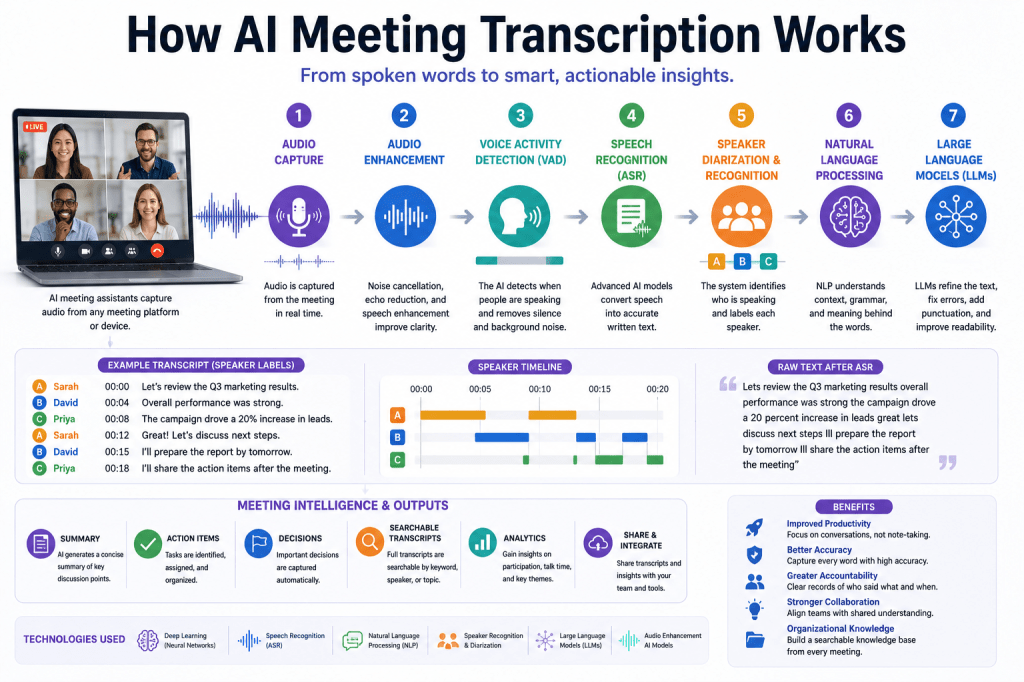
Modern AI meeting assistants follow a multi-stage processing pipeline.
Step 1: Audio Capture
Everything begins with audio.
The meeting assistant captures sound from:
- Zoom meetings
- Microsoft Teams
- Google Meet
- Webex
- Conference room systems
- Laptop microphones
- Smartphones
- Uploaded recordings
The goal is to capture every participant’s voice as clearly as possible.
Step 2: Audio Enhancement
Raw audio is rarely perfect.
Before transcription begins, the system improves audio quality.
Enhancement techniques include:
Noise Cancellation
Removes:
- Keyboard typing
- Office chatter
- Traffic
- Air conditioning
- Fan noise
Echo Cancellation
Eliminates audio reflections.
Automatic Gain Control
Balances speaker volume levels.
Speech Enhancement
Improves voice clarity.
Better audio produces better transcription accuracy.
Step 3: Voice Activity Detection (VAD)
The next step is determining when someone is actually speaking.
Voice Activity Detection identifies:
- Speech
- Silence
- Background noise
This allows the AI system to ignore non-speech audio and focus on meaningful conversation.
VAD improves efficiency while reducing transcription errors.
Step 4: Audio Segmentation
The audio stream is divided into very small segments.
Typically:
- 10 milliseconds
- 20 milliseconds
- 30 milliseconds
Processing smaller segments allows the AI to recognize speech continuously throughout the meeting.
Step 5: Speech Recognition
The core transcription process begins.
Automatic Speech Recognition (ASR) converts spoken language into written text.
Modern ASR systems use:
- Deep learning
- Neural networks
- Massive speech datasets
- Acoustic models
- Language models
The AI predicts which words are being spoken based on both sound patterns and context.
For example:
Speaker says:
“Let’s schedule a follow-up meeting for Friday.”
The ASR system converts the speech into text almost instantly.
Step 6: Speaker Diarization
Meetings usually involve multiple participants.
The AI must determine:
- Who is speaking
- When speakers change
- Which statements belong to each participant
This process is known as speaker diarization.
Instead of producing one continuous block of text, the transcript becomes:
Sarah: Let’s review the budget.
David: Marketing is ready for launch.
Speaker labels make transcripts much easier to understand.
Step 7: Speaker Recognition
Some AI meeting assistants go beyond diarization.
Speaker recognition identifies known participants based on their voices.
Benefits include:
- Personalized transcripts
- Better meeting analytics
- Accurate action item assignment
- Improved collaboration
This feature is particularly valuable for recurring team meetings.
Step 8: Language Detection
Many organizations conduct multilingual meetings.
AI systems automatically detect:
- Spoken language
- Language changes
- Mixed-language conversations
Advanced meeting assistants support dozens of languages.
Some platforms also provide:
- Live translation
- Multilingual transcripts
- Localized meeting summaries
Step 9: Natural Language Processing (NLP)
Once speech becomes text, Natural Language Processing begins.
NLP helps the AI understand:
- Grammar
- Sentence structure
- Context
- Meaning
- Intent
- Relationships between topics
Rather than simply recording words, the system begins interpreting conversations.
Step 10: Large Language Models
Many modern AI meeting assistants now use Large Language Models (LLMs).
These models improve transcripts by:
Correcting Errors
Fixing transcription mistakes using context.
Improving Punctuation
Adding commas, periods, and paragraph breaks.
Understanding Context
Resolving ambiguous phrases.
Organizing Conversations
Grouping related discussion topics.
LLMs significantly improve transcript readability.
Step 11: Meeting Intelligence
Once transcription is complete, AI meeting assistants generate additional insights.
These may include:
Meeting Summaries
Concise overviews of discussions.
Action Items
Tasks assigned during the meeting.
Decisions
Important conclusions reached.
Topics
Key themes discussed.
Follow-Up Suggestions
Recommended next steps.
All of these features depend on accurate transcription.
Real-Time vs Post-Meeting Transcription
AI meeting assistants generally support two approaches.
Real-Time Transcription
Text appears while participants speak.
Benefits include:
- Live captions
- Accessibility
- Immediate note-taking
- Instant search
Post-Meeting Transcription
Processing occurs after the meeting ends.
Benefits include:
- More processing time
- Higher accuracy
- Additional AI refinement
Many platforms combine both methods.
Machine Learning Behind Transcription
Modern transcription engines learn from enormous datasets.
Training data includes:
- Millions of speakers
- Multiple accents
- Various languages
- Different microphones
- Diverse environments
Machine learning enables systems to recognize speech patterns far more accurately than earlier technologies.
How AI Handles Difficult Conversations
Modern meeting assistants address many real-world challenges.
Multiple Speakers
Speaker diarization separates voices.
Background Noise
Noise cancellation improves clarity.
Accents and Dialects
Acoustic models recognize diverse pronunciation patterns.
Industry Terminology
Language models understand technical vocabulary.
Fast Conversations
Deep learning models process rapid speech efficiently.
Together, these technologies produce highly accurate transcripts.
Improving Transcription Accuracy
Organizations can improve results by following several best practices.
Use High-Quality Microphones
Better audio capture improves recognition.
Reduce Background Noise
Quiet environments reduce transcription errors.
Avoid Speaking Over One Another
Sequential speaking improves speaker separation.
Speak Clearly
Natural pacing improves speech recognition.
Enable Audio Enhancement Features
Most meeting assistants include built-in optimization tools.
Small improvements in audio quality often lead to significant gains in transcription accuracy.
Benefits of AI Meeting Transcription
Organizations experience numerous advantages.
Better Documentation
Meetings are automatically recorded in text.
Improved Productivity
Participants focus on discussion rather than note-taking.
Searchable Knowledge
Past meetings become easy to search.
Better Collaboration
Teams stay aligned on decisions and responsibilities.
Improved Compliance
Organizations maintain detailed meeting records.
More Reliable AI Insights
Accurate transcripts lead to better summaries and analytics.
Future of AI Meeting Transcription
Meeting transcription continues to evolve rapidly.
Future developments include:
Personalized Speech Models
AI learns recurring speakers.
Better Speaker Separation
Improved handling of overlapping conversations.
Real-Time Translation
Multilingual collaboration without language barriers.
Context-Aware AI
Deeper understanding of meeting objectives.
Edge AI Processing
Faster and more private transcription on local devices.
These innovations will continue improving transcription quality and meeting intelligence.
Conclusion
AI meeting transcription is much more than speech-to-text conversion. It is a sophisticated pipeline that combines audio capture, noise cancellation, voice activity detection, speech recognition, speaker diarization, natural language processing, and large language models to transform conversations into valuable organizational knowledge.
As AI meeting assistants continue to evolve, transcription will remain the foundation for meeting summaries, action item tracking, searchable archives, collaboration insights, and business intelligence. By understanding how AI meeting transcription works, organizations can better appreciate the technology that turns everyday conversations into accurate, actionable information.







 Meeting Notes AI