Introduction
AI meeting assistants have transformed the way organizations document conversations. Instead of relying on manual note-taking, professionals can now receive accurate transcripts, meeting summaries, action items, and searchable records automatically.
One of the biggest decisions when choosing an AI meeting assistant is whether to use real-time transcription or post-meeting transcription.
Although both approaches convert speech into text, they are designed for different use cases and offer unique advantages. Some organizations prioritize live captions and instant accessibility, while others value maximum transcription accuracy and deeper AI analysis after a meeting concludes.
This guide explains how real-time and post-meeting transcription work, compares their strengths and limitations, and helps you determine which approach best fits your organization’s needs.
What Is AI Meeting Transcription?
AI meeting transcription is the automated process of converting spoken conversations into written text using artificial intelligence.
Modern AI meeting assistants combine:
- Speech Recognition
- Machine Learning
- Audio Enhancement
- Speaker Diarization
- Natural Language Processing (NLP)
- Large Language Models (LLMs)
The result is a searchable transcript that forms the foundation for meeting summaries, analytics, and action item extraction.
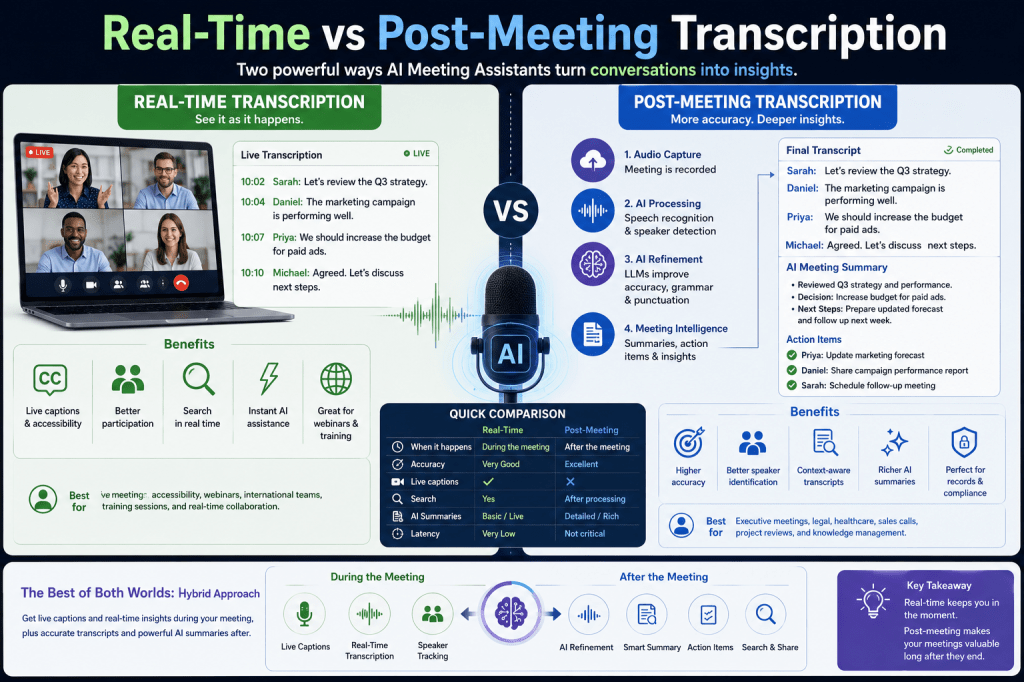
The primary difference lies in when the transcription occurs.
What Is Real-Time Transcription?
Real-time transcription converts speech into text while participants are still speaking.
As someone talks, words appear on the screen within seconds.
The transcription updates continuously throughout the meeting.
This enables AI meeting assistants to provide immediate information without waiting for the meeting to end.
How Real-Time Transcription Works
The process happens in several stages.
Step 1: Audio Capture
The AI captures speech from:
- Zoom
- Microsoft Teams
- Google Meet
- Conference room systems
- Mobile devices
Step 2: Audio Enhancement
Noise reduction and speech enhancement improve audio quality.
Step 3: Speech Recognition
Automatic Speech Recognition (ASR) converts speech into text immediately.
Step 4: Speaker Identification
The system tracks who is speaking.
Step 5: Live Display
Captions appear on screen in near real time.
The entire process typically occurs within a few hundred milliseconds.
Benefits of Real-Time Transcription
Live Captions
Participants can read conversations as they occur.
This greatly improves accessibility.
Better Meeting Participation
Attendees can focus on discussions instead of taking notes.
Immediate Search
Participants can quickly search earlier parts of the conversation before the meeting ends.
Real-Time AI Assistance
Some meeting assistants provide:
- Live summaries
- Suggested action items
- Key topic tracking
- Meeting highlights
during the meeting itself.
Accessibility
Real-time captions help:
- Hearing-impaired participants
- Non-native speakers
- Noisy meeting environments
Limitations of Real-Time Transcription
Real-time processing has several challenges.
Lower Accuracy
The AI has limited future context while people are speaking.
Limited Correction Time
The system must make predictions immediately.
Greater Processing Pressure
Speech recognition must operate continuously with very low latency.
Network Dependence
Cloud-based systems require reliable internet connections.
Despite these challenges, modern systems have become remarkably accurate.
What Is Post-Meeting Transcription?
Post-meeting transcription begins after the meeting has ended.
Instead of processing speech under strict time constraints, the AI analyzes the complete recording.
This additional processing time allows the system to produce more refined results.
How Post-Meeting Transcription Works
The workflow is similar to real-time transcription but includes additional refinement.
Audio Capture
The meeting is recorded.
Audio Enhancement
Noise reduction and speech enhancement improve quality.
Speech Recognition
Speech is converted into text.
Speaker Diarization
Participants are identified more accurately.
AI Refinement
Large Language Models improve:
- Grammar
- Punctuation
- Context
- Formatting
Meeting Intelligence
The AI generates:
- Summaries
- Decisions
- Action items
- Follow-up recommendations
The final transcript is usually available within a few minutes after the meeting ends.
Benefits of Post-Meeting Transcription
Higher Accuracy
The AI has access to the complete conversation.
This improves contextual understanding.
Better Speaker Identification
The system can analyze entire conversations before assigning speaker labels.
Improved Formatting
Paragraphs, punctuation, and sentence structure become more natural.
Better Summaries
LLMs generate more comprehensive meeting summaries.
Stronger Analytics
Participation analysis becomes more reliable.
Limitations of Post-Meeting Transcription
No Live Captions
Participants cannot view transcripts during meetings.
Delayed Availability
Users must wait until processing completes.
Less Immediate Collaboration
Meeting notes are unavailable until after the discussion.
For many organizations, this delay is acceptable because accuracy is prioritized.
Comparing Real-Time and Post-Meeting Transcription
| Feature | Real-Time Transcription | Post-Meeting Transcription |
|---|---|---|
| Processing Time | During the meeting | After the meeting |
| Live Captions | Yes | No |
| Accessibility | Excellent | Limited |
| Immediate Search | Yes | After processing |
| Transcription Accuracy | Very Good | Excellent |
| Speaker Identification | Good | Better |
| Summary Quality | Good | Excellent |
| Context Understanding | Limited | Complete |
| AI Refinement | Limited | Extensive |
| Latency | Extremely Low | Not Critical |
Which Is More Accurate?
In most cases, post-meeting transcription produces higher accuracy.
Why?
Because the AI can analyze:
- Entire sentences
- Complete conversations
- Speaker relationships
- Overall meeting context
Large Language Models can also revisit uncertain phrases and improve transcription quality before presenting the final version.
Real-time systems simply do not have the same opportunity for refinement.
The Role of Large Language Models
LLMs have significantly improved both transcription methods.
For real-time transcription, LLMs can:
- Improve punctuation
- Correct obvious recognition errors
- Add basic formatting
For post-meeting transcription, LLMs can additionally:
- Interpret context
- Correct ambiguous words
- Organize discussions
- Generate structured summaries
- Extract decisions
- Identify action items
This makes post-meeting workflows particularly valuable for knowledge management.
Real-Time Transcription Use Cases
Real-time transcription is ideal for:
Live Business Meetings
Participants follow discussions more easily.
Accessibility
Supports hearing-impaired attendees.
International Teams
Captions assist non-native speakers.
Webinars
Viewers receive live subtitles.
Training Sessions
Learners can read along with presentations.
Post-Meeting Transcription Use Cases
Post-meeting transcription works well for:
Executive Meetings
High-quality documentation is essential.
Legal Meetings
Accurate records are required.
Healthcare Consultations
Detailed transcripts support documentation.
Sales Calls
Reliable summaries improve follow-up.
Project Reviews
Complete meeting records become valuable knowledge assets.
Hybrid Approaches
Many modern AI meeting assistants combine both methods.
Typical workflow:
During the Meeting
- Live captions
- Basic transcription
- Speaker tracking
After the Meeting
- Transcript refinement
- AI summaries
- Action items
- Analytics
- Search indexing
This hybrid approach offers the best balance between immediacy and accuracy.
Choosing the Right Approach
The best choice depends on your priorities.
Choose real-time transcription if you need:
- Live captions
- Accessibility
- Immediate collaboration
- Interactive meetings
Choose post-meeting transcription if you prioritize:
- Maximum accuracy
- Better summaries
- Reliable documentation
- Detailed analytics
For most organizations, a platform that supports both provides the greatest flexibility.
Future of AI Meeting Transcription
Future AI meeting assistants are expected to deliver:
Near-Human Accuracy
Advanced speech recognition models.
Better Live Summaries
Real-time meeting intelligence.
Personalized Voice Models
Recognition improves for recurring participants.
Faster AI Refinement
Minimal delay between meetings and final transcripts.
Edge AI Processing
Private, low-latency transcription directly on local devices.
These innovations will continue reducing the gap between real-time and post-meeting transcription quality.
Conclusion
Real-time and post-meeting transcription each play an important role in modern AI meeting assistants. Real-time transcription enhances accessibility, collaboration, and live participation, while post-meeting transcription delivers higher accuracy, richer meeting intelligence, and more comprehensive AI-generated insights.
Rather than choosing one over the other, many organizations benefit from AI meeting assistants that combine both approaches. Live transcription keeps meetings productive and inclusive, while post-meeting processing refines the transcript and transforms conversations into searchable knowledge, actionable tasks, and meaningful business insights.







 Meeting Notes AI