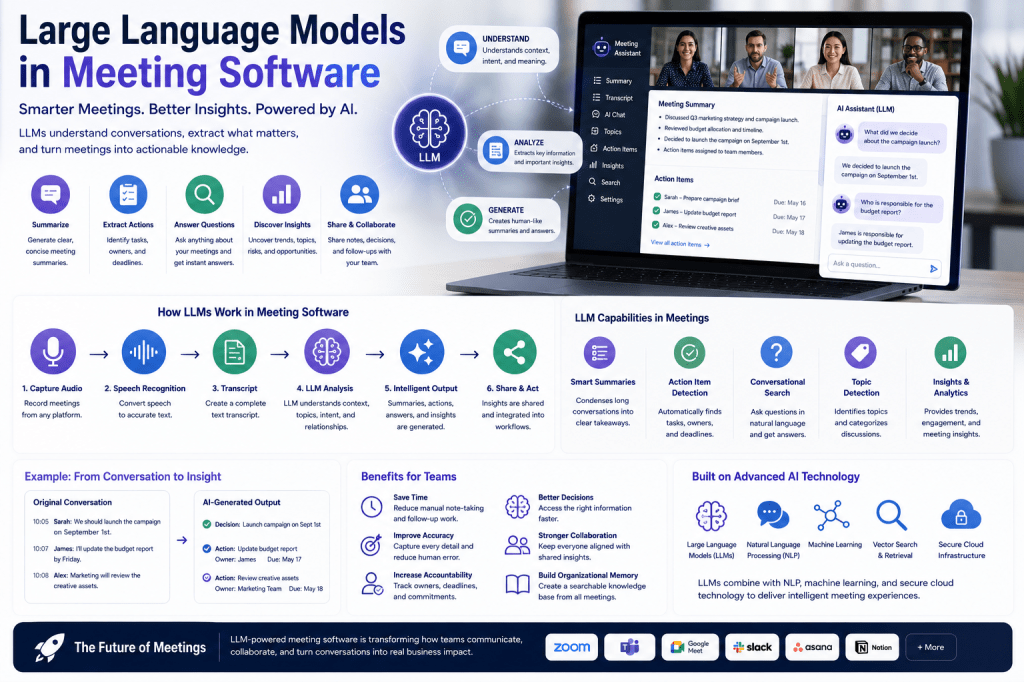
Large Language Models (LLMs) have transformed the capabilities of modern meeting software. What began as simple recording and transcription tools has evolved into intelligent meeting assistants capable of generating summaries, identifying action items, answering questions, and providing valuable business insights. Today, LLMs are one of the most important technologies powering AI meeting assistants and meeting intelligence platforms.
In this article, we’ll explore what Large Language Models are, how they work within meeting software, and why they are reshaping the future of workplace collaboration.
What Are Large Language Models?
Large Language Models are advanced artificial intelligence systems trained on enormous amounts of text data.
These models learn patterns within language and can:
- Understand context
- Interpret meaning
- Generate human-like text
- Answer questions
- Summarize information
- Extract insights
Unlike traditional software that relies on predefined rules, LLMs can understand natural language and adapt to a wide variety of communication scenarios.
Popular examples of LLM technology include models used in modern AI assistants, chatbots, and meeting intelligence platforms.
Why Meeting Software Needs LLMs
Meetings generate large amounts of unstructured information.
A typical meeting may include:
- Discussions
- Decisions
- Questions
- Action items
- Brainstorming
- Project updates
Traditional transcription software can capture words, but it cannot truly understand what those words mean.
Large Language Models add intelligence by helping software interpret conversations and extract valuable information automatically.
The Evolution of Meeting Software
Before AI
Traditional meeting tools focused primarily on:
- Audio recording
- Video conferencing
- Basic note-taking
Users were responsible for reviewing conversations and documenting outcomes.
Early AI Systems
The first generation of AI meeting assistants introduced:
- Speech-to-text transcription
- Basic speaker recognition
- Keyword search
While useful, these systems still required significant manual effort.
Modern LLM-Powered Platforms
Today’s meeting assistants use LLMs to:
- Generate summaries
- Detect action items
- Identify decisions
- Answer questions
- Organize knowledge
- Provide meeting insights
This dramatically reduces administrative workload and improves productivity.
How Large Language Models Work in Meeting Software
Large Language Models typically operate after a meeting transcript has been created.
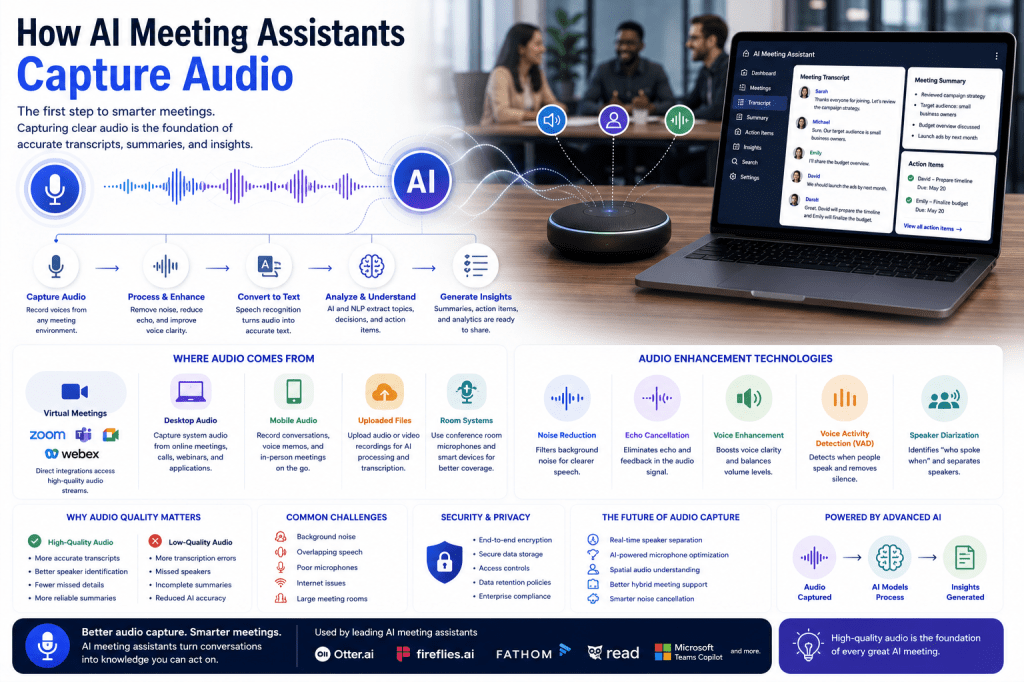
The process often follows these steps:
Step 1: Audio Capture
The meeting assistant records audio from:
- Zoom
- Microsoft Teams
- Google Meet
- Webex
- Uploaded recordings
Step 2: Speech Recognition
Automatic Speech Recognition (ASR) converts spoken language into text.
The result is a transcript of the conversation.
Step 3: LLM Analysis
The transcript is sent to a Large Language Model for analysis.
The model examines:
- Context
- Relationships
- Topics
- Intent
- Discussion flow
This allows the software to understand the meeting rather than simply store it.
Step 4: Intelligent Output
The LLM generates useful outputs such as:
- Meeting summaries
- Action items
- Key decisions
- Follow-up recommendations
- Insights
This information is then presented to users in a structured format.
LLM-Powered Meeting Summaries
One of the most popular applications of Large Language Models is automatic summarization.
Instead of reviewing a lengthy transcript, users receive a concise overview.
A typical AI-generated summary may include:
Meeting Overview
A brief explanation of what was discussed.
Key Topics
The major subjects covered during the meeting.
Decisions Made
Important conclusions and agreements.
Action Items
Tasks assigned during the discussion.
Next Steps
Recommended follow-up activities.
This capability saves significant time and improves information sharing.
Action Item Extraction
Meetings frequently include commitments and responsibilities.
Examples include:
- “Sarah will prepare the proposal.”
- “Marketing will review the campaign.”
- “Let’s schedule a follow-up next week.”
Large Language Models can recognize these statements and convert them into structured tasks.
The AI identifies:
- Task description
- Responsible person
- Deadline
- Context
Many meeting platforms can then integrate these tasks into project management systems.
Question Answering and Meeting Search
LLMs have introduced conversational search capabilities into meeting software.
Instead of manually reviewing notes, users can ask questions such as:
- “What did we decide about the product launch?”
- “Who owns the budget proposal?”
- “When did we discuss customer onboarding?”
The AI searches meeting records and generates a relevant answer.
This turns meeting archives into a powerful organizational knowledge base.
Topic Detection and Categorization
Large Language Models can automatically identify discussion topics.
Examples include:
- Marketing
- Sales
- Product Development
- Customer Success
- Budget Planning
- Human Resources
Topic detection helps:
- Organize meeting content
- Improve search functionality
- Create structured knowledge repositories
- Generate topic-based reports
Organizations with thousands of meetings benefit significantly from automated categorization.
Meeting Intelligence and Insights
Many AI meeting assistants now use LLMs to provide meeting intelligence.
These systems can analyze conversations and identify:
Trends
Recurring themes across meetings.
Risks
Potential issues requiring attention.
Opportunities
Ideas and suggestions raised during discussions.
Frequently Discussed Topics
Subjects that repeatedly appear across teams.
This transforms meetings into a valuable source of business intelligence.
Personalized Meeting Experiences
One of the emerging applications of LLMs is personalization.
Future meeting assistants may generate different summaries based on user roles.
For example:
Executive Summary
Focuses on strategic decisions and business outcomes.
Project Manager Summary
Highlights tasks, deadlines, and dependencies.
Team Member Summary
Focuses on individual responsibilities.
This helps users receive information that is most relevant to their role.
Retrieval-Augmented Generation (RAG)
Many advanced meeting platforms are beginning to incorporate Retrieval-Augmented Generation (RAG).
What Is RAG?
RAG combines:
- Information retrieval
- Large Language Models
Before generating a response, the AI retrieves relevant information from meeting archives.
Benefits
- More accurate answers
- Better context awareness
- Reduced hallucinations
- Improved knowledge retrieval
RAG is becoming increasingly important for enterprise meeting intelligence systems.
Benefits of LLMs in Meeting Software
Reduced Administrative Work
Users spend less time reviewing transcripts and writing notes.
Better Knowledge Management
Meeting content becomes searchable and reusable.
Improved Accountability
Action items are automatically identified and tracked.
Faster Decision-Making
Important insights are surfaced quickly.
Enhanced Collaboration
Teams remain aligned through shared summaries and records.
Challenges and Limitations
While LLMs are powerful, they are not perfect.
Common challenges include:
Hallucinations
AI may occasionally generate inaccurate information.
Context Limitations
Very long meetings can be difficult to process efficiently.
Specialized Terminology
Industry-specific language may require additional training.
Privacy Considerations
Meeting data often contains sensitive information.
Organizations should review AI-generated outputs before relying on them for critical business decisions.
The Future of Large Language Models in Meeting Software
Large Language Models continue to evolve rapidly.
Future capabilities may include:
Real-Time Meeting Coaching
AI providing suggestions during discussions.
Autonomous Follow-Up
Automatically sending reminders and updates.
Predictive Recommendations
Identifying risks and opportunities before meetings conclude.
Long-Term Organizational Memory
Connecting insights across months or years of meetings.
AI Agents
Taking action on behalf of users after meetings.
These advancements will make meeting assistants increasingly proactive and valuable.
Popular Meeting Platforms Using LLM Technology
Many leading platforms now leverage LLM capabilities, including:
- Microsoft Teams Copilot
- Otter.ai
- Fireflies.ai
- Read AI
- Fellow
- Fathom
While implementations differ, all are moving toward more intelligent and context-aware meeting experiences.
Final Thoughts
Large Language Models have become a foundational technology in modern meeting software. By enabling meeting assistants to understand conversations, generate summaries, identify action items, answer questions, and uncover insights, LLMs transform meetings from isolated discussions into valuable organizational knowledge. As the technology continues to mature, LLM-powered meeting software will play an increasingly important role in helping teams communicate, collaborate, and make better decisions.

 Meeting Notes AI