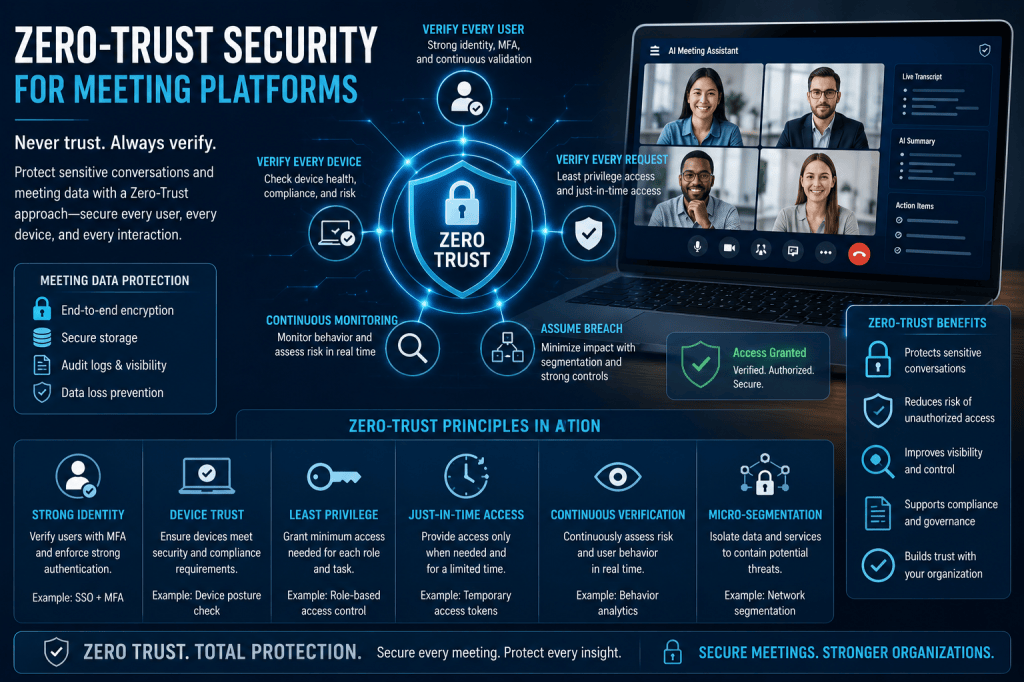
As organizations increasingly rely on AI Meeting Assistants and digital collaboration tools, protecting meeting data has become a top priority. Meetings often contain some of the most sensitive information within a business, including strategic plans, financial discussions, customer information, product roadmaps, legal matters, and confidential employee conversations.
Traditional security models were designed around the concept of a trusted internal network. Once users were inside the corporate network, they were often granted broad access to systems and data. However, modern workplaces have changed dramatically. Employees work remotely, use multiple devices, access cloud applications, and collaborate across organizational boundaries.
To address these challenges, many organizations are adopting a Zero-Trust Security model.
For AI Meeting Assistants and meeting intelligence platforms, Zero Trust provides a powerful framework for protecting sensitive conversations and meeting data.
What Is Zero Trust Security?
Zero Trust is a cybersecurity approach based on a simple principle:
Never trust, always verify.
Rather than automatically trusting users, devices, or applications because they are inside a corporate network, Zero Trust assumes that every access request must be verified.
Every user, device, application, and network connection is treated as potentially untrusted until proven otherwise.
This approach significantly reduces the risk of unauthorized access, account compromise, and data breaches.
Why Meeting Platforms Need Zero Trust
Meeting platforms have become central repositories of organizational knowledge.
Modern AI Meeting Assistants store:
- Meeting recordings
- Audio files
- Video files
- Meeting transcripts
- AI-generated summaries
- Action items
- Decisions
- Analytics
- Searchable knowledge repositories
Because these platforms contain large amounts of sensitive information, they are attractive targets for cybercriminals.
A compromised meeting account could expose:
- Customer information
- Financial plans
- Product strategies
- Intellectual property
- Internal communications
Zero Trust helps reduce these risks by continuously verifying access and limiting exposure.
The Core Principles of Zero Trust
Most Zero-Trust architectures are built around several key principles.
Verify Explicitly
Every access request should be authenticated and authorized using available signals.
Examples include:
- User identity
- Device health
- Geographic location
- Access history
- Risk score
- Authentication strength
Verification occurs continuously rather than only at login.
Least Privilege Access
Users should receive only the permissions required to perform their jobs.
For example:
- Team members may view transcripts.
- Managers may access analytics.
- Administrators may configure system settings.
Restricting permissions minimizes the impact of compromised accounts.
Assume Breach
Zero Trust assumes attackers may already be present within the environment.
Security controls are designed to:
- Detect threats quickly
- Limit lateral movement
- Protect sensitive assets
- Reduce potential damage
This mindset helps organizations prepare for real-world attack scenarios.
Identity as the New Security Perimeter
In traditional security models, the network served as the primary perimeter.
In Zero Trust, identity becomes the new perimeter.
Meeting platforms rely heavily on identity management systems to verify users.
Common technologies include:
- Microsoft Entra ID
- Google Workspace
- Okta
- OneLogin
- Ping Identity
Every access request is evaluated based on verified identity rather than network location.
This approach is particularly important in remote and hybrid work environments.
Multi-Factor Authentication
Multi-Factor Authentication (MFA) is one of the most important Zero-Trust controls.
MFA requires users to provide multiple forms of verification.
Examples include:
- Passwords
- Authentication apps
- Hardware security keys
- Biometrics
- Push notifications
Even if attackers obtain a password, MFA significantly reduces the likelihood of unauthorized access.
For meeting platforms, MFA protects access to recordings, transcripts, and meeting intelligence data.
Device Verification
Zero Trust does not trust devices automatically.
Before granting access, organizations may evaluate:
- Operating system version
- Security patches
- Antivirus status
- Device encryption
- Device ownership
For example, a fully managed corporate laptop may receive broader access than an unknown personal device.
Device verification reduces the risk of compromised endpoints accessing sensitive meeting data.
Role-Based Access Control
Role-Based Access Control (RBAC) is another essential component of Zero Trust.
Permissions are assigned based on responsibilities.
Common meeting platform roles include:
- Administrator
- Team Manager
- Meeting Host
- Team Member
- Viewer
Users receive only the permissions necessary to perform their tasks.
RBAC limits exposure and supports the principle of least privilege.
Conditional Access Policies
Modern identity systems support conditional access policies.
These policies evaluate context before granting access.
Examples include:
- Blocking access from unknown countries
- Requiring MFA for sensitive actions
- Restricting access from unmanaged devices
- Enforcing session limits
- Detecting unusual behavior
Conditional access helps organizations adapt security controls to changing risk levels.
Continuous Authentication
Traditional security often authenticates users once at login.
Zero Trust extends verification throughout the session.
Continuous authentication may evaluate:
- User behavior
- Device status
- Location changes
- Session activity
- Risk signals
If risk increases, the platform may:
- Request additional verification
- Limit functionality
- End the session
This reduces the risk of account hijacking.
Data Encryption Everywhere
Encryption is a fundamental requirement within Zero-Trust environments.
Meeting platforms typically protect data using:
Data in Transit
TLS encryption secures communications between users and services.
Data at Rest
AES-256 encryption protects stored recordings, transcripts, and summaries.
Data in Processing
Emerging technologies such as confidential computing protect data while AI systems analyze it.
Encryption ensures that even if systems are compromised, meeting information remains protected.
Microsegmentation
Microsegmentation divides systems into smaller protected zones.
Instead of granting broad access across an environment, each component is isolated.
For meeting platforms, microsegmentation may separate:
- User authentication services
- Meeting storage systems
- AI processing services
- Analytics systems
- Administrative functions
This limits the ability of attackers to move between systems.
Monitoring and Audit Logging
Zero Trust relies heavily on visibility.
Meeting platforms should maintain detailed audit logs for activities such as:
- User logins
- Recording access
- Transcript downloads
- Permission changes
- Administrative actions
- Data exports
Security teams use these logs to:
- Detect suspicious behavior
- Investigate incidents
- Demonstrate compliance
- Monitor security posture
Comprehensive monitoring is essential for Zero-Trust operations.
AI-Specific Security Considerations
AI Meeting Assistants introduce additional security requirements.
Organizations should evaluate:
- AI model access controls
- Prompt security
- Data isolation
- Customer-specific environments
- Model training policies
Questions to ask include:
- Is customer data used for model training?
- How is AI processing isolated?
- Who can access AI-generated outputs?
Zero Trust principles should extend to AI systems as well.
Zero Trust and Regulatory Compliance
Many compliance frameworks align closely with Zero-Trust principles.
Examples include:
GDPR
Protects personal information within the European Union.
HIPAA
Protects healthcare information.
SOC 2
Evaluates organizational security controls.
ISO 27001
Provides standards for information security management.
Zero Trust helps organizations strengthen compliance by enforcing stronger access controls and auditing capabilities.
Benefits of Zero Trust for Meeting Platforms
Organizations implementing Zero Trust can benefit from:
Improved Security
Continuous verification reduces unauthorized access.
Reduced Insider Risk
Least-privilege access limits exposure.
Better Remote Work Protection
Security remains effective regardless of location.
Stronger Compliance
Enhanced controls support regulatory requirements.
Reduced Breach Impact
Microsegmentation and access restrictions limit damage.
Greater Visibility
Comprehensive monitoring improves threat detection.
As organizations continue adopting cloud-based collaboration tools, these benefits become increasingly important.
Challenges of Zero Trust Adoption
Implementing Zero Trust is not without challenges.
Organizations may face:
- Increased complexity
- Identity management requirements
- Legacy system limitations
- User training needs
- Additional infrastructure costs
However, the long-term security benefits often outweigh these challenges.
Many organizations adopt Zero Trust gradually rather than through a single large migration.
The Future of Zero Trust for AI Meeting Assistants
Zero Trust is becoming a foundational security model for modern collaboration platforms.
Future developments may include:
- AI-driven threat detection
- Continuous risk scoring
- Adaptive access controls
- Confidential AI processing
- Customer-controlled encryption keys
- Post-quantum cryptography
As AI Meeting Assistants become more deeply integrated into business operations, Zero Trust will play a critical role in protecting organizational knowledge and sensitive conversations.
Conclusion
AI Meeting Assistants capture some of the most valuable and sensitive information within an organization. Traditional perimeter-based security models are no longer sufficient for protecting cloud-based collaboration platforms used across remote, hybrid, and global workforces.
Zero-Trust Security provides a modern approach based on continuous verification, least-privilege access, strong identity controls, device validation, encryption, monitoring, and microsegmentation. By adopting Zero-Trust principles, organizations can significantly improve the security of recordings, transcripts, summaries, analytics, and meeting intelligence data.
In a world where every conversation may contain valuable business knowledge, Zero Trust helps ensure that only the right people have access to the right information at the right time.







 Meeting Notes AI