AI Meeting Assistants have become valuable tools for organizations looking to improve productivity, capture knowledge, and automate meeting documentation. By recording conversations, generating transcripts, creating summaries, identifying action items, and providing analytics, these platforms help teams work more efficiently.
However, as organizations increasingly rely on AI Meeting Assistants, an important question arises: how is meeting data protected?
Meeting recordings often contain highly sensitive information, including business strategies, financial discussions, customer conversations, legal matters, and confidential employee information. Protecting this data is critical for maintaining trust, privacy, and regulatory compliance.
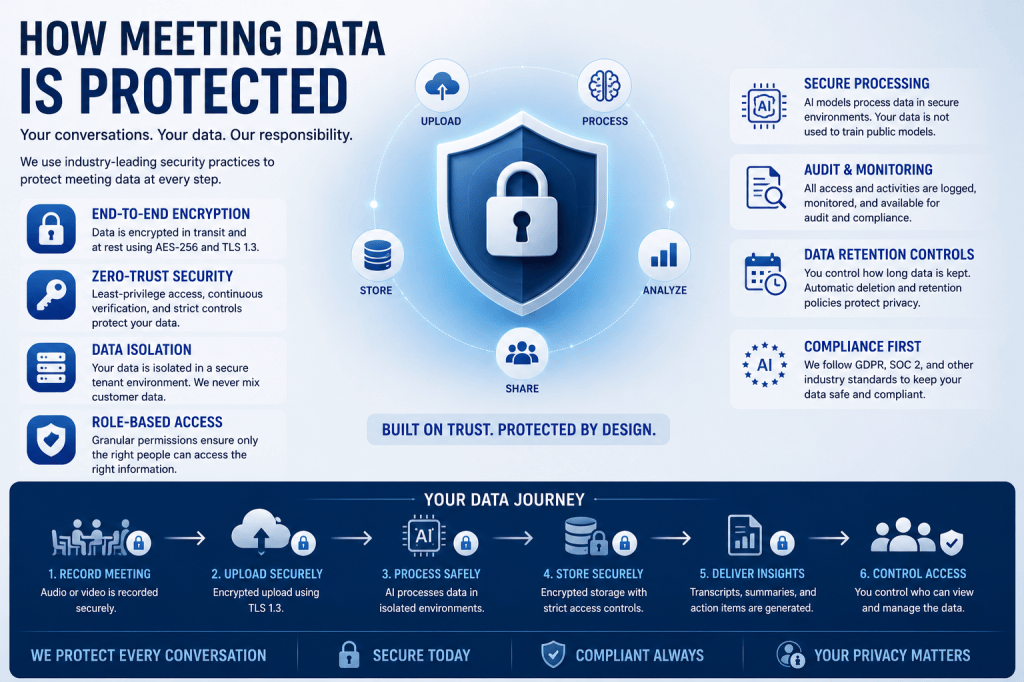
In this article, we’ll explore how modern AI Meeting Assistants protect meeting data throughout its entire lifecycle.
Understanding the Meeting Data Lifecycle
To understand how meeting data is protected, it’s helpful to first understand where that data exists.
A typical AI Meeting Assistant processes information through several stages:
- Meeting Capture
- Data Transmission
- Data Processing
- Data Storage
- User Access
- Data Retention
- Data Deletion
Each stage presents unique security challenges that must be addressed.
Protecting Data During Meeting Capture
Meeting protection begins before any AI processing occurs.
Audio and video data are captured from sources such as:
- Zoom meetings
- Microsoft Teams meetings
- Google Meet sessions
- Uploaded recordings
- In-person conference room systems
Security measures at this stage often include:
- Authenticated meeting access
- Recording permissions
- Host controls
- Participant consent mechanisms
- Secure meeting invitations
Organizations should ensure only authorized participants can join meetings and access recordings.
Securing Data in Transit
Once captured, meeting data must travel between devices, cloud services, and AI processing systems.
During transmission, data is vulnerable to interception if proper protections are not in place.
Modern AI Meeting Assistants use Transport Layer Security (TLS) encryption to secure communications.
TLS helps protect:
- Live audio streams
- Video streams
- Transcript transfers
- API requests
- User authentication sessions
TLS encryption prevents unauthorized parties from reading or modifying information while it travels across networks.
Most leading platforms use TLS 1.2 or TLS 1.3 for secure communication.
Protecting Data During AI Processing
One of the most unique aspects of AI Meeting Assistants is that meeting data is actively analyzed by AI systems.
Processing may include:
- Speech recognition
- Speaker identification
- Topic detection
- Action item extraction
- Summary generation
- Sentiment analysis
- Meeting analytics
During processing, organizations need assurance that data remains secure.
Common protections include:
- Isolated processing environments
- Secure cloud infrastructure
- Access controls
- Temporary processing storage
- Monitoring and auditing
Some advanced systems are beginning to adopt confidential computing technologies that protect information even while it is being processed.
Encryption of Stored Data
After processing, meeting information is typically stored for future access.
Stored data may include:
- Audio recordings
- Video recordings
- Meeting transcripts
- AI-generated summaries
- Action items
- Decisions
- Analytics reports
Most AI Meeting Assistants use AES-256 encryption to protect stored information.
AES-256 is considered one of the strongest commercially available encryption standards and is widely used by:
- Governments
- Financial institutions
- Healthcare organizations
- Major cloud providers
Encryption ensures that stored meeting data remains protected even if storage systems are compromised.
Access Control and User Permissions
Not everyone within an organization should have access to every meeting.
Access control systems determine who can:
- View recordings
- Read transcripts
- Download files
- Share content
- Manage users
- Configure settings
Role-Based Access Control (RBAC) is commonly used to assign permissions based on job responsibilities.
Typical roles include:
- Administrator
- Team Manager
- Meeting Organizer
- Team Member
- Viewer
Limiting access reduces the risk of unauthorized exposure.
Single Sign-On and Identity Management
Many organizations integrate AI Meeting Assistants with existing identity systems.
Single Sign-On (SSO) enables employees to use company credentials when accessing meeting data.
Common SSO providers include:
- Microsoft Entra ID
- Google Workspace
- Okta
- OneLogin
Benefits include:
- Stronger authentication
- Centralized user management
- Simplified access control
- Faster user provisioning
SSO also allows organizations to immediately revoke access when employees leave.
Multi-Factor Authentication
Passwords alone are no longer sufficient to protect sensitive information.
Multi-Factor Authentication (MFA) requires users to verify their identity using additional methods such as:
- Authentication applications
- Security keys
- Biometrics
- SMS verification
Even if a password is compromised, MFA significantly reduces the likelihood of unauthorized account access.
Audit Logging and Monitoring
Organizations need visibility into how meeting data is accessed and used.
Audit logging records activities such as:
- User logins
- Recording views
- Transcript downloads
- Administrative changes
- Permission updates
- Data exports
Security teams can use audit logs to:
- Detect suspicious activity
- Investigate incidents
- Demonstrate compliance
- Monitor user behavior
Comprehensive audit trails are a key component of enterprise security.
Data Retention Policies
Not all meeting data needs to be stored indefinitely.
Data retention controls allow organizations to determine how long information is kept.
Examples include:
- Delete recordings after 30 days
- Retain transcripts for one year
- Archive strategic meetings
- Automatically purge old data
Retention policies help reduce risk by limiting unnecessary storage of sensitive information.
Secure Cloud Infrastructure
Most AI Meeting Assistants operate on cloud platforms.
Common cloud providers include:
- Amazon Web Services (AWS)
- Microsoft Azure
- Google Cloud Platform (GCP)
These providers offer advanced security features such as:
- Physical data center security
- Network protection
- Threat detection
- Encryption services
- Backup systems
- Disaster recovery capabilities
AI Meeting Assistant vendors build additional security controls on top of these cloud infrastructures.
Data Isolation and Privacy Controls
Organizations increasingly want assurances that their data remains separate from other customers.
Modern AI Meeting Assistants often provide:
- Tenant isolation
- Customer-specific storage
- Dedicated environments
- Private AI deployments
These controls help ensure that one organization’s data cannot be accessed by another.
AI Model Privacy Protections
A growing concern involves how meeting data is used by AI systems.
Organizations should understand:
- Whether data is used for model training
- How long data is retained
- Who can access processed information
- Whether customer data remains isolated
Many vendors now offer policies that prevent customer meeting content from being used to train future AI models.
These protections are becoming increasingly important for enterprise adoption.
Compliance and Regulatory Protection
Meeting data protection often involves compliance with industry regulations.
Common frameworks include:
GDPR
Protects personal information within the European Union.
SOC 2
Evaluates organizational security controls and operational practices.
HIPAA
Protects healthcare information in regulated environments.
ISO 27001
Provides standards for information security management systems.
Organizations should verify that their AI Meeting Assistant supports relevant compliance requirements.
Data Deletion and Right to Be Forgotten
Eventually, meeting data may need to be removed.
Modern platforms often provide:
- User-initiated deletion
- Automated deletion policies
- Retention expiration workflows
- Compliance-based removal procedures
Some regulations require organizations to permanently remove personal information upon request.
Reliable deletion processes are therefore an important aspect of data protection.
Emerging Technologies Improving Protection
Security technologies continue to evolve.
Future innovations include:
Confidential Computing
Protects information while AI systems process data.
Post-Quantum Encryption
Designed to resist future quantum computing threats.
Zero Trust Architectures
Continuously verify users and devices before granting access.
Customer-Controlled Encryption Keys
Allow organizations to manage encryption independently.
These technologies will further strengthen meeting data protection in coming years.
Best Practices for Organizations
To maximize meeting security, organizations should:
- Enable MFA for all users
- Implement SSO where possible
- Limit permissions using RBAC
- Review audit logs regularly
- Define retention policies
- Train employees on security awareness
- Understand vendor privacy policies
- Evaluate compliance certifications
Security is strongest when both technology and organizational practices work together.
Conclusion
Protecting meeting data requires a combination of technologies, policies, and operational controls. Modern AI Meeting Assistants use encryption, access controls, secure cloud infrastructure, identity management, audit logging, retention policies, and privacy safeguards to protect recordings, transcripts, summaries, and analytics.
As AI-powered meeting intelligence becomes increasingly important to organizations, robust data protection will remain essential for maintaining trust, compliance, and security. Understanding how meeting data is protected helps organizations make informed decisions when selecting and deploying AI Meeting Assistants.
The value of meeting intelligence depends not only on the insights it generates but also on the confidence that sensitive conversations remain secure.







 Meeting Notes AI