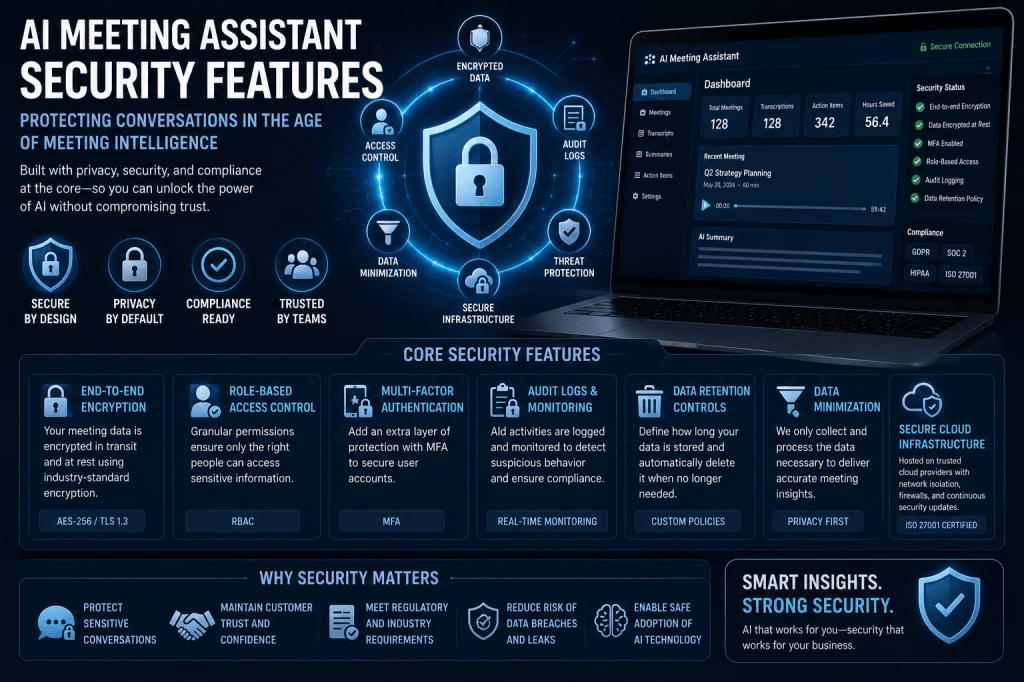
AI Meeting Assistants have transformed how organizations capture, summarize, and analyze conversations. By automatically generating transcripts, meeting summaries, action items, and insights, these platforms help teams save time and improve productivity. However, as more business discussions are processed by AI systems, security becomes one of the most important considerations when selecting an AI Meeting Assistant.
Meeting recordings often contain sensitive information, including strategic plans, financial discussions, customer data, intellectual property, and confidential employee conversations. Organizations need confidence that their meeting data is protected throughout its entire lifecycle.
In this article, we’ll explore the most important security features found in modern AI Meeting Assistants and why they matter.
Why Security Matters for AI Meeting Assistants
Unlike traditional note-taking applications, AI Meeting Assistants process large amounts of sensitive information. A single meeting may contain:
- Financial forecasts
- Product roadmaps
- Customer information
- Legal discussions
- Employee performance reviews
- Acquisition or partnership plans
- Confidential business strategies
Without strong security controls, unauthorized access to this information could lead to significant business risks.
As AI Meeting Assistants become part of daily workflows, security is no longer optional—it is a core requirement.
End-to-End Encryption
One of the most important security features is encryption.
Encryption protects meeting data while it is:
- Being transmitted
- Being processed
- Being stored
Modern AI Meeting Assistants typically use strong encryption protocols such as:
- TLS (Transport Layer Security) for data in transit
- AES-256 encryption for stored data
Encryption helps ensure that unauthorized individuals cannot intercept or read meeting information.
Secure Cloud Storage
Meeting recordings, transcripts, summaries, and analytics are usually stored in cloud environments.
Secure storage systems include:
- Encrypted databases
- Secure object storage
- Data redundancy
- Access auditing
- Backup protection
Leading providers often build their platforms on secure cloud infrastructures such as Amazon Web Services (AWS), Microsoft Azure, or Google Cloud Platform.
Role-Based Access Control (RBAC)
Not every employee should have access to every meeting.
Role-Based Access Control allows organizations to define who can:
- View recordings
- Access transcripts
- Download files
- Edit summaries
- Manage users
- Configure settings
Common roles include:
- Administrator
- Team Manager
- Meeting Host
- Team Member
- Read-Only User
RBAC reduces the risk of accidental or unauthorized data exposure.
Single Sign-On (SSO)
Many organizations use Single Sign-On solutions to manage employee authentication.
SSO allows users to log in using existing company credentials through providers such as:
- Microsoft Entra ID (Azure AD)
- Google Workspace
- Okta
- OneLogin
Benefits include:
- Stronger authentication
- Simplified user management
- Faster employee onboarding
- Centralized access control
SSO also makes it easier to disable access when employees leave the organization.
Multi-Factor Authentication (MFA)
Passwords alone are no longer sufficient.
Multi-Factor Authentication requires additional verification steps such as:
- Authentication apps
- Security keys
- SMS verification
- Biometric authentication
Even if a password is compromised, MFA significantly reduces the likelihood of unauthorized access.
Data Retention Controls
Organizations often need control over how long meeting data is stored.
Data retention settings allow administrators to:
- Automatically delete old recordings
- Remove transcripts after a specified period
- Retain data for compliance purposes
- Archive important meetings
Retention controls help reduce risk by limiting unnecessary data storage.
Audit Logs and Activity Tracking
Audit logging provides visibility into who accessed meeting data and when.
Typical audit logs track:
- User logins
- Recording access
- Transcript downloads
- Administrative changes
- Permission updates
- Data exports
Audit trails support both security investigations and compliance requirements.
Meeting Permission Controls
Modern AI Meeting Assistants provide granular controls over meeting access.
Examples include:
- Restricting who can view recordings
- Limiting transcript sharing
- Controlling download permissions
- Restricting external access
- Password-protected meeting records
These controls help organizations manage sensitive information more effectively.
Data Residency Options
Many organizations must comply with regulations that dictate where data can be stored.
Data residency options allow customers to choose:
- United States
- European Union
- United Kingdom
- Canada
- Australia
- Other supported regions
Data residency is particularly important for multinational organizations operating under regional privacy laws.
Compliance Certifications
Security features are often supported by independent compliance certifications.
Common certifications include:
SOC 2
SOC 2 evaluates security controls related to:
- Security
- Availability
- Confidentiality
- Privacy
- Processing integrity
GDPR
The General Data Protection Regulation governs personal data protection within the European Union.
AI Meeting Assistants serving European customers often provide:
- Data processing agreements
- User consent controls
- Data deletion capabilities
- Privacy protections
HIPAA
Healthcare organizations may require HIPAA-compliant solutions when meetings involve protected health information (PHI).
ISO 27001
ISO 27001 demonstrates that an organization follows internationally recognized information security management practices.
AI Model Privacy Controls
Organizations increasingly want control over how AI models use meeting data.
Important privacy controls include:
- Data isolation
- Customer-owned data policies
- No training on customer content
- Private AI processing
- Dedicated AI environments
Many vendors now allow customers to prevent meeting content from being used to train future AI models.
Redaction and Sensitive Information Detection
Advanced AI Meeting Assistants can automatically identify and protect sensitive information.
Examples include:
- Credit card numbers
- Social security numbers
- Personal identifiers
- Medical information
- Confidential project names
Redaction systems help reduce accidental exposure of sensitive data.
Secure API Access
Organizations often integrate AI Meeting Assistants with:
- CRM systems
- Project management tools
- Knowledge bases
- Productivity platforms
Secure APIs typically include:
- Authentication tokens
- OAuth authorization
- Access scopes
- Rate limiting
- Audit logging
Proper API security prevents unauthorized access to meeting information.
Emerging Security Features
As AI technology evolves, new security capabilities are emerging.
These include:
Private AI Models
Organizations can deploy AI systems within private environments rather than relying on shared public infrastructure.
On-Premise Deployment
Some organizations prefer to keep all meeting data within their own infrastructure.
Confidential Computing
Confidential computing protects data even while it is being processed.
Zero Trust Security
Zero Trust architectures verify every user and device before granting access to meeting resources.
Best Practices for Organizations
Even the most secure platform requires proper configuration.
Organizations should:
- Enable MFA for all users
- Use SSO when available
- Limit access based on roles
- Review audit logs regularly
- Define retention policies
- Train employees on security practices
- Evaluate vendor compliance certifications
- Understand AI data usage policies
Security is a shared responsibility between the software provider and the organization using the platform.
Conclusion
AI Meeting Assistants deliver tremendous productivity benefits, but they also process some of the most sensitive information within an organization. Strong security features such as encryption, access controls, audit logging, compliance certifications, data retention policies, and AI privacy protections are essential for protecting meeting data.
As AI Meeting Intelligence Platforms continue to evolve, security will become even more important. Organizations evaluating AI Meeting Assistants should carefully assess both functionality and security capabilities to ensure their conversations remain protected.
The most valuable meeting insights are only useful when they are also secure.







 Meeting Notes AI