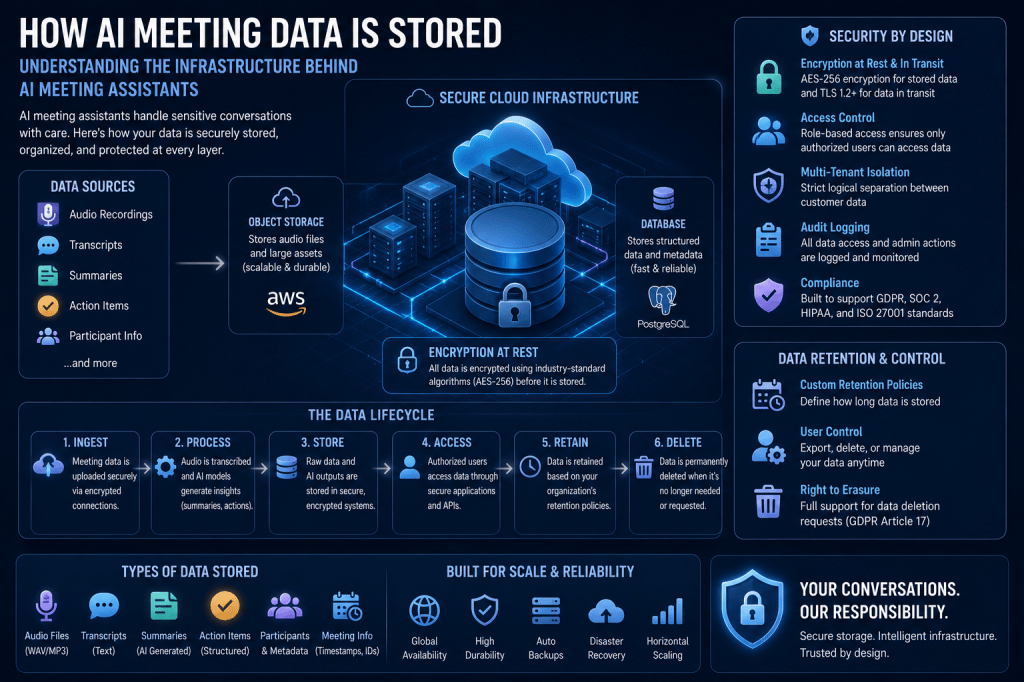
As AI meeting assistants become increasingly common in workplaces around the world, organizations are asking an important question:
What happens to meeting data after a meeting ends?
Modern AI meeting assistants record conversations, generate transcripts, create summaries, identify action items, detect decisions, and produce meeting analytics. All of this information must be stored, processed, secured, and managed throughout its lifecycle.
For businesses evaluating AI meeting technologies, understanding how meeting data is stored is essential for making informed decisions about privacy, security, compliance, governance, and knowledge management.
This article explains how AI meeting assistants typically store meeting data, the technologies involved, common security practices, and the challenges organizations should consider.
What Is AI Meeting Data?
AI meeting data includes all information generated before, during, and after a meeting.
Examples include:
Audio Recordings
Raw meeting audio captured during conversations.
Video Recordings
Video streams from virtual meetings.
Transcripts
Speech-to-text representations of conversations.
Meeting Summaries
AI-generated summaries and key takeaways.
Action Items
Tasks and follow-up commitments.
Decisions
Documented meeting outcomes.
Analytics
Participation metrics, engagement data, and sentiment analysis.
Metadata
Information such as:
- Meeting date
- Participants
- Duration
- Platform used
- Meeting title
All of these components may be stored differently depending on the platform architecture.
Why Data Storage Matters
Meeting data often contains valuable and sensitive information.
Examples include:
- Business strategies
- Financial discussions
- Customer conversations
- Product roadmaps
- Legal matters
- Employee information
Organizations need confidence that their data is:
- Secure
- Accessible
- Compliant
- Reliable
- Properly governed
Storage architecture directly affects all of these concerns.
The Meeting Data Lifecycle
AI meeting assistants generally follow a structured data lifecycle.
Step 1: Data Capture
The platform records:
- Audio
- Video
- Chat messages
- Screen-sharing events
Step 2: Processing
AI systems generate:
- Transcripts
- Summaries
- Insights
- Analytics
Step 3: Storage
Raw and processed data is stored.
Step 4: Retrieval
Users access meeting information later.
Step 5: Retention or Deletion
Data is archived or deleted according to policy.
Understanding this lifecycle helps explain how storage systems operate.
Where Is Meeting Data Stored?
Most AI meeting assistants use cloud infrastructure.
Common storage locations include:
Cloud Object Storage
Used for:
- Audio files
- Video recordings
- Attachments
Examples include cloud storage services provided by major infrastructure providers.
Databases
Used for:
- Meeting metadata
- Participant information
- Action items
- Analytics
- Search indexes
Knowledge Repositories
Used for:
- Meeting summaries
- Organizational knowledge
- Searchable meeting archives
These storage layers work together to support meeting intelligence functionality.
Storing Raw Meeting Recordings
Audio and video files are typically the largest data assets generated by meetings.
Because recordings consume significant storage space, platforms commonly use object storage systems designed for large media files.
These systems provide:
- High durability
- Scalability
- Backup capabilities
- Global accessibility
Recordings are often stored separately from transcripts and analytics data.
How Meeting Transcripts Are Stored
Transcripts are generally stored in structured databases.
Advantages include:
- Fast search performance
- Efficient indexing
- Metadata linking
- AI analysis support
This enables users to search for specific words, topics, speakers, decisions, or action items across thousands of meetings.
Transcript storage is one of the foundations of modern meeting intelligence platforms.
How AI Summaries and Insights Are Stored
AI-generated outputs are usually stored separately from raw transcripts.
Examples include:
Meeting Summaries
High-level overviews.
Key Takeaways
Important discussion points.
Action Items
Tasks and commitments.
Decisions
Documented outcomes.
Risks and Opportunities
Business insights identified by AI.
These structured records are often optimized for rapid retrieval and reporting.
Metadata Storage
Metadata helps organize meeting information.
Examples include:
- Meeting ID
- Meeting title
- Date and time
- Participants
- Duration
- Platform source
- Department
- Project associations
Metadata enables filtering, search, reporting, and analytics.
Without metadata, managing large meeting repositories would be extremely difficult.
Search Indexes and Knowledge Bases
Many AI meeting assistants create searchable knowledge repositories.
To support fast retrieval, platforms generate search indexes.
These indexes may contain:
- Keywords
- Topics
- Entities
- Participants
- Decisions
- Action items
This allows users to quickly locate information without reviewing entire transcripts.
Searchable meeting intelligence is one of the most valuable outcomes of modern AI meeting platforms.
Cloud Storage Architecture
Most AI meeting assistants use cloud-native architectures.
Advantages include:
Scalability
Storage grows automatically as meeting volume increases.
Availability
Data remains accessible from anywhere.
Reliability
Multiple copies reduce the risk of data loss.
Performance
Cloud infrastructure supports large-scale AI processing.
This architecture enables organizations to store years of meeting history efficiently.
Data Encryption
Meeting platforms typically encrypt data during:
Transmission
Data moving between users and servers.
Storage
Data stored within databases and cloud infrastructure.
Encryption helps protect information from unauthorized access.
Common encryption approaches include:
- Transport Layer Security (TLS)
- Encryption at rest
- Key management systems
Encryption has become a standard security requirement.
Access Controls
Meeting intelligence platforms often provide role-based access controls.
Examples include:
Administrators
Full access.
Managers
Department-level access.
Employees
Personal meeting access.
External Participants
Limited visibility.
Access controls help ensure sensitive information remains protected.
Data Retention Policies
Organizations frequently define retention rules.
Examples include:
Short-Term Retention
Delete recordings after 90 days.
Long-Term Retention
Retain meeting records for compliance purposes.
Project-Based Retention
Store information until project completion.
AI meeting assistants often provide configurable retention policies to support governance requirements.
Compliance Requirements
Different industries face different regulatory obligations.
Common compliance frameworks include:
GDPR
European data protection requirements.
SOC 2
Security and operational controls.
HIPAA
Healthcare privacy regulations.
ISO 27001
Information security management standards.
Financial Regulations
Industry-specific compliance requirements.
Organizations should evaluate platform compliance capabilities carefully.
How AI Models Access Meeting Data
Many users wonder how AI systems process meeting information.
Typically, AI models access:
- Transcripts
- Metadata
- Contextual information
to generate:
- Summaries
- Insights
- Action items
- Analytics
The exact processing approach varies by platform.
Some systems process data entirely in the cloud, while others increasingly support local or edge-based processing.
Data Privacy Considerations
Meeting data often contains sensitive information.
Organizations should evaluate:
Data Ownership
Who owns the meeting data?
Data Residency
Where is the data stored?
Third-Party Access
Can external parties access data?
AI Training Policies
Is meeting data used to train AI models?
Deletion Rights
Can data be permanently deleted?
Transparency around these issues is becoming increasingly important.
The Rise of Private AI and Edge Processing
One emerging trend involves private AI deployments.
Instead of sending all meeting data to centralized cloud services, organizations may use:
Private Cloud Environments
Dedicated infrastructure.
On-Premises Deployments
Local data processing.
Edge AI
Processing data closer to the source.
These approaches can improve privacy and regulatory compliance.
Challenges in Meeting Data Storage
Despite major advances, several challenges remain.
Data Volume
Large organizations generate enormous amounts of meeting content.
Cost Management
Storage and AI processing can become expensive.
Security Risks
Sensitive business information requires protection.
Compliance Complexity
Global organizations face multiple regulations.
Information Governance
Organizations must manage data responsibly.
Addressing these challenges requires thoughtful planning and platform selection.
The Future of Meeting Data Storage
Meeting data storage continues to evolve.
Future developments may include:
Intelligent Archiving
Automatically prioritizing important information.
AI-Powered Knowledge Graphs
Connecting meeting data across the organization.
Real-Time Data Processing
Generating insights instantly.
Enhanced Privacy Controls
Greater user control over data.
Distributed AI Architectures
Reducing reliance on centralized cloud processing.
These innovations will further improve how organizations manage meeting intelligence.
Conclusion
AI meeting assistants generate large amounts of valuable information, including recordings, transcripts, summaries, action items, decisions, analytics, and metadata. Modern platforms typically store this data using cloud-based object storage, databases, search indexes, and knowledge repositories designed for scalability and accessibility. Security measures such as encryption, access controls, retention policies, and compliance frameworks help protect sensitive meeting information throughout its lifecycle. As AI meeting intelligence continues to mature, organizations must understand how meeting data is stored, processed, governed, and secured to maximize the benefits of these platforms while maintaining privacy, compliance, and trust.







 Meeting Notes AI