AI meeting assistants have become an essential part of modern workplace productivity. From automatically joining meetings and generating transcripts to creating summaries and identifying action items, these tools help teams capture and act on valuable information from conversations.
But behind every successful AI meeting assistant is a critical capability that often goes unnoticed: calendar integration.
Calendar integrations serve as the bridge between users, meetings, and AI-powered automation. Without access to calendar data, AI meeting assistants would struggle to know when meetings occur, who is attending, or how to automate meeting workflows effectively.
Understanding how calendar integrations work can help organizations maximize the value of their AI meeting assistant investments while improving collaboration, scheduling efficiency, and meeting intelligence.
What Is a Calendar Integration?
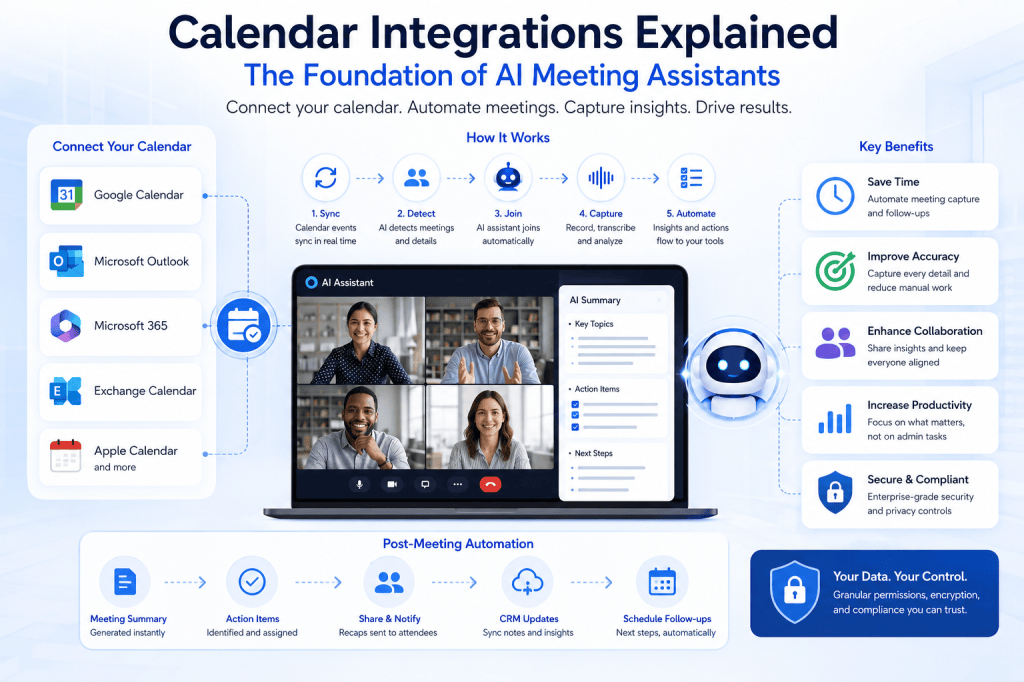
A calendar integration connects an AI meeting assistant to a user’s calendar platform, such as:
- Google Calendar
- Microsoft Outlook Calendar
- Microsoft 365
- Exchange Calendar
- Apple Calendar (through supported integrations)
This connection allows the AI assistant to access meeting-related information and automate tasks before, during, and after meetings.
Rather than requiring manual setup for every meeting, the assistant can automatically detect upcoming events and perform actions based on predefined rules.
Why Calendar Integrations Matter
Meetings generate large amounts of information, but manually managing meeting logistics can be time-consuming.
Employees often spend valuable time:
- Scheduling meetings
- Sending invitations
- Tracking meeting links
- Taking notes
- Sharing summaries
- Following up on action items
Calendar integrations enable AI meeting assistants to automate many of these processes.
The result is:
- Reduced administrative work
- Better meeting organization
- Improved attendance
- Accurate meeting records
- Faster follow-ups
- Enhanced productivity
By connecting directly to calendars, AI meeting assistants become proactive participants in the meeting lifecycle.
How Calendar Integrations Work
Step 1: User Authorization
The process begins when a user grants permission for the AI meeting assistant to access their calendar.
This authorization typically occurs through secure authentication protocols such as OAuth.
Users can control:
- Which calendars are connected
- Permission levels
- Meeting access settings
- Data-sharing preferences
Most enterprise-grade solutions allow administrators to manage permissions centrally.
Step 2: Event Synchronization
Once connected, the AI assistant continuously synchronizes with calendar events.
The system can access information such as:
- Meeting title
- Date and time
- Meeting location
- Virtual meeting link
- Attendee list
- Organizer details
- Recurring meeting schedules
This information allows the assistant to understand when meetings are scheduled and what actions may be required.
Step 3: Meeting Detection
The AI assistant identifies meetings that qualify for automation.
For example, it may detect:
- Customer calls
- Sales demos
- Team meetings
- Project reviews
- Training sessions
- Executive briefings
Organizations can configure rules that determine which meetings should be recorded, transcribed, or analyzed.
Step 4: Automated Participation
At the scheduled time, the AI assistant can automatically join supported virtual meetings.
This eliminates the need for users to:
- Start recordings manually
- Invite the assistant individually
- Configure settings for each meeting
The assistant arrives automatically and begins capturing information.
Step 5: Post-Meeting Workflows
After the meeting concludes, calendar integration supports automated follow-up actions.
Examples include:
- Distributing meeting summaries
- Sharing transcripts
- Creating tasks
- Updating CRM records
- Scheduling follow-up meetings
- Sending recap emails
This creates a seamless workflow from scheduling through execution and follow-up.
Key Benefits of Calendar Integrations
Automatic Meeting Recording
One of the most significant advantages is automated meeting capture.
Instead of remembering to activate recording tools, users can rely on the AI assistant to join meetings and begin processing information automatically.
This ensures important discussions are consistently documented.
Accurate Context
Calendar events provide valuable context that improves AI-generated outputs.
The assistant can understand:
- Meeting purpose
- Participant roles
- Customer accounts
- Project associations
- Team structures
This additional context often results in more accurate summaries and insights.
Improved Scheduling Efficiency
Calendar integrations simplify scheduling by reducing coordination efforts.
Some AI-powered systems can:
- Suggest meeting times
- Detect scheduling conflicts
- Coordinate across time zones
- Recommend optimal meeting windows
This reduces back-and-forth communication and accelerates meeting planning.
Enhanced Collaboration
Meeting information becomes easier to share across teams.
Attendees can access:
- Meeting recordings
- Action items
- Discussion highlights
- Follow-up recommendations
Even team members who could not attend can quickly catch up.
Calendar Integrations and CRM Workflows
Many organizations connect calendar-integrated AI assistants with CRM platforms.
This combination creates powerful automation opportunities.
For example:
- A sales call appears on a representative’s calendar.
- The AI assistant automatically joins the meeting.
- The conversation is recorded and transcribed.
- Key insights are extracted.
- CRM records are updated automatically.
- Follow-up tasks are generated.
This workflow reduces manual work while ensuring customer data remains accurate and current.
Calendar Integrations for Customer Success Teams
Customer success teams manage numerous recurring meetings, including:
- Onboarding sessions
- Business reviews
- Support escalations
- Renewal discussions
Calendar integrations ensure every customer interaction is documented consistently.
Benefits include:
- Better customer visibility
- Improved renewal planning
- Early risk detection
- Enhanced account management
The AI assistant becomes a reliable source of customer intelligence.
Security and Privacy Considerations
Because calendar integrations involve access to scheduling and attendee information, security is essential.
Organizations should evaluate:
Access Controls
Users should have clear visibility into what information the AI assistant can access.
Encryption
Calendar data should be encrypted both in transit and at rest.
Data Retention
Meeting and calendar information should be stored according to organizational policies.
Compliance Requirements
Organizations operating in regulated environments should verify compliance with:
- GDPR
- CCPA
- HIPAA (where applicable)
- SOC 2 requirements
- Internal governance policies
Strong security controls help ensure trust while enabling automation.
Common Calendar Platforms Supported
Most AI meeting assistants integrate with leading calendar providers, including:
- Google Workspace
- Microsoft 365
- Outlook Calendar
- Exchange Online
- Enterprise scheduling platforms
Native integrations typically provide the best user experience and reliability.
The Future of Calendar-Aware AI Assistants
Calendar integrations are evolving beyond simple scheduling awareness.
Future AI meeting assistants are expected to:
- Predict meeting outcomes
- Suggest agenda topics automatically
- Identify missing stakeholders
- Recommend preparation materials
- Generate personalized meeting briefs
- Schedule follow-ups autonomously
- Detect productivity patterns across organizations
As AI capabilities continue to mature, calendars will become a central source of context that powers increasingly intelligent workplace automation.
Conclusion
Calendar integrations are the foundation that enables AI meeting assistants to function effectively. By connecting directly to scheduling systems, these tools can automatically detect meetings, join conversations, generate insights, and streamline follow-up activities.
The result is a more productive, organized, and intelligent meeting experience. For organizations seeking to improve collaboration, reduce administrative workload, and maximize the value of workplace conversations, calendar-integrated AI meeting assistants are rapidly becoming an indispensable part of the modern digital workplace.







 Meeting Notes AI