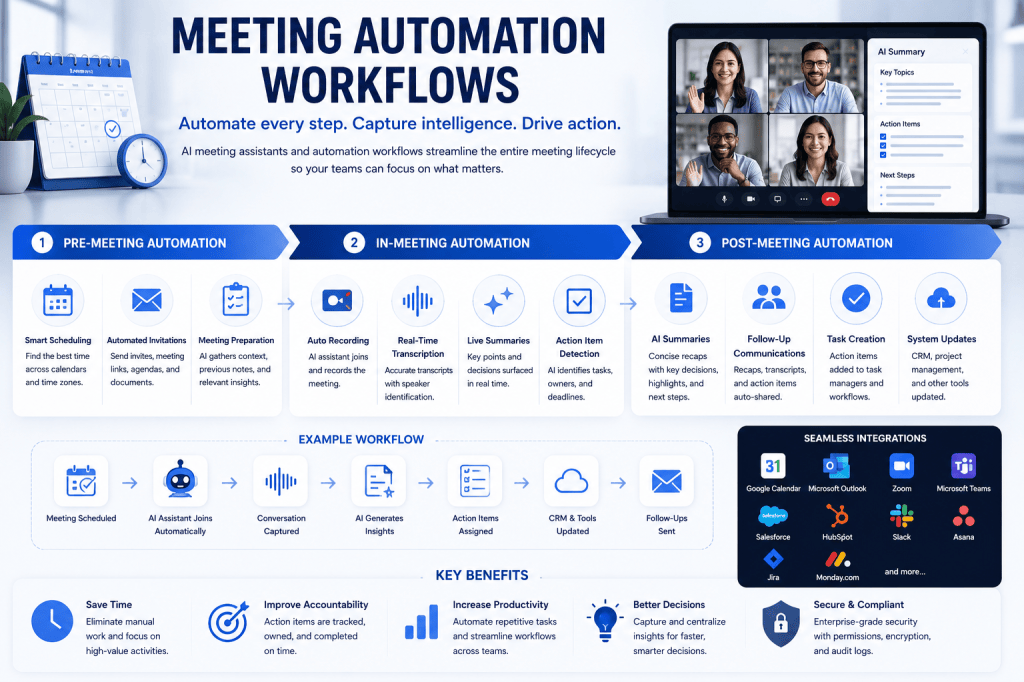
Meetings are essential for collaboration, decision-making, and business growth. Yet despite advances in workplace technology, many organizations still spend countless hours managing repetitive meeting-related tasks. Scheduling, note-taking, follow-up emails, action item tracking, CRM updates, and documentation often consume more time than the meetings themselves.
Meeting automation workflows are changing this reality.
Powered by artificial intelligence and workflow automation technologies, modern meeting automation solutions streamline every stage of the meeting lifecycle. From scheduling and preparation to post-meeting execution, organizations can eliminate manual work, improve accountability, and ensure that important information never falls through the cracks.
As businesses continue to embrace digital transformation, meeting automation workflows are becoming a cornerstone of productivity, collaboration, and operational efficiency.
What Are Meeting Automation Workflows?
Meeting automation workflows are predefined sequences of automated actions that occur before, during, and after meetings.
These workflows use AI, integrations, and automation platforms to reduce manual tasks and improve consistency across business processes.
Examples include:
- Automatically scheduling meetings
- Sending reminders to attendees
- Recording conversations
- Generating transcripts
- Creating meeting summaries
- Assigning action items
- Updating CRM systems
- Scheduling follow-up meetings
- Sharing notes with stakeholders
Instead of requiring employees to complete these tasks manually, automated workflows ensure they happen automatically and accurately.
Why Meeting Automation Matters
Many organizations underestimate the hidden costs associated with meetings.
Employees often spend significant time:
- Coordinating schedules
- Preparing agendas
- Taking notes
- Writing meeting summaries
- Tracking action items
- Updating systems
- Following up with attendees
These activities create administrative overhead that can reduce productivity and delay decision-making.
Meeting automation helps organizations:
- Save time
- Improve consistency
- Reduce human error
- Increase accountability
- Enhance collaboration
- Accelerate workflows
The result is a more efficient and productive meeting culture.
The Three Stages of Meeting Automation
1. Pre-Meeting Automation
Automation begins before the meeting even starts.
Smart Scheduling
AI-powered scheduling tools can:
- Identify available time slots
- Coordinate across time zones
- Detect conflicts
- Suggest optimal meeting times
This reduces the back-and-forth communication typically associated with scheduling.
Automated Invitations
Once a meeting is scheduled, workflows can automatically:
- Send invitations
- Generate virtual meeting links
- Share agendas
- Attach relevant documents
Participants receive everything they need before the meeting begins.
Meeting Preparation
Advanced AI systems can prepare attendees by generating:
- Meeting briefs
- Account summaries
- Previous meeting notes
- Customer history
- Open action items
This helps participants arrive informed and ready to contribute.
2. In-Meeting Automation
The second stage focuses on capturing and analyzing meeting content.
Automatic Recording
AI meeting assistants can automatically join meetings and begin recording without manual intervention.
This ensures important conversations are documented consistently.
Real-Time Transcription
Speech recognition technology converts conversations into searchable text.
Benefits include:
- Accurate meeting records
- Accessibility improvements
- Easy information retrieval
- Searchable knowledge repositories
Live Summarization
Some AI systems generate summaries while meetings are still in progress.
Participants can quickly identify:
- Key decisions
- Discussion points
- Risks
- Opportunities
Action Item Detection
Natural Language Processing (NLP) can identify commitments and tasks automatically.
Examples include:
- Follow-up responsibilities
- Deadlines
- Deliverables
- Assigned owners
This reduces the risk of missed responsibilities.
3. Post-Meeting Automation
The greatest productivity gains often occur after meetings conclude.
Automated Summaries
AI-generated summaries provide concise overviews of discussions.
These summaries often include:
- Key decisions
- Major topics
- Action items
- Next steps
Attendees can quickly review outcomes without reading lengthy transcripts.
Follow-Up Communications
Workflows can automatically distribute:
- Meeting recaps
- Summary emails
- Action item lists
- Supporting documents
This ensures alignment among all participants.
Task Creation
Action items identified during meetings can automatically create tasks in:
- Project management tools
- Collaboration platforms
- Ticketing systems
- CRM platforms
Work begins immediately without manual data entry.
CRM Updates
For customer-facing teams, meeting insights can flow directly into CRM systems.
Examples include:
- Opportunity updates
- Customer notes
- Contact records
- Account activity logs
This improves visibility while reducing administrative work.
Common Meeting Automation Workflows
Sales Meeting Workflow
- Calendar event is created.
- AI assistant joins automatically.
- Meeting is recorded and transcribed.
- Customer insights are extracted.
- CRM records are updated.
- Follow-up tasks are assigned.
- Summary email is sent.
This workflow improves sales productivity and forecasting accuracy.
Customer Success Workflow
- Quarterly review meeting is scheduled.
- AI prepares customer history.
- Meeting is recorded.
- Risks and opportunities are identified.
- Renewal actions are assigned.
- Customer records are updated.
This ensures customer information remains current and actionable.
Project Management Workflow
- Team meeting occurs.
- AI captures discussion points.
- Decisions are documented.
- Tasks are assigned automatically.
- Project boards are updated.
- Progress tracking begins immediately.
This reduces delays and improves accountability.
Benefits of Meeting Automation
Increased Productivity
Employees spend less time on administrative work and more time on strategic activities.
Better Accountability
Action items are clearly documented, assigned, and tracked.
Improved Knowledge Management
Meeting information becomes searchable and accessible across the organization.
Faster Decision-Making
Automated summaries and workflows help teams act on information more quickly.
Reduced Human Error
Automation minimizes the risk of missed notes, forgotten tasks, and inaccurate updates.
Technologies Powering Meeting Automation
Modern meeting automation platforms combine several technologies:
Artificial Intelligence
AI enables transcription, summarization, sentiment analysis, and insight extraction.
Natural Language Processing
NLP helps systems understand conversations and identify important information.
Workflow Automation Platforms
Automation engines connect meetings with business systems and trigger actions automatically.
Integrations
Meeting automation solutions often integrate with:
- Google Workspace
- Microsoft 365
- Zoom
- Microsoft Teams
- Slack
- Salesforce
- HubSpot
- Asana
- Jira
- Monday.com
These integrations create seamless workflows across the workplace technology stack.
Security and Compliance Considerations
Organizations implementing meeting automation should evaluate:
- Data encryption
- Access controls
- Audit logging
- Data retention policies
- User permissions
- GDPR compliance
- SOC 2 certifications
Strong governance ensures meeting data remains secure while enabling automation.
The Future of Meeting Automation
Meeting automation is evolving rapidly.
Future capabilities may include:
- Predictive action recommendations
- Autonomous follow-up execution
- AI-generated meeting agendas
- Meeting outcome forecasting
- Real-time coaching during conversations
- Automated project updates
- Cross-meeting trend analysis
As AI becomes more sophisticated, meeting automation workflows will move from simple task execution to intelligent decision support.
Conclusion
Meeting automation workflows are transforming how organizations manage collaboration. By automating scheduling, recording, transcription, summaries, follow-ups, and system updates, businesses can significantly reduce administrative burdens while improving productivity and accountability.
As organizations seek to maximize the value of every meeting, automation provides a scalable way to capture knowledge, streamline operations, and ensure that conversations lead to meaningful action. Companies that embrace meeting automation today will be better positioned to build faster, smarter, and more efficient workflows in the future.







 Meeting Notes AI